
HTPC - TV Tuner Reviews
- Posted in
- Smartphones
- Mobile
PowerColor 550 Pro (cont'd)
If you're running Windows MCE, you can begin using the MCE interface immediately. (If you haven't configured MCE previously, you'll need to do that, but we'll skip that section.) For non-MCE users, CyberLink's PowerCinema4 is included, and at first, it seems like a decent piece of software.
Unfortunately, PowerCinema4 does not include support for any US EPG (Electronic Programming Guide) services. The problem apparently stems from US patents. PowerColor informed us: "The reason PowerCinema4 cannot support EPG in USA is because of patent issues; the royalty cost is extremely high now. ATI plans to support this product on their MMC software, but it is not ready yet." While MCE is the preferred method of using this card, we would really like to see a quick resolution to the lack of EPG support under XP. Considering that the EPG accessed via the remote doesn't work for any of the cards, though, it's not the end of the world.
Besides the channel selection, PowerCinema also allows you to configure timeshifting and recording options as usual. You can see the available screens below, which are accessed via an MCE-like interface. This software feels much more like a consumer electronics device, as the user interface works with either a mouse or the remote, and the UI looks the same whether you're in fullscreen mode or running in a window. Incidentally, I've heard some disparaging remarks about PowerCinema3, but the newest release doesn't seem to have many serious problems other than the lack of a US EPG.
Enabling timeshifting can be done in two ways. The first is to have it manually activate: you press the pause button, and you'll experience a delay of about two seconds while the software switches from a live video stream to the file stream. The second option is to have timeshifting always enabled, so there is no delay or temporary loss of signal when you pause the feed. The problem with having timeshifting always enabled is that changing channels becomes noticeably slower. Without timeshifting, it takes about .5 seconds to change channels; with timeshifting, it takes closer to 2 seconds. Frequent channel surfers will dislike the delay, but most people can learn to cope with it, and "instant replay" junkies will like the feature. Two seconds may seem rather slow, but that's actually about how long my Comcast box takes to change channels.
Our video quality was set to the highest encoding quality once again, as disk space isn't a major concern of ours. This resulted in a data rate of 8000 Kbps, so it's probably overkill as 4000 Kbps should be sufficient for 640x480 MPEG2 videos. Actually, the videos are recorded in a 720x480 format, but the aspect ratio encoded into the file apparently specifies a non-standard pixel size. While 720x480 is a 9:6 AR, the videos play as though they're 4:3 AR. It seems like that would use more space than is strictly necessary, but this is more of a PowerCinema topic than a Theater 550 topic.
After the time required to configure the digital (QAM) channels on the other two cards, it was a relief to only have to look at analog channels. Scanning the channels takes about a minute, and assuming that you're familiar with the channel lineup, you'll know exactly where your favorite channels are located. The EPG problem is unfortunate, as everything else works very well. Windows MCE is certainly the best solution, like PowerColor suggests, and unlike the Fusion5 card, you don't lose anything by switching to MCE. (The Fusion card only allows QAM reception in the FusionHDTV software, but the Theatre 550 doesn't have that feature in the first place.) Videos will be recorded in the tweaked .MS file format (it's MPEG2 with some Meta information about channel and program names), but otherwise, you get everything with MCE that you would get with PowerCinema, plus a working EPG.
Using the PowerColor card is a pleasing experience, though again, that's probably because there's no need to wrestle with subchannels. Perhaps the best news is that, just as we discovered in our last TV Tuner roundup, the analog quality of the Theater 550 chip is among the best available. Comparing the analog output of the PowerColor card with that of the others shows a dramatic difference in picture quality. The MyHD videos are clearly the worst (especially on a slower system), followed by the Fusion card. We'd go so far as to say that the Theater 550 actually has a better image than the output of the Comcast set-top box. Some might say the videos appear a bit "soft," but that's really a problem with analog content in general. 525 interlaced scan lines with up to 440 horizontal dots is still less than 640x480 content. It's also worth mentioning that many of the upsampled "HD" broadcasts have a worse picture than using the Theater 550 to watch the analog channel.
If/when HDTV content becomes more widespread, the Theater 550 will lose much of its value. Given the current time frame for the required conversion of all new TVs to DTV - not to mention the installed user base of existing TVs - we're likely stuck with analog TV for a long time, so getting a high quality analog tuner for your PC isn't a bad idea. The PCIe interface also makes it more future proof, as PCI slots are likely to be phased out over the coming years. (Yeah, I know - purchasing a piece of computer hardware and talking about it lasting for years is hardly the norm for enthusiasts.)
If you're running Windows MCE, you can begin using the MCE interface immediately. (If you haven't configured MCE previously, you'll need to do that, but we'll skip that section.) For non-MCE users, CyberLink's PowerCinema4 is included, and at first, it seems like a decent piece of software.
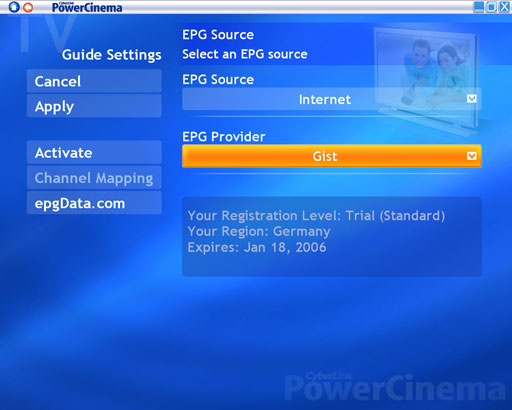
Unfortunately, PowerCinema4 does not include support for any US EPG (Electronic Programming Guide) services. The problem apparently stems from US patents. PowerColor informed us: "The reason PowerCinema4 cannot support EPG in USA is because of patent issues; the royalty cost is extremely high now. ATI plans to support this product on their MMC software, but it is not ready yet." While MCE is the preferred method of using this card, we would really like to see a quick resolution to the lack of EPG support under XP. Considering that the EPG accessed via the remote doesn't work for any of the cards, though, it's not the end of the world.
Besides the channel selection, PowerCinema also allows you to configure timeshifting and recording options as usual. You can see the available screens below, which are accessed via an MCE-like interface. This software feels much more like a consumer electronics device, as the user interface works with either a mouse or the remote, and the UI looks the same whether you're in fullscreen mode or running in a window. Incidentally, I've heard some disparaging remarks about PowerCinema3, but the newest release doesn't seem to have many serious problems other than the lack of a US EPG.
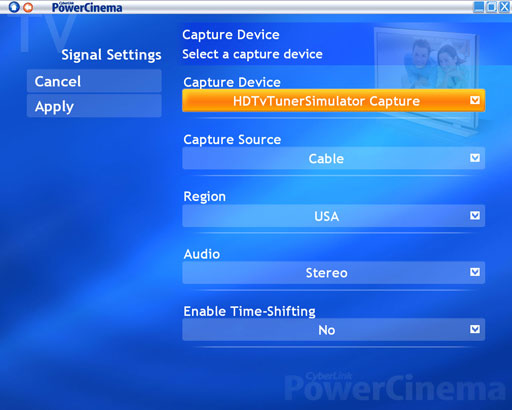
Enabling timeshifting can be done in two ways. The first is to have it manually activate: you press the pause button, and you'll experience a delay of about two seconds while the software switches from a live video stream to the file stream. The second option is to have timeshifting always enabled, so there is no delay or temporary loss of signal when you pause the feed. The problem with having timeshifting always enabled is that changing channels becomes noticeably slower. Without timeshifting, it takes about .5 seconds to change channels; with timeshifting, it takes closer to 2 seconds. Frequent channel surfers will dislike the delay, but most people can learn to cope with it, and "instant replay" junkies will like the feature. Two seconds may seem rather slow, but that's actually about how long my Comcast box takes to change channels.
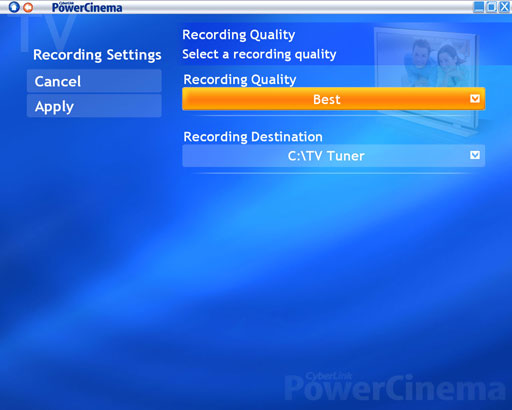
Our video quality was set to the highest encoding quality once again, as disk space isn't a major concern of ours. This resulted in a data rate of 8000 Kbps, so it's probably overkill as 4000 Kbps should be sufficient for 640x480 MPEG2 videos. Actually, the videos are recorded in a 720x480 format, but the aspect ratio encoded into the file apparently specifies a non-standard pixel size. While 720x480 is a 9:6 AR, the videos play as though they're 4:3 AR. It seems like that would use more space than is strictly necessary, but this is more of a PowerCinema topic than a Theater 550 topic.
After the time required to configure the digital (QAM) channels on the other two cards, it was a relief to only have to look at analog channels. Scanning the channels takes about a minute, and assuming that you're familiar with the channel lineup, you'll know exactly where your favorite channels are located. The EPG problem is unfortunate, as everything else works very well. Windows MCE is certainly the best solution, like PowerColor suggests, and unlike the Fusion5 card, you don't lose anything by switching to MCE. (The Fusion card only allows QAM reception in the FusionHDTV software, but the Theatre 550 doesn't have that feature in the first place.) Videos will be recorded in the tweaked .MS file format (it's MPEG2 with some Meta information about channel and program names), but otherwise, you get everything with MCE that you would get with PowerCinema, plus a working EPG.
Using the PowerColor card is a pleasing experience, though again, that's probably because there's no need to wrestle with subchannels. Perhaps the best news is that, just as we discovered in our last TV Tuner roundup, the analog quality of the Theater 550 chip is among the best available. Comparing the analog output of the PowerColor card with that of the others shows a dramatic difference in picture quality. The MyHD videos are clearly the worst (especially on a slower system), followed by the Fusion card. We'd go so far as to say that the Theater 550 actually has a better image than the output of the Comcast set-top box. Some might say the videos appear a bit "soft," but that's really a problem with analog content in general. 525 interlaced scan lines with up to 440 horizontal dots is still less than 640x480 content. It's also worth mentioning that many of the upsampled "HD" broadcasts have a worse picture than using the Theater 550 to watch the analog channel.
If/when HDTV content becomes more widespread, the Theater 550 will lose much of its value. Given the current time frame for the required conversion of all new TVs to DTV - not to mention the installed user base of existing TVs - we're likely stuck with analog TV for a long time, so getting a high quality analog tuner for your PC isn't a bad idea. The PCIe interface also makes it more future proof, as PCI slots are likely to be phased out over the coming years. (Yeah, I know - purchasing a piece of computer hardware and talking about it lasting for years is hardly the norm for enthusiasts.)
Originally published at https://www.anandtech.com/show/1887/htpc-ndash-tv-tuner-reviews (Wayback Machine).