
HTPC - TV Tuner Reviews
- Posted in
- Smartphones
- Mobile
Performance Considerations
We've talked a lot about the cards, but we haven't said much about the actual performance or CPU usage. It varies by card, as well as what content you're watching, so we captured some graphs showing CPU usage in a variety of situations. For the most part, anything faster than around 1.6 GHz P4 or 1600+ Athlon should suffice, though just to be safe, you might want closer to 2.4 GHz/2400+. Using the Sempron 64 running at 2.50 GHz was more than sufficient for everything but the MyHD analog recording. Let's start first by looking at how each card performs in analog mode. The MyHD and Theater 550 are running on the Athlon 64 4000+ HP system, while the Fusion5 is in the Sempron system. Don't worry - we're only looking for a rough estimate of CPU power requirements, and the Fusion5 worked fine with the Sempron as well as the slightly faster HP.
For watching analog content, not only is the Theater 550 a better image, but it also uses far less CPU power. In fact, the image for watching and recording with the Theater 550 is the same. Can you spot the point where we enabled recording in the graph? (The higher CPU usage at the start is actually PowerCinema loading, so don't confuse that with the latter portion of the chart.) We began recording the station on the 550 around the spot marked by the two "peaks" where CPU use spiked to 40% or so. Otherwise, CPU use remains around 10%.
The Fusion does quite well when only viewing analog channels, averaging around 20% CPU use on the Sempron system and slightly less (15%) on the 4000+ (which we didn't capture). Recording with the Fusion5 kicks CPU usage up to about 60%. That's a pretty big jump, but we were running with a maximized viewport (720p content), and we didn't experience any stalls or other problems. For watching an analog channel, the Fusion5 is a close second to the Theater 550, though it's a distant second for recording the content.
Finally, we have the MyHD card. Similar to the Fusion, watching an analog channel uses less CPU time than recording the channel. However, less in this case means about 40% CPU usage. Enabling even the fastest DivX encoding (with MP3 audio) kicks the CPU up to almost 80% usage. The video capture doesn't cut out, but there does seem to be a slight delay every second or so. Even though there is supposedly 20% idle CPU time, the capture isn't really clean, and it's about equal to watching TV with only mediocre reception. We don't have a graph, but moving to the 2.6 GHz X2 chip with Normal quality DivX encoding still used a whopping 65% of the CPU time - remember that there are two cores, so that would be over 130% CPU time for the 4000+. The faster X2 also removed the slight lag in the video, all while producing a much better encode.
Here's another version of the data, with a few additional reference points. The graphs are colored according to performance: green indicates that there were no difficulties, yellow means that there may be periodic issues, and red means that the result was unacceptable.
Moving to digital channels removes the Theater 550 from the list, but we have both the DxVA accelerated and non-DxVA modes in FusionHDTV. Most modern GPUs can use the DxVA acceleration, so consider the non-DxVA charts to be a worst case scenario. All of the results were taken while viewing a 1080i football game broadcast.
With DxVA enabled, watching 1080i with the Fusion5 requires about 20% of your CPU time. Recoding the same content appears to add about 10% more CPU use, and we get close to 30%. The non-DxVA mode requires quite a bit more power to handle the decoding of the digital signal, using 45% of the CPU power. As before, recording the same content appears to add another 10%. Remember that unlike analog signals, digital TV is already compressed. Decompressing is quite a bit easier than compressing a signal, which is why a Sempron can handle 1920x1080 video at 30 FPS without trouble, whereas the same CPU chokes when attempting to encode even 640x480 video at 30 FPS.
Viewing digital content with the MyHD is completely different from using the card in analog mode. CPU usage on the 4000+ was around 25% when viewing a 1080i signal, though disabling the overlay screen knocks that down around 15%. The record mode oddly enough has consistently lower CPU usage, at around 12 or 13%. The hardware acceleration of DTV decoding that the MyHD card provides is clearly put to good use.
Again, here's the simplified graph. All of the results are green, as there were no difficulties. Judging by the CPU usage on the Sempron for the MyHD, most of the CPU usage is used by the overlay window.
We've talked a lot about the cards, but we haven't said much about the actual performance or CPU usage. It varies by card, as well as what content you're watching, so we captured some graphs showing CPU usage in a variety of situations. For the most part, anything faster than around 1.6 GHz P4 or 1600+ Athlon should suffice, though just to be safe, you might want closer to 2.4 GHz/2400+. Using the Sempron 64 running at 2.50 GHz was more than sufficient for everything but the MyHD analog recording. Let's start first by looking at how each card performs in analog mode. The MyHD and Theater 550 are running on the Athlon 64 4000+ HP system, while the Fusion5 is in the Sempron system. Don't worry - we're only looking for a rough estimate of CPU power requirements, and the Fusion5 worked fine with the Sempron as well as the slightly faster HP.
Analog Channels (watching on left, recording on right)
| FusionHDTV | |
 |
 |
| Click to enlarge. | |
| MyHD | |

|  |
| Click to enlarge. | |
| Theater 550 | |
 |
|
| Click to enlarge. | |
For watching analog content, not only is the Theater 550 a better image, but it also uses far less CPU power. In fact, the image for watching and recording with the Theater 550 is the same. Can you spot the point where we enabled recording in the graph? (The higher CPU usage at the start is actually PowerCinema loading, so don't confuse that with the latter portion of the chart.) We began recording the station on the 550 around the spot marked by the two "peaks" where CPU use spiked to 40% or so. Otherwise, CPU use remains around 10%.
The Fusion does quite well when only viewing analog channels, averaging around 20% CPU use on the Sempron system and slightly less (15%) on the 4000+ (which we didn't capture). Recording with the Fusion5 kicks CPU usage up to about 60%. That's a pretty big jump, but we were running with a maximized viewport (720p content), and we didn't experience any stalls or other problems. For watching an analog channel, the Fusion5 is a close second to the Theater 550, though it's a distant second for recording the content.
Finally, we have the MyHD card. Similar to the Fusion, watching an analog channel uses less CPU time than recording the channel. However, less in this case means about 40% CPU usage. Enabling even the fastest DivX encoding (with MP3 audio) kicks the CPU up to almost 80% usage. The video capture doesn't cut out, but there does seem to be a slight delay every second or so. Even though there is supposedly 20% idle CPU time, the capture isn't really clean, and it's about equal to watching TV with only mediocre reception. We don't have a graph, but moving to the 2.6 GHz X2 chip with Normal quality DivX encoding still used a whopping 65% of the CPU time - remember that there are two cores, so that would be over 130% CPU time for the 4000+. The faster X2 also removed the slight lag in the video, all while producing a much better encode.
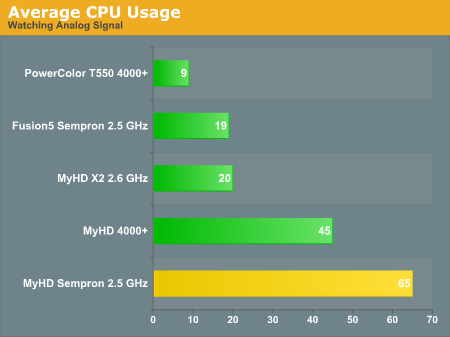
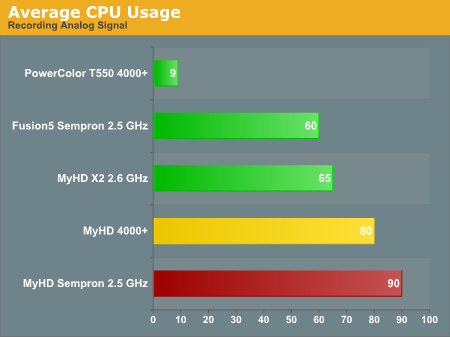
Here's another version of the data, with a few additional reference points. The graphs are colored according to performance: green indicates that there were no difficulties, yellow means that there may be periodic issues, and red means that the result was unacceptable.
Digital Channels (watching on left, recording on right)
| FusionHDTV DxVA | |
 |
 |
| Click to enlarge. | |
| FusionHDTV non-DxVA | |
 |
 |
| Click to enlarge. | |
| MyHD | |
 |
 |
| Click to enlarge. | |
Moving to digital channels removes the Theater 550 from the list, but we have both the DxVA accelerated and non-DxVA modes in FusionHDTV. Most modern GPUs can use the DxVA acceleration, so consider the non-DxVA charts to be a worst case scenario. All of the results were taken while viewing a 1080i football game broadcast.
With DxVA enabled, watching 1080i with the Fusion5 requires about 20% of your CPU time. Recoding the same content appears to add about 10% more CPU use, and we get close to 30%. The non-DxVA mode requires quite a bit more power to handle the decoding of the digital signal, using 45% of the CPU power. As before, recording the same content appears to add another 10%. Remember that unlike analog signals, digital TV is already compressed. Decompressing is quite a bit easier than compressing a signal, which is why a Sempron can handle 1920x1080 video at 30 FPS without trouble, whereas the same CPU chokes when attempting to encode even 640x480 video at 30 FPS.
Viewing digital content with the MyHD is completely different from using the card in analog mode. CPU usage on the 4000+ was around 25% when viewing a 1080i signal, though disabling the overlay screen knocks that down around 15%. The record mode oddly enough has consistently lower CPU usage, at around 12 or 13%. The hardware acceleration of DTV decoding that the MyHD card provides is clearly put to good use.
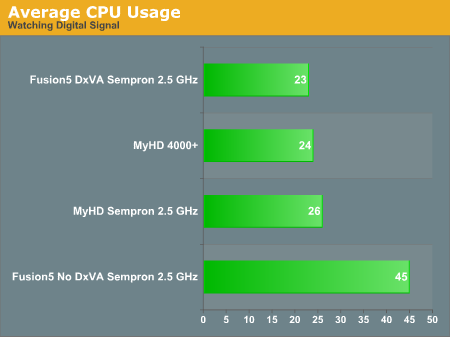
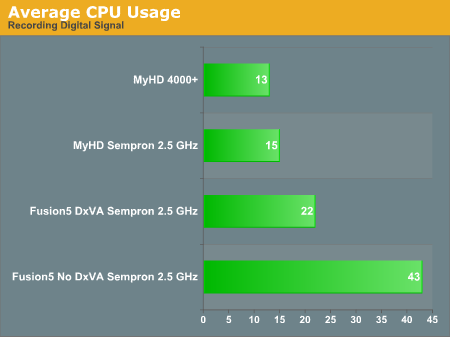
Again, here's the simplified graph. All of the results are green, as there were no difficulties. Judging by the CPU usage on the Sempron for the MyHD, most of the CPU usage is used by the overlay window.
Originally published at https://www.anandtech.com/show/1887/htpc-ndash-tv-tuner-reviews (Wayback Machine).