
Intel NUC11TNBi5 and Akasa Newton TN Fanless Case Review: Silencing the Tiger
HTPC Workloads
The HTPC-related sections in previous SFF PC reviews covered a range of aspects. Display refresh rate stability (particularly, the ability to drive 23.976 Hz for stutter-free playback of cinema content), OTT streaming efficiency (YouTube and Netflix), and local media playback performance and efficiency evaluation were some of them. While such a detailed study may still make sense for dedicated HTPC reviews, we have decided to pare down the evaluated aspects for system reviews. Workloads were processed on the Intel NUC11TNBi5 in Akasa's Newton TN fanless case for the results in this section.
YouTube Streaming Efficiency
4K video streaming has become ubiquitous enough for its support to be a necessity even for secondary HTPCs. HDR has also become affordable - in fact, one of the key changes for HTPCs in Jasper Lake is the enabling of HDR over HDMI, a feature not available in Gemini Lake-based systems. Keeping these aspects in mind, we have chosen Mystery Box's Peru 8K HDR 60FPS video as our test sample moving forward. On PCs running Windows, it is recommended that HDR streaming videos be viewed using the Microsoft Edge browser after putting the desktop in HDR mode.
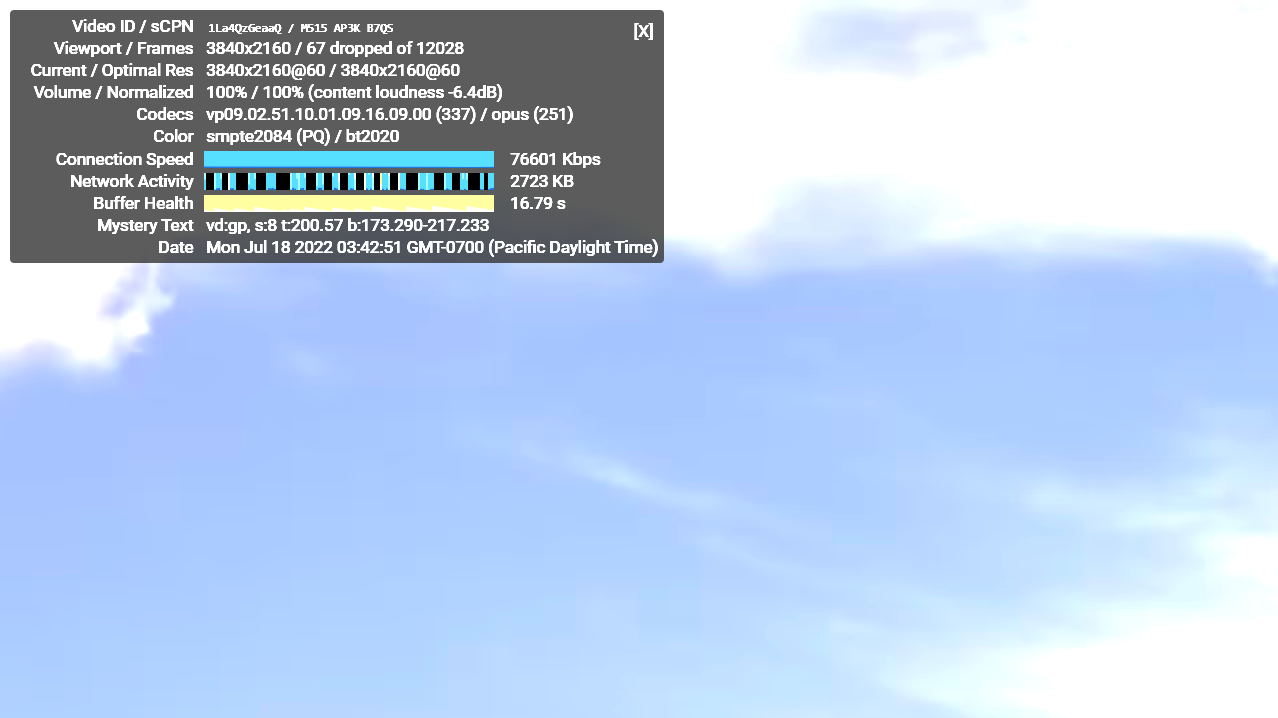
Intel's Xe Graphics in TGL-U supports hardware decoding for VP9 Profile 2. Taking advantage of this feature, MS Edge automatically fetches the 4Kp60 VP9 Profile 2 encode from the YouTube servers. The playback was flawless in both builds, with the few dropped frames happening in the beginning during playback resolution / fullscreen switching.
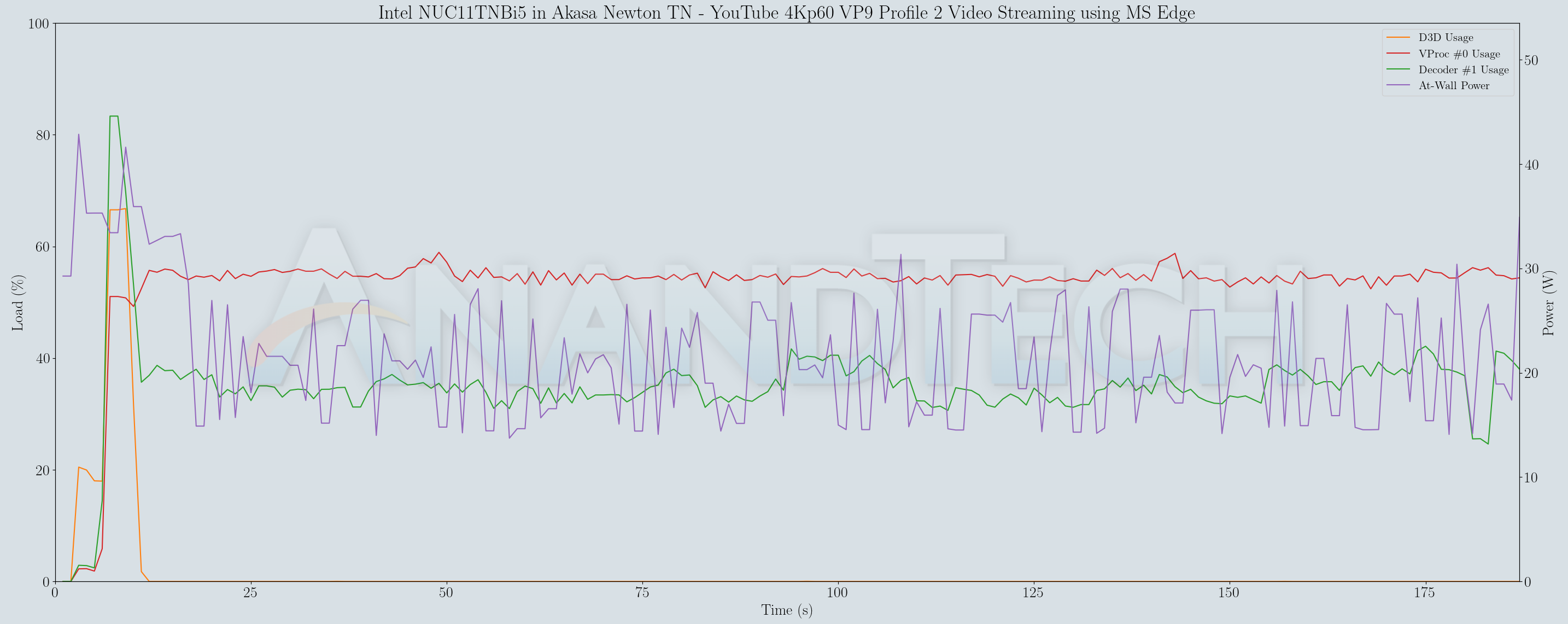
D3D usage makes its appearance for upscaling purposes (when the streamed / decoded video doesn't match the native display resolution), but soon disappears after the 4Kp60 stream starts coming in. The at-wall power consumption is around 20W on an average and the decoder loading is south of 40%, with the video processor load coming in around 55%. With smooth playback and no dropped frames worth analyzing, the graph analysis turns out to be pretty uneventful.
Hardware-Accelerated Encoding and Decoding
The transcoding benchmarks in the systems performance section presented results from evaluating the QuickSync encoder within Handbrake's framework. The iGPU in the systems support hardware encode for AVC, JPEG, HEVC (8b and 10b, 4:2:0 and 4:4:4), and VP9 (8b and 10b, 4:2:0 and 4:4:4). The capabilities of the decoder engine are brought out by DXVAChecker.
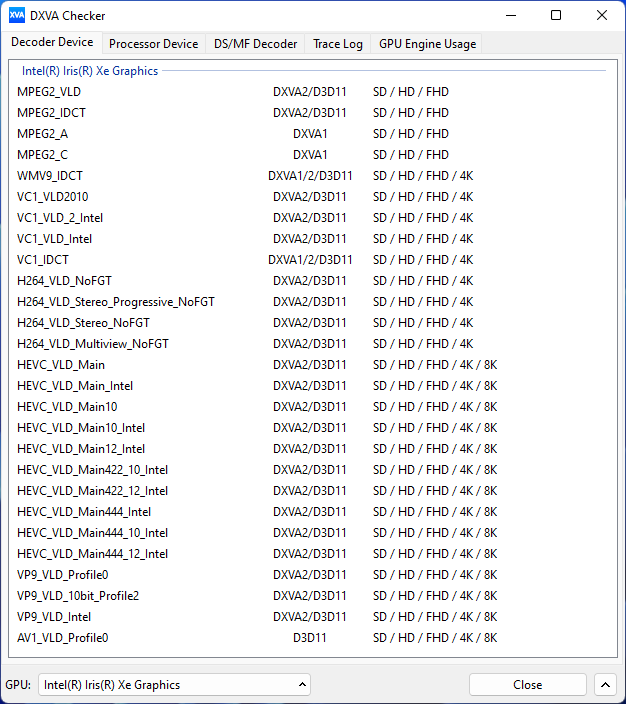
The decoder engine in Tiger Lake-U supports the latest and greated that Intel has to offer (except for AV1 encode, which is present only in the Arc dGPUs for now).
Local Media Playback
Evaluation of local media playback and video processing is done by playing back files encompassing a range of relevant codecs, containers, resolutions, and frame rates. A note of the efficiency is also made by tracking GPU usage and power consumption of the system at the wall. Users have their own preference for the playback software / decoder / renderer, and our aim is to have numbers representative of commonly encountered scenarios. Considering the target market for Tiger Lake-U systems, we played back the test streams using the following install-and-forget combinations:
- VLC 3.0.17.4
- Kodi 19.4
The fourteen test streams (each of 90s duration) were played back from the local disk with an interval of 30 seconds in-between. Various metrics including GPU usage and at-wall power consumption were recorded during the course of this playback. Based on the DXVAChecker report presented previously, the GPU should be able to play back all codecs with hardware acceleration.
All our playback tests were done with the desktop HDR setting turned on. It is possible for certain system configurations to automatically turn on/off the HDR capabilities prior to the playback of a HDR video, but, we didn't take advantage of that in our testing.
VLC is the playback software of choice for the average PC user who doesn't need a ten-foot UI. Its install-and-play simplicity has made it extremely popular. Over the years, the software has gained the ability to take advantage of various hardware acceleration options. Kodi, on the other hand, has a ten-foot UI making it the perfect open-source software for dedicated HTPCs. Support for add-ons make it very extensible and capable of customization. We played back our test files using the default VLC and Kodi configurations, and recorded the following metrics.
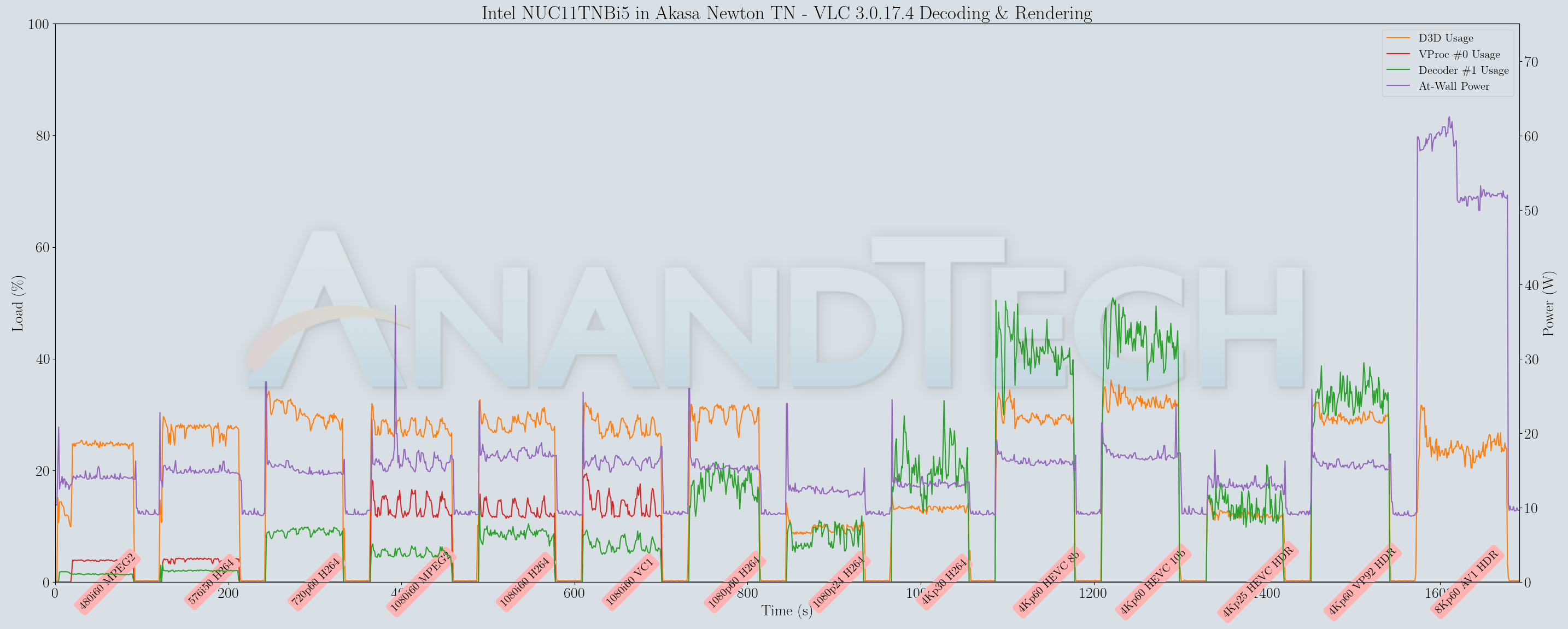
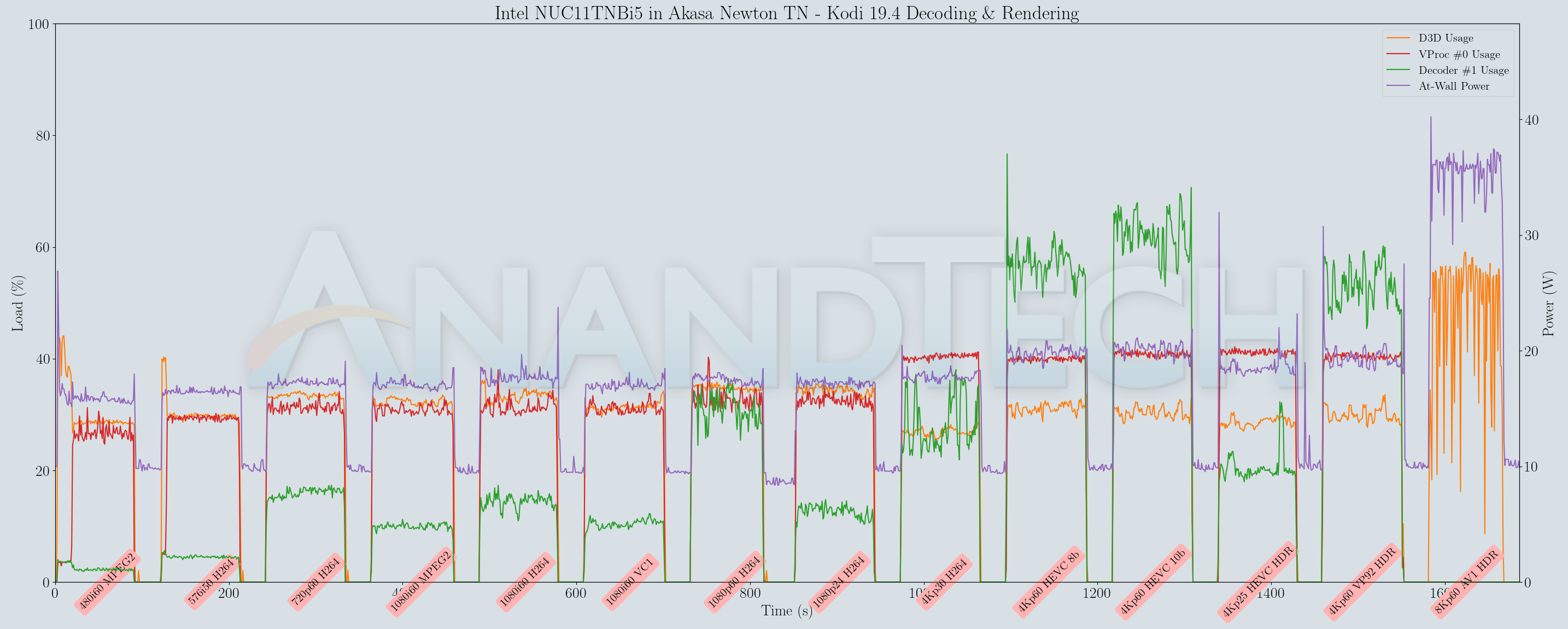
Playback is perfectly smooth in both VLC and Kodi for all streams except the 8Kp60 AV1 clip. Power consumption is below 20W for all streams decoded in hardware. While hardware decoding support for AV1 exists, this is a case of the software infrastructure yet to catch up with the hardware capabilities. With alpha releases of Kodi supporting AV1 hardware decoding, this scenario for the 8Kp60 AV1 clip is bound to change for the better in the coming months.
Originally published at https://www.anandtech.com/show/17502/intel-nuc11tnbi5-and-akasa-newton-tn-fanless-case-review-silencing-the-tiger (Wayback Machine).