
Vendor Cards: BFG GeForce 7800GTX OC
- Posted in
- GPUs
Test Setup and Performance
The frame rates for this card are similar to EVGA's because they are both factory overclocked. You will see a slight advantage though with the BFG overall because the memory clock is set at 1.3 GHz - higher than what we've seen yet, even with our own overclocks. While bumping up the core clock improves the card's performance in general, boosting the memory clock improves memory-specific aspects such as AA (among other things). This explains why there are slightly higher gains with BFG in tests with 4xAA enabled. Keep in mind that there are other ways in which the memory clock affects performance, such as playing at higher resolutions, and/or with certain high-quality settings like the ultra high setting in Doom 3. Doom 3's shadowing also puts a larger strain on graphics memory bandwidth than other games.When looking at performance, one of the things that we are the most interested in is how each of these cards compare to each other, out of the box. This is because most people will be using the card as is, without overclocking it manually. As always, we tested the cards on the same system:
MSI K8N Neo4 Platinum/SLI motherboard
AMD Athlon 64 FX-55 Processor
1 GB OCZ 2:2:2:6 DDR400 RAM
Seagate 7200.7 120 GB Hard Drive
OCZ 600 W PowerStream Power Supply
Here are the gaming benchmarks.
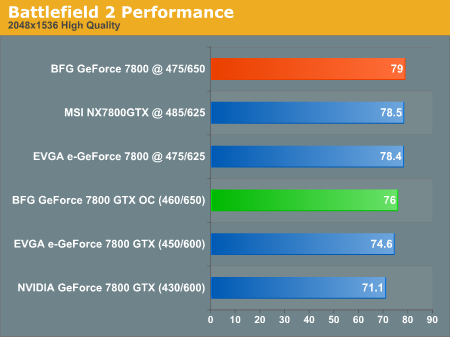
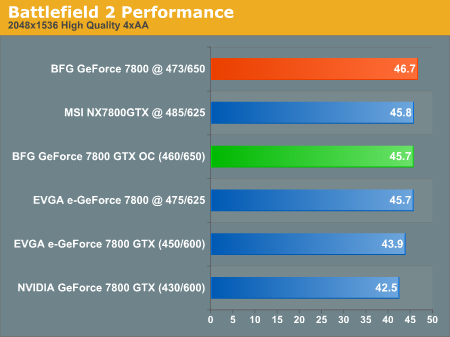
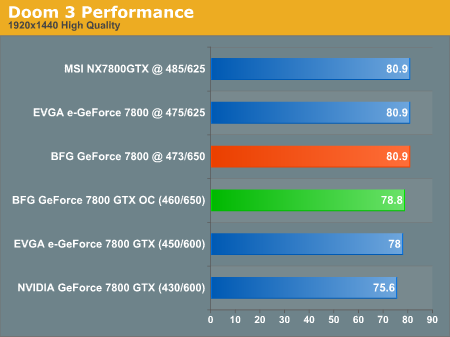
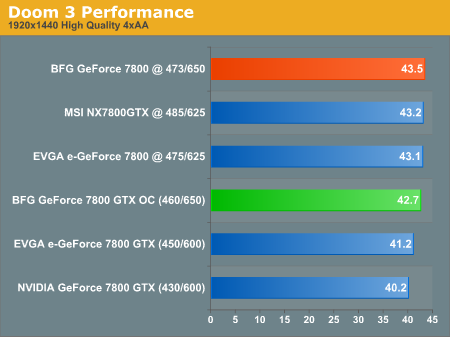
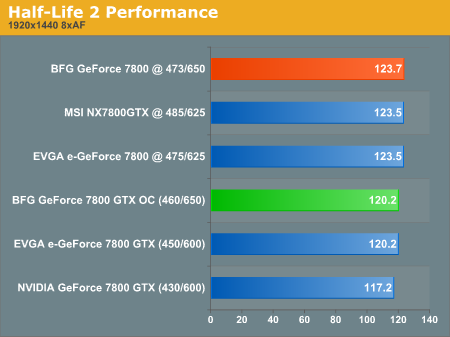
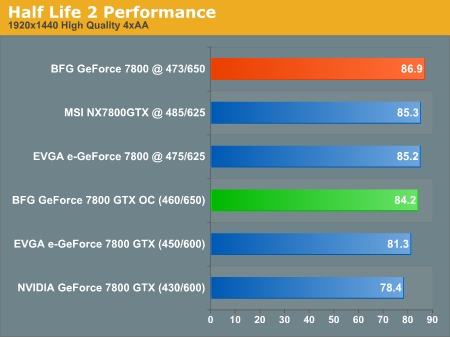
Battlefield 2 gets almost 2 FPS better with the BFG, which is about a 4% increase from the EVGA card. We see nearly the same increase with Doom 3 (3.6%) and with Half-Life 2, the BFG 7800 picks up almost 3 frames, giving it a 4.8% increase over EVGA's frame rate.
Overclocked, all three of these cards g et very similar numbers. BFG only sees slight gains at 473MHz over the others in games with 4xAA enabled. The BFG's increases aren't nearly as pronounced here because we boosted the memory clock speeds of the MSI and EVGA to 1.25GHz, much closer to BFG's standard 1.3GHz factory overclock.
Remember that each individual graphics card overclocks differently, so you may not get the same results as ours when overclocking these cards at home. Also remember that there is always the risk of damaging your card when overclocking, so do so at your own risk. Next, let’s take a look at power, heat and noise.
Originally published at https://www.anandtech.com/show/1746 (Wayback Machine).