
The Mac mini as a Media Computer
- Posted in
- Mac
Limitations of iRecord & AV/C Browser
Despite the fact that they work quite well, there are a number of limitations to both of the programs that we looked at from the standpoint of being used as a DVR:- Lack of Guide Functionality - while iRecord is able to record on a schedule, neither iRecord or the AV/C Browser have any knowledge of what's actually airing in your area. For this, you'll have to turn to TV Guide online or TitanTV. There is potential for this sort of functionality to get integrated; however, that would fall on a developer to build up enough interest to do so.
- No Preview while Recording – You have to be pretty confident that what you're recording is what you want to be recording because neither of these programs offer a preview of what you're recording. You can view the transport stream as it is being recorded, and Patrick Edson also has a plugin for VLC that lets you watch what's on a channel without actually recording it.
- No 5C Encryption Support - Content that has 5C encryption enabled will not be playable, although it will appear to record fine. This will vary from one cable area to the next, but this type of content should primarily be premium channels (e.g. HBO HD). Although, we have seen situations where SD channels also appeared to have 5C encryption enabled.
Performance on the Mac mini
Recording performance is absolutely a non-issue on the mini, since there's no decoding going on. Just simply write the MPEG-2 transport stream to your hard disk. Even when recording the highest bitrate HD streams, we didn't see CPU utilization go higher than 3% on our 1.25GHz Mac mini.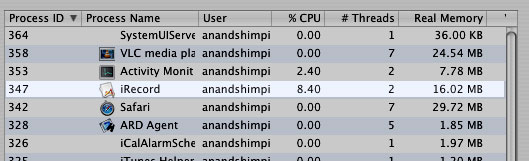
Regardless, as impressive as the development support has been around DVR enablement on the mini (and OS X in general), it's still far from complete and far from polished.
Originally published at https://www.anandtech.com/show/1617 (Wayback Machine).