
Shuttle SK83G: VIA's Shot at SFF
- Posted in
- Systems
Shuttle SK83G: BIOS
As with the vast majority of motherboards in the world, the Shuttle FX83 motherboard utilizes the Phoenix Award BIOS.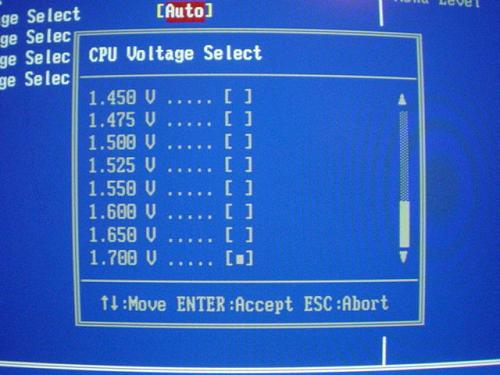
The SK83G allows a good amount of Vcore tuning in its BIOS, up to 1.55V in 0.0250V increments, and in 0.050V increments from there up to 1.70V. Actual operating Vcore when set to its default (1.50V) Auto setting is somewhere between 1.53V and 1.55V on average. This is a nice plus with this system, as setting Vcore to 1.70V in the BIOS actually ends up being more like 1.73V-1.75V. Unfortunately, as you will soon see, you can't take much advantage of these good Vcore features with the way the SK83G overclocks.
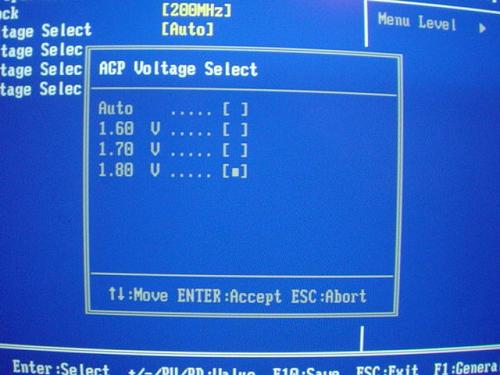
The SK83G BIOS also allows AGP voltage adjustments up to 1.8V in 0.1V increments, as shown above. VAGP adjustments aren't very useful beyond extreme video card overclocking, and even then, its use is mostly minimal. Anyway, despite the fact that the default AGP spec calls for operating voltage of 1.5V, we suggest 1.6V for maximum stability. In fact, some motherboards already set VAGP to 1.6V manually, including the SK83G's motherboard. The biggest problem with the VAGP in this BIOS is that it's apparently capped at 1.48V, an odd problem to say the least. Though, if we had to guess, we'd say that VAGP tuning simply doesn't work.
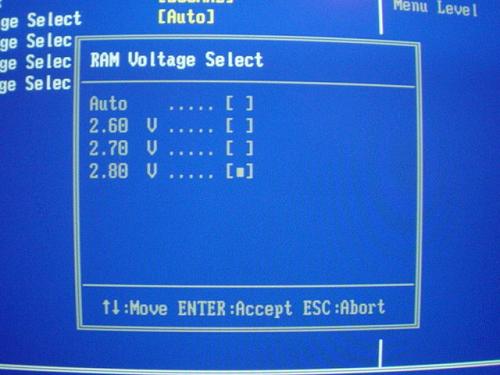
As shown above, VDIMM adjustments aren't terribly spectacular. Even though adjustments that are available up to 2.8V in 0.1V increments aren't poor, it's fairly average nowadays. Still, if you have little use for memory overclocking, your DDR module's default operating voltage of 2.5V will more than suffice. However, setting VDIMM to 2.6V isn't a bad idea, if you want to take advantage of your memory module's lowest possible memory timings; the extra voltage aids in keeping stable low latencies, like CAS 2-2-2-6 (though, those low latencies would probably require BH5 chips, which are all but extinct, except for promising new Samsung chips).
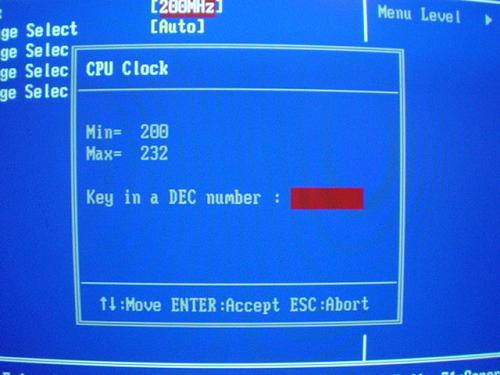
Arguably, the most significant overclocking feature of a motherboard is its FSB adjustments. Though, to be clear, Athlon 64 systems don't really have a FSB; there is no such thing as a FSB in this type of system because the memory controller has moved from the North Bridge onto the Athlon 64 CPU die itself. Therefore, technically, the bus that you're overclocking is the HT (HyperTransport) bus, AMD's name for their Athlon 64 (a.k.a. K8 Hammer) bus. Still, many manufacturers refer to the Athlon 64's HT bus as FSB, even if they know it's technically inaccurate. But that doesn't change the fact that you can adjust an HT bus exactly like you would a FSB, such as those found on Athlon XP and Pentium 4 processors. In the SK83G's case, you can adjust the Athlon 64's bus up to 232MHz. Unfortunately, this is simply unacceptable. 300MHz should really be the minimum with Athlon 64 boards these days, and so we're really not sure what the big deal is here.
|
|
|


The SK83G's PC Health section is well organized and features readings such as Vcore, VAGP, and VDIMM, all vital readings for most enthusiasts these days. Other important readings include System, CPU and Power temperatures, three different fan header speed readings, and PSU voltages (all rails). Be sure to check out the CPU Fan Speed Control option, as it does an excellent job of smartly adjusting to the task (program) at hand and therefore significantly reducing system noise in general.
Originally published at https://www.anandtech.com/show/1390 (Wayback Machine).