
AMS eCube EG65D: Decent Performance, but Many Issues
- Posted in
- Systems
AMS eCube EG65D: CF-EG65 Motherboard
| Motherboard Specifications | |
| CPU Interface | Socket-478 |
| Chipset | Intel 82865PE MCH (North Bridge) Intel ICH5 (South Bridge) |
| Bus Speeds | Not Adjustable |
| AGP/PCI Speeds | Disabled, Fixed at 66 |
| Core Voltages Supported | Not Adjustable |
| AGP Voltages Supported | Not Adjustable |
| DRAM Voltages Supported | Not Adjustable |
| Memory Slots | 2 x 184-pin Dual-Channel DDR DIMM Slots |
| Expansion Slots | 1 AGP 8X Slot 1 PCI Slot |
| Onboard Graphics | Intel 865G Extreme Graphics 2 |
| Onboard RAID | None |
| Onboard USB 2.0/IEEE-1394 | Four USB 2.0 supported through ICH5 Three TI 1394a FireWire ports |
| Onboard LAN | Realtek 8100B 10/100 |
| Onboard Audio | Realtek ALC650 5.1 Digital Audio With SPDIF Optical IN/OUT |
| Onboard Serial ATA | Two Standard SATA connectors ICH5 |
The AMS motherboard was quite a disappointment, since it is the first SFF system we have reviewed with no overclocking adjustments at all. With a 220-watt Power Supply and edgy styling, we expected more. AMS states that stability was their first concern, and that they may add overclocking features in future BIOS revisions. For now, the Frequency/Voltage tab in the BIOS is certainly misnamed and empty, since there are no frequency or voltage adjustments at all.
The small motherboard size, like other SFF, limits memory to 2 DIMMs, but the 2 DIMMs are dual-channel to make the most of the 865G chipset. Memory is limited to a maximum of 2GB, which should be enough for most any use of this small system.
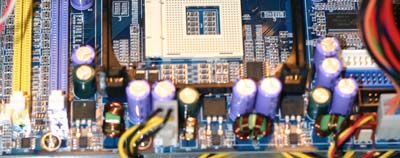
AMS appears to use a 3 phase power design as you can see from the components in this view. The coil nearest the ATX power connector gets very hot in operation. Little computers are doing a great job of working well with what we would normally consider sub-standard power supplies. They accomplish this partly by using 3- and 4-phase power regulation on the motherboards. Competing units have all used Enhance Power supplies, but AMS opted for a Chyang Fun small power supply.
In our recent Biostar review, we were impressed that you could assemble, upgrade, and change memory without having to remove the drive cage from the case. The AMS again is average in this regard. It allows changing memory and adding cards without major disassembly, but you do need to remove the drive cage to install the CPU. As we have found in many other SFF systems, it is best to remove the drive cage, install components under the drive cage, then mount just the hard drive and floppy. Reinstall the drive cage, connect the cables, and then install optical drives. If you install optical drives before cabling the floppy and hard drive, you may find it almost impossible to get to the floppy/hard drive connectors. The included cables are well prepared and contribute to a neat finished wiring arrangement inside the AMS.
Originally published at https://www.anandtech.com/show/1187 (Wayback Machine).