
AMS eCube EG65D: Decent Performance, but Many Issues
- Posted in
- Systems
AMS eCube EG65D: BIOS and Overclocking
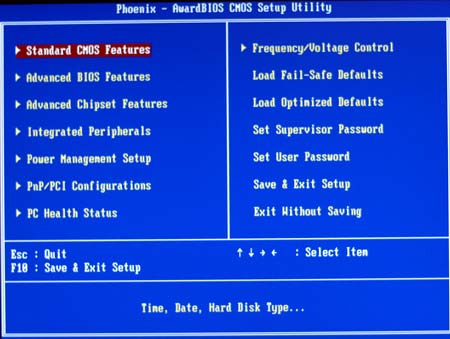
AMS eCube uses the familiar Award BIOS, which will be comfortable for most users. The main menu lists the available submenus, making it easy to find the adjustment menu for which you are looking. For now, the Frequency/Voltage tab in the BIOS is certainly misnamed and empty of adjustments, since there are no frequency or voltage adjustments at all.
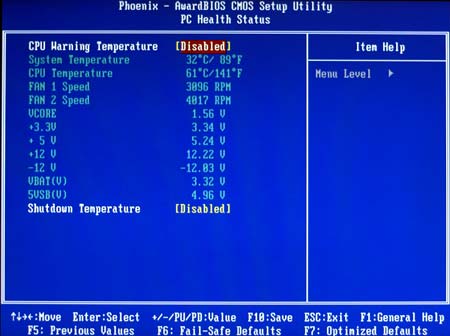
A full Hardware Health submenu with a complete readout of fan speeds, temperatures, and power levels is available in the BIOS.
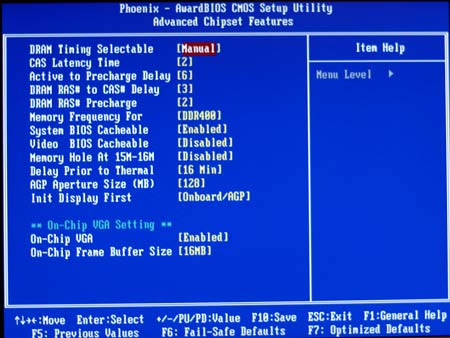
Advanced Chipset Features offers a complete selection of memory timing adjustments. This is the only menu in the AMS eCube BIOS with any of the tweaking and overclocking features we find in competing systems.
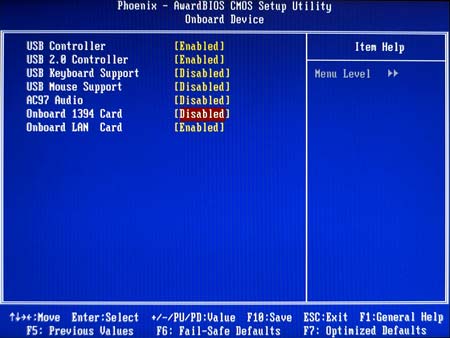
Onboard Devices is another submenu you may visit, since it allows set up of on-board peripherals.
FSB Overclocking Results
AMS clearly has targeted the Enthusiast market with the eCube EG65D, and yet provided no overclocking options at all. Shuttle, Biostar, and Soltek all compete in the same market, and they all include a very complete selection of effective overclocking and tweaking options. If you do not intend to overclock your system, then this will not be an issue.Since there are only 2 DIMM slots on any of the tested SFF systems, all benchmarking was done with both slots filled to provide dual-channel memory support.
Originally published at https://www.anandtech.com/show/1187 (Wayback Machine).