
ABIT KV7 (KT600): Budget Performance in a Small Package
- Posted in
- Motherboards
ABIT KV7: Board Layout
The general layout of the ABIT KV7 is barely acceptable, mostly due to the KV7’s tiny dimensions. In fact, the KV7 is one of the smallest motherboards in an ATX form factor that we’ve ever come across, challenging even the tiny Albatron PX845PEV Pro.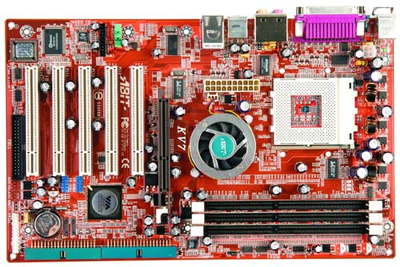
One of the less important, but still notable, layout mismanagements of the KV7 is the location of the ATX connector. The ATX connector is placed on the left-hand side of the motherboard, just below the lower left portion of the CPU socket. As we’ve mentioned time and again, standard PSUs usually do not have an extra long ATX cable, and this becomes a problem with motherboards that have their ATX connectors located on the left-hand portion of the motherboard. It will increase clutter and can obstruct the installation/uninstallation of the CPU HSF, memory modules, and any other components in that area in which a user may decide to modify or uninstall. If you're using a high-quality PSU with an extra-long ATX connector, you have nothing to worry about. Still, the vast majority of ATX cases come with standard PSU’s with short cables. If you are thinking of purchasing a KV7, you more than likely aren’t going to spend any extra money on anything you don’t have to.
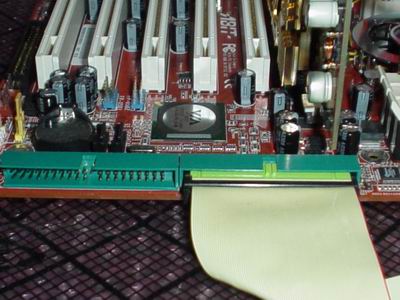
Unfortunately, we see that ABIT continues to place the Primary and Secondary IDE connectors of their enthusiast motherboards at a 45 degree angle to the board. Not only that, but the Primary and Secondary IDE connectors are located at the edge of the motherboard below the AGP slot. This location will make it nearly impossible for a user to use the KV7’s bundled IDE cables, as they will simply be too short to reach the upper bays of an ATX case. What this means is that you will be unable to install optical drives in the first drive bay of your computer case and possibly the second drive bay as well. In the end, we still see no reason for ABIT to continually use this type of location on their desktop motherboards.
One of the more positive aspects of the KV7’s layout is the location of the Floppy connector. If you’re going to install a Floppy drive, the Floppy connector location on the KV7 makes it easier for the user to route the Floppy cable under and alongside the motherboard’s edges. This will reduce any possible cable collision and case clutter, making for a much more neat and organized computer case. Air flow is also improved, though this is less of a concern unless you’re going to load up every imaginable drive and device on this budget motherboard.
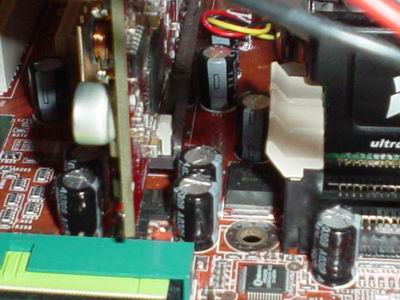
The KV7’s DIMM connectors are nicely located well away from the AGP slot. This makes it possible for users to install or uninstall memory modules easily without having to uninstall their video card, which is a time-consuming process that includes steps like unscrewing your video card, unplugging your VGA cable, and physically uninstalling your video card from its AGP slot. This location is becoming more and more common, thankfully.
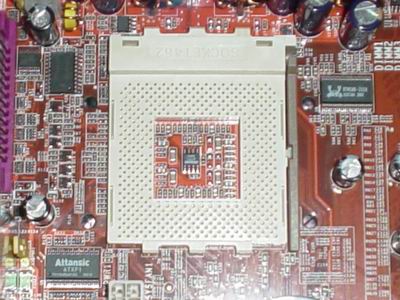
As always, ABIT is accommodating to enthusiasts, and this couldn’t be better portrayed than with the addition of the four mounting holes required for more powerful Athlon XP CPU HSFs. Cooling enthusiasts will be delighted to hear this, as will the most serious overclockers. Despite this excellent addition, there are good copper HSFs out there that can be bought very cheaply (between $10 and $15) that don't require mounting holes.
Originally published at https://www.anandtech.com/show/1140 (Wayback Machine).