
ABIT KV7 (KT600): Budget Performance in a Small Package
- Posted in
- Motherboards
ABIT KV7: BIOS and Overclocking
ABIT utilizes their standard Award BIOS setup for the KT600-based KV7. ABIT dubs their enthusiast BIOSes “Soft Menu III”, but it’s simply an Award BIOS with some code modified to make Soft Menu III look like an ABIT-centric invention.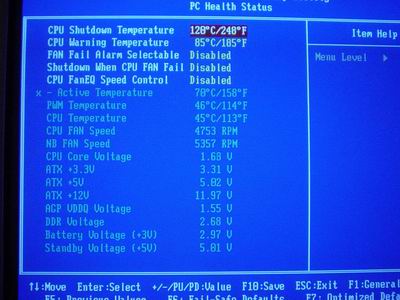
The KV7’s PC Health section doesn’t include any options that we haven’t seen from the hundreds of modern-day motherboards we’ve looked at. The KV7 includes such readings as Active, Power, and CPU temperatures, CPU and North Bridge fan speeds, Vcore, PSU readings (all rails), VAGP, VDIMM, and battery/standby voltage readings. It’s certainly a plus to see a PC Health section with viewable VAGP and VDIMM readings; there are far too many BIOSes out there without these basic readings. Another excellent addition to this section, and one that is more standard, is the addition of a CPU fan control option, dubbed “CPU FanEQ Fan Control”. This option comes in very handy for users that are sensitive to high noise levels within their PC and therefore do not want to worry about noise coming from their CPU’s HSF. Some other options that are less interesting, but are standard nonetheless, include: CPU Shutdown Temperature, CPU Warning Temperature, Fan Fail Alarm Selectable, and Shutdown When CPU Fan Fails options. All in all, the KV7’s PC Health section is one of the better available system monitoring resources out there.
The “Soft Menu III” section is where the majority of your performance optimizing time will be spent. In this section are options for adjusting the FSB, CPU multiplier, VAGP, VDIMM, Vcore, and chipset voltage. This section is the overclocker’s bible, as everything related to extreme, out-of-spec performance enhancements are available here. We’ll go into detail about the range of these options in just a minute.
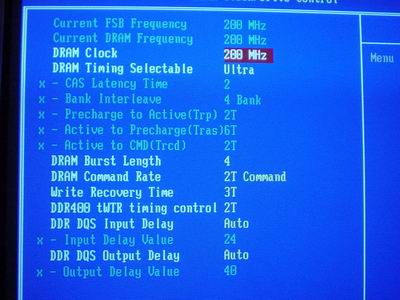
The KV7’s Advanced Chipset Features is set up similarly to the many other KT600 motherboards we’ve reviewed. Within the KV7’s Advanced Chipset Features section are six performance-enhancing tweaking sections. However, the enthusiast will be doing the majority of their performance tweaking with the first section, dubbed the “DRAM Clock/Drive Control” section. In this section are memory timing options such as CAS Latency, RAS to CAS Delay, RAS Precharge, Precharge Delay, Bank Interleave, Command Rate, and Fast Command. These are all the memory related options that you’re ever going to need for maximum performance. One additional option that isn’t usually found in the Advanced Chipset Features section is the DRAM frequency adjustments, which are available in DDR266, DDR333, DDR400 and SPD (DDR400).
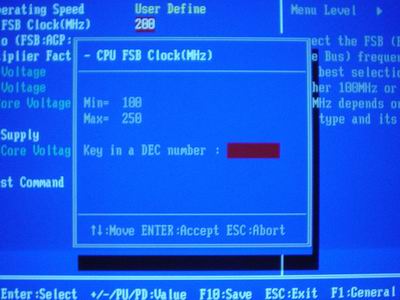
The KV7’s FSB frequency adjustments, found in the “Soft Menu III” section, are high enough for even the most adventurous overclockers. Up to 250MHz FSB is available in the KV7’s BIOS in 1MHz increments. Even with an expensive overclocking kit (be it Vapochill or liquid nitro setup), 250MHz FSB is going to be hard to come by. Serious overclockers who aren’t insane (i.e. air cooling overclocking enthusiasts) will be more than accommodated by the KV7’s FSB flexibility.
The KV7’s VDIMM range is fairly standard, available up to 2.80V. While there are several memory modules now available on the market that are under warranty between 2.9V and 3.1V, they aren’t applicable here. Due to the Athlon XP’s limited FSB bandwidth, there is no need to install high speed memory modules (anything too far over DDR400) in an Athlon motherboard. The same certainly isn’t true of Intel motherboards, as the Pentium 4’s FSB bandwidth is much larger, and therefore main memory needs to supply enough bandwidth to maximize the Pentium 4’s performance. Still, even the Pentium 4 can perform quite well with main memory operating much slower than its FSB.
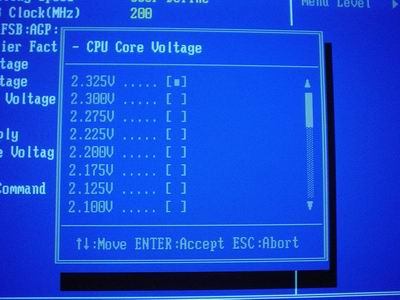
The KV7’s Vcore range is absolutely superb, the best we’ve seen from any Athlon XP motherboard to date. The KV7’s Vcore is adjustable in the BIOS, up to 2.325V in 0.0250V increments, excluding 1.925V, 2.050V, 2.150V, and 2.250V. Some overclockers and overvolters may have preferred 0.0125V Vcore increments instead of 0.0250V increments because of the natural fluctuation in Vcore when set at a certain value. We believe, however, that 0.0250V should satisfy just about anyone considering the KV7 allows up to 2.325V.
ABIT continues their tradition of somewhat low VAGP ranges, this time from 1.50V to 1.65V in 0.5V increments (located in the “Soft Menu III” section). Even if you’re a video card overclocker, any VAGP over 1.6V is simply unnecessary. If your motherboard requires higher than that to reliably operate at stock and even many different levels of overclocked speeds, something is wrong with your motherboard.
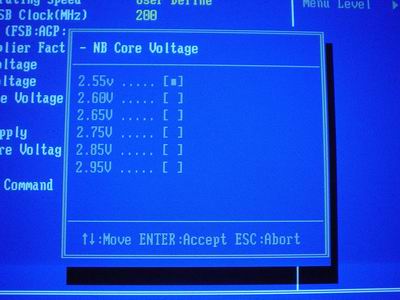
One option that seems to be popping up on more Athlon XP and Pentium 4 motherboards are chipset voltage options. Also located in the “Soft Menu III” section, chipset voltage is dubbed “NB Core Voltage” by ABIT. This is a more appropriate name really, as all motherboards that display “chipset voltage” are really referring to the operating voltage of the North Bridge. The South Bridge has very little to do with how well a motherboard overclocks, though some motherboards do benefit from South Bridge cooling. Anyway, “NB Core Voltage” is available up to a friendly 2.95V, which is more than enough, and can be quite dangerous if set at that level.
The ABIT KV7, like every KT600 motherboard before it, lacks an AGP/PCI lock. As we have reiterated time and again, any motherboard that doesn’t have an AGP/PCI lock really shouldn’t be taken too seriously among overclocker, unless they were somehow able to magically reach high FSB speeds without this option. We have not encountered such a motherboard, and are about to prove yet again in our overclocking section, that such a motherboard (with no AGP/PCI lock) doesn’t exist.
FSB Overclocking Results
For FSB overclocking, the following setup was used on the ABIT KV7:| Front Side Bus Overclocking Testbed | ||
| Processor: | Athlon XP 2500+ (Barton Core) | |
| CPU Vcore: | 1.65V (default) | |
| Cooling: | Thermalright SK-7 with 80mm Thermaltake Fan | |
| Memory: | Two 256MB Corsair 3200LL at SPD | |
| Power Supply: | Enermax 350W | |
It’s not at all surprising to see that KT600 motherboards are coming up considerably short of nForce2 Ultra 400 motherboards in the overclocking department, as evident from our numerous KT600 motherboard reviews lately. However, that doesn’t take away from the fact that the ABIT KV7 is one of the best KT600 FSB overclockers we’ve come across. The KV7 was able to reach 211MHz FSB without any reliability issues to report, using our standard overclocking setup listed above.
Originally published at https://www.anandtech.com/show/1140 (Wayback Machine).