
Intel's E7205: Granite Bay Hits the Streets
- Posted in
- Motherboards
Gigabyte 8INXP: BIOS and Overclocking
Not surprisingly, we see that Gigabyte uses the Award BIOS.
The PC Health section includes a good deal of information, although pretty average by today's standards.
In PC Health you'll find only one temperature reading, CPU temperature. This reading ended up fluctuating between 45-47C, which is unusual because we're used to seeing CPU temperatures between 38 and 43C with our particular 2.26B Pentium 4 CPU. Perhaps this is simply an early BIOS issue. Other PC Health readings include fan speeds for the CPU, power, and system fan headers. Vcore and PSU readings (all rails) are also included, and are normal for the most part. Finally, we see that there are four "Warnings" options in PC Health. These include CPU warning temperature, CPU fan failure warning, power fan failure warning, and system fan failure warning. Fan failure warnings are a nice little feature to have, since fan failure is not that uncommon.
Gigabyte continues their recent trend of hiding the Advanced Chipset Features section in the 8INXP BIOS. You have to press and hold CTRL while hitting the F1 key to bring up the Advanced Chipset Features section in the BIOS. Some readers have emailed us asking why Gigabyte hides this feature in their BIOS, and even we were stumped for a while before we got an answer. Gigabyte's explanation is quite simple; they don't want users messing with DRAM timings, as it can cause system instability. We think this is fair, especially since Gigabyte does mention the CTRL + F1 feature in their manual.
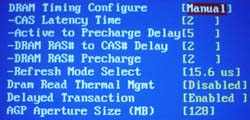
As far as the features in the Advanced Chipset Features section are concerned, there isn't anything we haven't seen before. You're allowed to adjust CAS Latency, Precharge to Active, Active to Precharge, Active to CMD, and a handful of other options that don't boost performance whatsoever. We weren't astonished to see the absence of Bank Interleave or Command Rate options, since we can't remember the last time we encountered a BIOS for an Intel chipset based motherboard that had these options. You'll see Command Rate and Bank Interleave options in SiS 648 motherboards more often than not. All in all, DRAM tweaking is fair, and the Top Performance feature (located outside of Advanced Chipset Features) is a nice plus.
As should be expected with all Granite Bay motherboards from this point on, Gigabyte's 8INXP contained absolutely no divider adjustments besides 1:1. There were no onboard jumpers or switches that could have changed this fact either. This isn't surprising, as all you really need is a 533MHz FSB processor and two modules that can ran at 266MHz or better to squeeze out the best performance from your system. This assumes you don't overclock since, as we mentioned before, the only way you can increase your memory speed beyond 266MHz with a Granite Bay motherboard is by increasing the FSB.
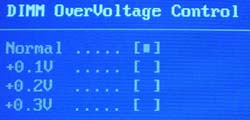
Voltage adjustments are fairly plentiful in the 8INXP BIOS. VDIMM is adjustable as high as 2.8V in 0.1V increments, which should be adequate for all users, including most memory overclockers. VAGP is also quite adjustable; in 0.1V increments you can adjust VAGP all the way up to 1.8V. Video card overclockers will have no gripes with this type of voltage flexibility.
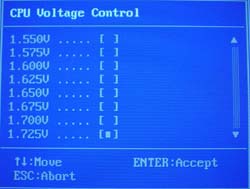
Vcore options are pretty good for this particular motherboard. Since most P4 overclockers don't really need to raise Vcore to get a large overclock, having the ability to raise Vcore anywhere past 1.6V or so really isn't necessary (using a 1.5V Northwood CPU of course). This BIOS allows for "only" 1.725V in 0.025V increments. Vcore reads steady at 1.5V according to PC Health, so hitting an actual 1.725V should be a reality. So, while not spectacular, the Vcore ceiling for this BIOS is acceptable.
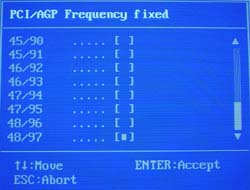
Additionally, we see that the 8INXP BIOS includes the much welcomed AGP/PCI lock feature. We've become accustomed to seeing this feature on almost all 845-based as well as nForce-based motherboards in the last year or so, and we welcome the day SiS and VIA motherboards start fully implementing AGP/PCI lock functions. This AGP/PCI lock is also adjustable as high as 48MHz/97MHz instead of the stock 66MHz/33MHz if you are interested in even more overclocking adventures. Be forewarned though, it generally isn't advisable to go higher than 70MHz/37MHz, as your AGP and/or PCI devices may fail.
We ran some overclocking tests on the Gigabyte 8INXP, which ended up performing very well in our benchmarks, as you will see shortly. The following table lists the components we used for overclocking the FSB using the 8INXP motherboard:
|
Front Side Bus Overclocking Testbed |
|
|
Processor:
|
Pentium
4 2.26GHz
|
|
CPU
Vcore:
|
1.5V
(actual)
|
|
Cooling:
|
Intel
Retail HSF & Thermal Pad
|
|
Power
Supply:
|
Enermax
300W
|
With this setup we were easily able to hit 163MHz FSB, or about 2.78GHz core clock. Looking at both the Gigabyte 8INXP and ASUS P4G8X, it becomes clear that Granite Bay boards will probably end up overclocking no worse than 845PE motherboards. However, as you'll see shortly, overclocking benchmarks are another story altogether.
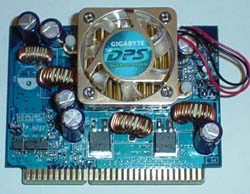
We were skeptical about Gigabyte's DPS (Dual Power System) system at first, even if it did turn the 8INXP into a 6-phase motherboard. After numerous benchmarks and overclocking tests, we can safely conclude that DPS does absolutely nothing for overclocking stability or otherwise. Not surprisingly, performance was the same as was general stability. However, we would be interested in knowing if DPS does anything for the longevity of the onboard components as well as the motherboard itself.
As with the ASUS P4G8X, the Gigabyte 8INXP does not have any other dividers besides 1:1. Therefore, we weren't able to run any memory overclocking tests that would have been as worthwhile as they turned out to be in our October 7th 845PE shootout . We early await SiS 655 motherboards for this reason.
Originally published at https://www.anandtech.com/show/1033 (Wayback Machine).