
Intel's E7205: Granite Bay Hits the Streets
- Posted in
- Motherboards
ASUS P4G8X Deluxe: BIOS and Overclocking
The P4G8X utilizes Phoenix Technology's Award BIOS, which seems to be the most popular BIOS for power users these days.
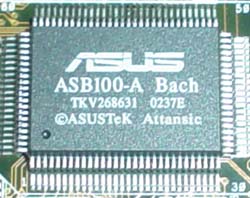
BIOS hardware monitoring is powered by ASUS's ASB100-A Bach chip. The Hardware Monitor section includes some fairly normal readings and information in general.
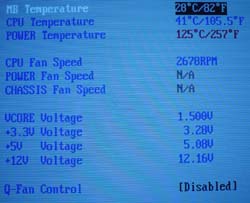
Here you'll find readings on motherboard temperature, CPU temperature, power temperature, fan speeds (CPU, power, and chassis), Vcore, PSU readings (all rails), and an option for enabling ASUS's Q-fan technology. Q-fan is a nice little BIOS option to have, as it regulates your CPU's fan speed based on how taxed your system is at any given moment. CPU temp readings were right where we expected them to be, between 39C and 41C.
Normally called the Advanced Chipset Features section, the Chip Configuration section included some fairly nice DRAM tweaking as well as other such options.
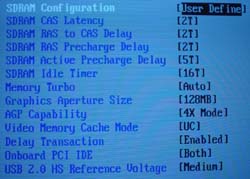
In Chip Configuration, it's possible to adjust DRAM timing mode, CAS Latency, Precharge to Active, Active to Precharge, Active to CMD, and Idle Timer (which doesn't really boost performance at all) among other minor options. There are no Bank Interleave or Command Rate adjustments available, but that's normal for Intel-chipset based motherboards these days. All in all, the Chip Configuration section lives up to the tweaker's needs for the most part.
With Intel's E7205 chipset, the highest memory speed possible is 266MHz (dual channel operated) if your FSB is operating at stock speed (133MHz). Since there are no other divider options available in the BIOS or via onboard jumpers or switches, the only way you can increase your memory speed is by increasing your FSB. If you raise the FSB of your processor to 166MHz (666MHz effective FSB), assuming you have a good enough processor, you can run your memory at DDR333 (dual channel). However, since dual DDR266 already maxes out the bandwidth that 533MHz FSB Pentium 4 processors can handle, there's no need to overclock unless, of course, you're an overclocker.
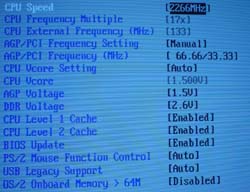
The P4G8X BIOS does include some fairly good voltage tweaking options. In 0.1V increments, you can adjust VDIMM up to 2.7V, which is adequate for most users, considering that overvolting memory doesn't usually yield a significantly better overclock. VAGP is also adjustable in 0.1V increments; as high as 1.7V.
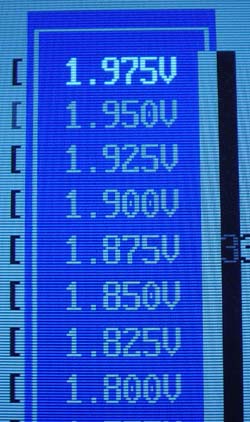
ASUS goes all out with the Vcore options, allowing as high as 1.975V in 0.025V increments. 1.975V should be plenty for most people, as running any modern day Pentium 4 CPU at 1.975V will significantly reduce the lifespan of the CPU. For once, ASUS produces a board that doesn't overvolt, since Vcore (as read through the Hardware Monitor) consistently reads a dead-on 1.5V.
Like every other 845-based motherboard we've tested in the past, the ASUS P4G8X comes with an independent AGP/PCI lock running at 66.67MHz/33.33MHz, and adjustable all the way up to 104.46MHz/52.63MHz. This is a vital feature to have for overclockers, as running your AGP or PCI cards too far out of spec can damage those parts. For non-overclockers, it's still a nice BIOS option to have.
Overclocking the ASUS P4G8X Deluxe was a cinch. The following table lists the components we used for overclocking the FSB:
|
Front Side Bus Overclocking Testbed |
|
|
Processor:
|
Pentium
4 2.26GHz
|
|
CPU
Vcore:
|
1.5V
(actual)
|
|
Cooling:
|
Intel
Retail HSF & Thermal Pad
|
|
Power
Supply:
|
Enermax
300W
|
This is quite a conservative and cheap overclocking setup, but every since its inception P4 Northwood processors have continually been able to outperform AMD's Thoroughbred processors overclocking-wise, making us more impressed by the day with Intel's 0.13-micron process. That said, we were easily able to hit 160MHz FSB, or just over 2.70GHz core clock. This is certainly not out of the ordinary for an Intel chipset based motherboard.
We weren't able to conduct any memory overclocking tests due to the fact that this motherboard only contains a 1:1 divider. However, have no fear, ASUS is coming out with a motherboard based on SiS' 655 chipset, which supports dual channel DDR333. It'll be interesting to see how much performance gain there is with dual channel memory running at 400MHz and beyond on SiS 655 motherboards.
Originally published at https://www.anandtech.com/show/1033 (Wayback Machine).