
HP Z27q Monitor Review: Aiming For More Pixels
Display Uniformity
Having an accurate display is great, but the best displays maintain that accuracy across the entire display. This is challenging for most displays, with larger displays struggling to keep an even backlighting across the entire panel.
White Levels


The HP Z27q suffers from the same issues with uniformity that the Z27x had. There is a significant drop in brightness at the edges of the display. The maximum drop is the upper left corner, where it falls over 20% from the center. The rest of the panel is quite a bit more consistent, but some work could be done here to improve the results.
Black Levels


The black levels are even more inconsistent than the white levels, with the top of the display having the best black levels, and the bottom of the display has the brightest blacks. As a percentage basis, it’s not great.
Color Variation

The error level from the center is, on average, pretty good. There are a couple of areas where the error level is above that of something you would notice, but generally it is pretty close to the same error level as the center. Color uniformity is likely impacted by the same backlight issues that caused the white levels to drop off. Overall, the uniformity results of the Z27q are very similar to the Z27x. There is quite a bit of variation across the panel, and true professionals will likely want a display more accurate than this. At the center, it is very good, but once you move out to the edges, the backlight is quite uneven.
Power Use
Power is measured at the wall with a Kll-A-Watt meter. Measurements are done at both the maximum backlight level, and the minimum backlight level. Maximum brightness is right around 300 nits, and minimum is 51.
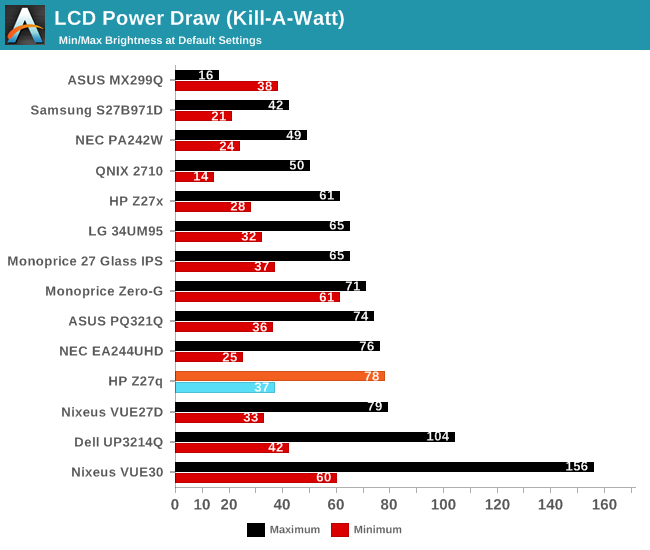
The display draws quite a bit of power compared to other 27-inch panels, with a maximum draw of 78 watts at 100% brightness. The minimum power draw is 37 watts, which is once again pretty high. This is not that surprising due to the resolution of this panel, since in order to hit the same brightness levels as a lower resolution display, it is going to need a more powerful backlight due to the transistors in the panel blocking more of the light.
The standby power draw was also quite high. I measured 16 watts at the wall when the display is in standby mode.
Efficiency
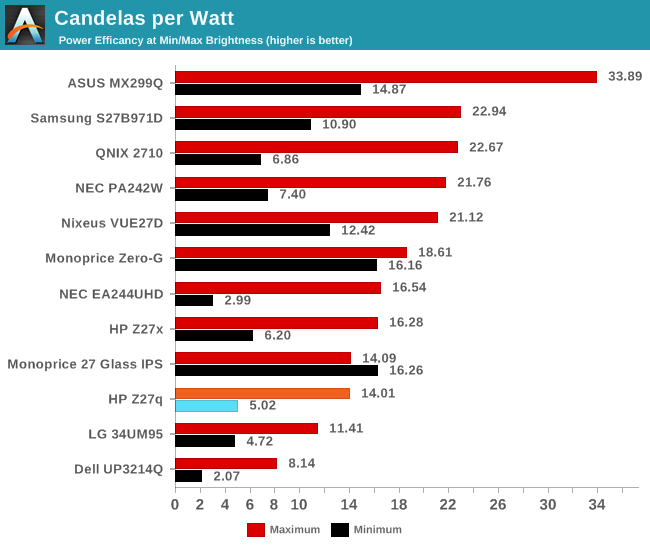
Once again, with the high number of pixels, this panel is not going to be as efficient as lower resolution devices. However, it is not as far off as you may think. Candelas per Watt at maximum brightness was 14.01, which is certainly lower than some of the other 27-inch devices, but not excessively so. At minimum brightness the efficiency drops to just 5.02 Candelas per Watt, and more of the power usage is shifted to the electronics of the unit rather than the backlight.
Originally published at https://www.anandtech.com/show/9870/hp-z27q-monitor-review-aiming-for-more-pixels (Wayback Machine).