
MSI B85M ECO Review: Aiming Green at $73
- Posted in
- Motherboards
- MSI
- B85
- ECO
MSI B85M ECO BIOS
If the Green Lantern (or perhaps Captain Planet) had a BIOS made especially for him, it would look something like the one MSI has equipped the B85M ECO with. If you have not had enough of the green theme, here it is in spades. The good thing for MSI is that the general BIOS layout is conducive to different color implementations, such as yellow for OC Certified and red for Gaming. Each of these gets a giant central logo, and here we get the ECO series version with a leaf being cupped by two hands.
Along the top ribbon is our usual fare of MSI data: Motherboard name, BIOS version, CPU installed, CPU speed, DRAM frequency, DRAM size, temperatures and boot order. As this is a B85 motherboard, the only real data missing here is perhaps the CPU fan speed, in case a dumb user (like I did) forgot to plug a CPU fan in at first.

On the top left is our ECO button which mimics the physical button on the motherboard as well as the ECO setting in software. This is where we normally see the XMP button on the main consumer line of motherboards.
In our six tabs we get two changes from normal – OC options become ECO and the OC Profiles become ECO Profiles. While the latter stays the same (saving the BIOS state to reload later), the ECO options gets the bulk of the BIOS changes.

However the first tab is the Settings options and anyone familiar with MSI BIOSes will not find anything out of place here. The first menu item, System Status, gives details on the BIOS and SATA ports connected:

The Advanced option in the Settings tab is more of the meaty part of the BIOS, giving configuration options for almost all of the onboard controllers.

There is not much here out of the ordinary. This motherboard supports Hot Plug on the SATA ports, although it is disabled via the Integrated Peripherals menu by default in order to speed up POST time and reduce power consumption when not in use.

Rapid Start is disabled by default, but Smart Connect is enabled as some of MSI’s OS software uses it incase the user wants to use it. The BIOS also includes Windows 8/8.1 fast booting features as well as Secure Boot and Wake Up events.

Users wanting to shave some more time from the POST, if they have full UEFI enabled hardware, can disable legacy boot options from the boot menu. Options such as Boot Override are found in the Save and Exit menu.

The real interesting new stuff in the BIOS comes in the ECO tab, where the first options allow the user to determine how the ECO button is controlled and if XMP should be enabled. As a side note, while we get XMP options, there are no sub-timing menus should users wish to optimize their memory manually.
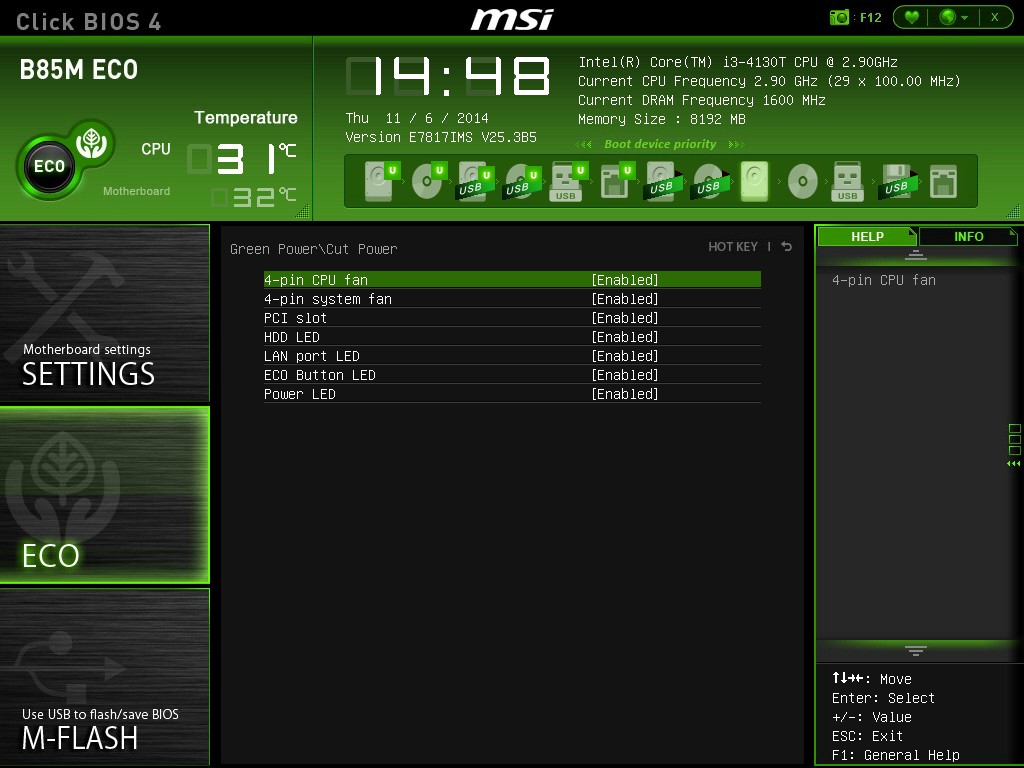
In the Cut Power menu option we are able to disable various LEDs and fan headers from system POST. This is a cut down version of the options we get in the OS, but it is interesting to consider that MSI does not allow users to undervolt their CPU. As a system that is focused on saving power, for those users that know what they are doing, undervolting into a more efficient power band might save even more power. We asked MSI about this, and have published the response in the conclusion.

The ECO tab also gives details on CPU functionality and tech, although users might want to migrate to the CPU Features option to organize their power limits or C-states.
The M-Flash tab allows users to update the BIOS via a USB stick, and the ECO Profiles tab as mentioned above lets the user to save the BIOS for a future time or to share with others. I find this a bit odd – no user is going to dabble with profiles saving a few hundred milliwatts here and there depending on their usage that day, let alone share it with friends.

MSI’s interactive hardware monitor / fan controls are here. These appeared a little while ago now and even though there is not complete fine grain control over the settings, it does give an opportunity for MSI to show exactly what a BIOS can do when you focus more on user experience than pure functionality.

To finish up, we also get Board Explorer to help diagnose POST issues. The B85M ECO also has a favorites menu although the usage of such a menu in this type of product is not something I predict many (if any) users taking advantage of.


Originally published at https://www.anandtech.com/show/8746/msi-b85m-eco-review-aiming-green-at-73 (Wayback Machine).