
ABIT LX6 LX Pentium II Board
- Posted in
- Motherboards
 |
After enabling the 100MHz bus speed setting the now
functional SoftMenuTM utility one thing quickly comes to notice, the BIOS
cannot recognize the newly implemented bus speed since it reports the CPU speed as if the
bus speed was set to a lower 83.3MHz setting. Does this mean that the 100MHz bus
speed doesn't work? Most definitely not! Further tests and benchmarks show
that the actual clock speed of the CPU, when using the 100MHz bus speed, does not reflect
an 83.3MHz setting...however it also doesn't reflect a 100MHz setting either! What's
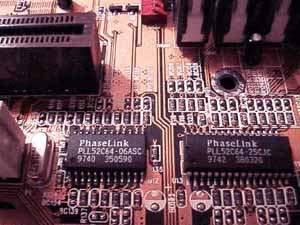
up with the LX6's clock crystal? Figure 3. (Left) Those chips you see there are what make the 100MHz bus speed setting on the LX6 possible, you can thank them for the performance you receive from the LX6 at the 100MHz setting. |
When the motherboard interprets the signal it receives from the user to enable the 100MHz setting internally the clock oscillator, not designed for operation within that specification, does the best job it possibly can to reach that 100MHz setting. However, the actual bus speed used when the 100MHz setting is activated fluctuates in a direct variation to the processor clock multiplier, for the most part. When the clock multiplier of the CPU was lowered from 4.0x to 3.0x the approximate memory bus speed of the LX6 jumped up from 91.5MHz to a whopping 106.6MHz!!! However when the clock multiplier was raised to 3.5x the bus speed dropped to a incredibly low (low when compared to the previous 106.6MHz mark) 90.57MHz. For the most part the higher bus speeds were achieved with lower clock multipliers, however that doesn't ALWAYS hold true. The LX6 will randomly boot at the lowest possible CPU bus speed of 89.0MHz when set to the 100MHz setting in SoftMenuTM regardless of the clock multiplier in which case you receive a performance boost nearly equivalent to that which you would receive if you had enabled the 83.3MHz frequency in the BIOS. The 100MHz setting results in a bus clock frequency ranging from the lowest setting of approximately 89.01MHz to the peak at about 106.67MHz with the most commonly achieved speeds lying in the 91.115MHz to 94.5MHz region. What good is a 100MHz bus speed setting if nothing will operate when using it? No good at all...HOWEVER the LX6, when used with the proper peripherals, displays its excellent stability even at the 100MHz bus speed. With 2 x 32MB of Advanced Megatrends SDRAM the LX6 could be set to the absolute fastest BIOS timings and it would complete all tests at the 100MHz bus speed setting. It should be mentioned now that even with a genuine Pentium II - 300 the highest the LX6 would boot at was 377MHz (~94.3MHz x 4.0) and the 100MHz x 4.5 setting wouldn't work at all (oh darn...looks like we'll have to wait for the 333MHz Pentium II to clock it at > 400MHz =)...) For your convenience, here is a list of peripherals that have passed the test at the 100MHz bus speed with the LX6:
Originally published at https://www.anandtech.com/show/82 (Wayback Machine).