
Quarterdeck MagnaRAM '97
- Posted in
- Software
Applications today are huge. A common application such as a
word processor can demand up to 8 MB of memory. Well, given that just Windows 95 takes
almost that much, how can we load many different applications without running out of
memory? Windows 95 helps us out with a nice little trick called Disk Swapping. It takes a
part of the memory that doesn't look like it's being used presently, and writes it to the
hard disk. Then it gives that memory to the program being loaded. It "swaps"
parts of memory on and off the hard disk depending on what is being used.
Well, that's nice, but as you may know, writing to the HDD is rather slow in comparison to
writing to the RAM. This is where MagnaRAM comes in. MagnaRAM takes part of the system's
free memory and creates what it calls a buffer. In this buffer, it stores memory that
Windows would normally swap to the hard disk. But when it stores it here, it compresses
it, so that it can fit more into it. If Windows fills up this buffer and still needs to
swap to disk, MagnaRAM compresses the data before writing it to the Hard Drive, so that
the write time is less. Somewhat like writing notes down in shorthand to save time and
keep up.
Another way MagnaRAM speeds up performance is by freeing RAM up from Windows' Hard Disk
cache memory. This memory is where Windows stores data being read from the Hard Disk in
order to access it faster. Often, the memory reserved for this is not being totally used
up. MagnaRAM frees the memory that Windows does not need, increasing once again the
capacity of your memory.
A feature that comes with MagnaRAM is TurboLoad. You can activate this feature separate of
the compression. TurboLoad analyzes how applications load and calculates optimal ways to
load them (it does this the first time you load the application while it is active). Then,
each time you load the application, it uses these calculations to load the program faster.
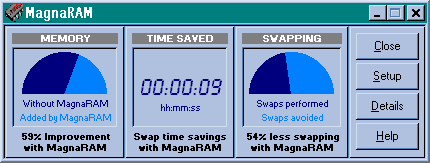
Quarterdeck MagnaRAM 97 is very simple and
easy to use, as there is not much to it. The main screen, shown below, shows reassuring
statistics: it shows the amount of memory added, an estimate of the amount
|
||
| statistics describing how well MagnaRAM has been improving your system's performance. It shows everything from compression ratios to the number of disk swaps saved. it also shows a breakdown of the memory with and without MagnaRAM. This window is quite informitive, and convinces you that you've made the right choice in buying this utility. |
Originally published at https://www.anandtech.com/show/79 (Wayback Machine).