
Smartphone Audio Quality Testing
- Posted in
- Smartphones
- Audio
- Mobile
- Tablets
- Testing
Dynamic Range
The dynamic range of the phone indicates the difference between the loudest possible sound and the background noise. The more residual noise in the background, the lower the dynamic range. Phones with more powerful amplifier sections will typically produce a greater dynamic range. The residual noise level is often constant, so as the overall volume level increases the difference between the music and the noise increases as well.
The best performer here is the iPhone 5 again, with 92.214 dB of range. The worst is the Nexus 5 with only 89.332 dB. A difference of 3 dB is not something I would concern myself over. If we see a phone or tablet that drops down below 80 dB then I will start to show more concern.
Crosstalk
Crosstalk, like dynamic range, is just a number here. This is the measurement how much signal leaks from one channel into another. If an instrument should only be in the right ear, some of that signal will leak into the left ear, but we want that as low as possible. The results are expressed in -dB, or how much quieter one ear is than the intended ear.
On the Note 3 we see a wonderful crosstalk measurement of -117.2 dB so the sounds in one ear are -117 dB quieter in the other ear. This makes them impossible to hear. The worst is the iPhone 5, with only -75.624 dB of isolation.
Stepped Response
The stepped response uses a 1 kHz 0 dBFS tone but measures output level from maximum volume to minimum volume. We can see how large the volume steps are and how many there are. It doesn’t produce a number we can use, but it ties back into our other results. For a good example, we can look at the Note 3.

We see steps that are around -5 dBu each. The final level is muted and just the background noise of the device. Each step is clean and even but as we get lower and lower we see noise start to intrude. This is the background noise starting to become audible in the signal. The flatter the levels are, the quieter it will be. Now, let us look at the Nexus 5.
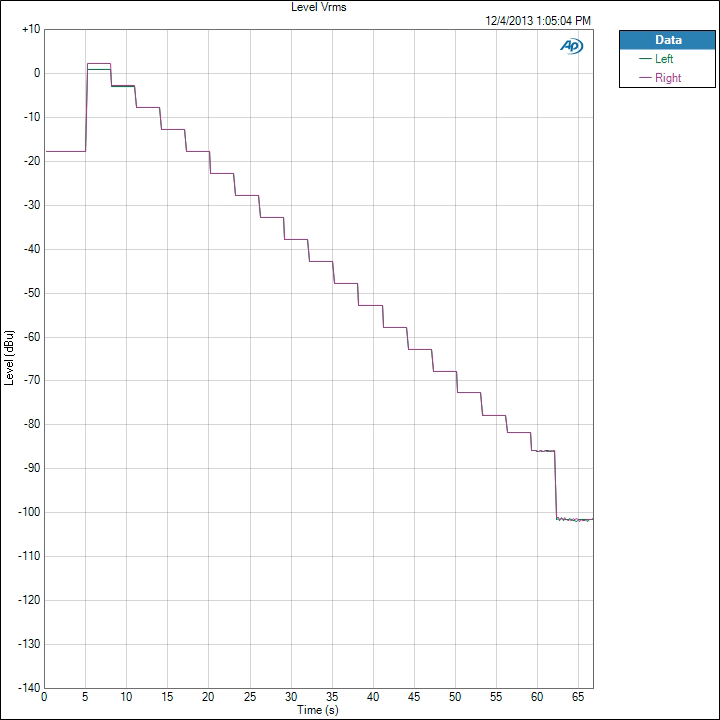
Notice at the very top how the right and left channels do not overlap. That is the clipping we talked about at the very beginning. It isn’t until the 4th volume setting that the level difference is down to nothing. Because of this, I would consider the top 3 volume settings of the Nexus 5 as ones that should be avoided. They each have enough THD+N introduced into them that it will sound poor, and one ear will be louder than the other.
Originally published at https://www.anandtech.com/show/7567/smartphone-audio-quality-testing (Wayback Machine).