
Server Buying Decisions: Memory
Measuring Latency
To measure latency, we use the open source "TinyMemBench" benchmark. The source was compiled for x86 with gcc 4.8.1 and optimization was set to "-O3". We used the latency values measured with the largest buffer size: 64MB. The measurement is described well by the manual of TinyMemBench:
Average time is measured for random memory accesses in the buffers of different sizes. The larger the buffer, the more significant the relative contributions of TLB, L1/L2 cache misses and DRAM accesses become. All the numbers represent extra time, which needs to be added to L1 cache latency (4 cycles).
First we tested with 1 DPC. RDIMM-1866 means we use the Micron 1866 RDIMMs. So even though they only work at 1600 MT/s when the Xeon E5-2690 is used, we describe them as "1866". The RDIMM-1600 are Samsung DIMMs which are designed to run at 1600 MT/s.
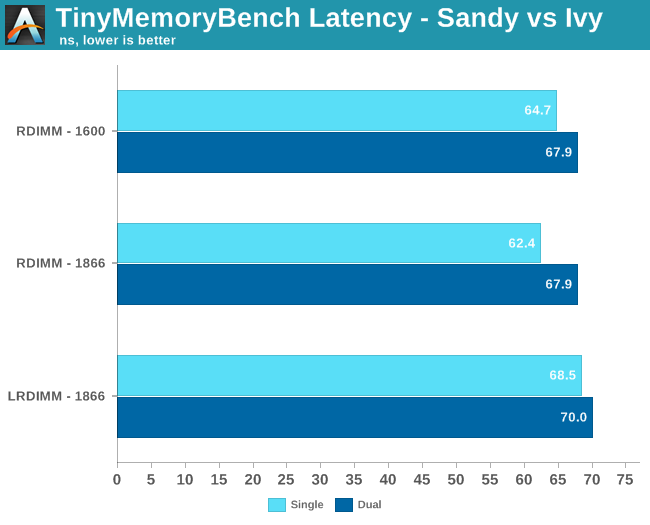
The iMB buffer increases latency by about 5 to 10%. But LRDIMMs are hardly useful when you insert only one DIMM per channel. They are made and bought to run at 3DPC, so that's what we tested neext. Both LRDIMMs and RDIMMs have to clock back to 1333 MT/s at 3DPC.
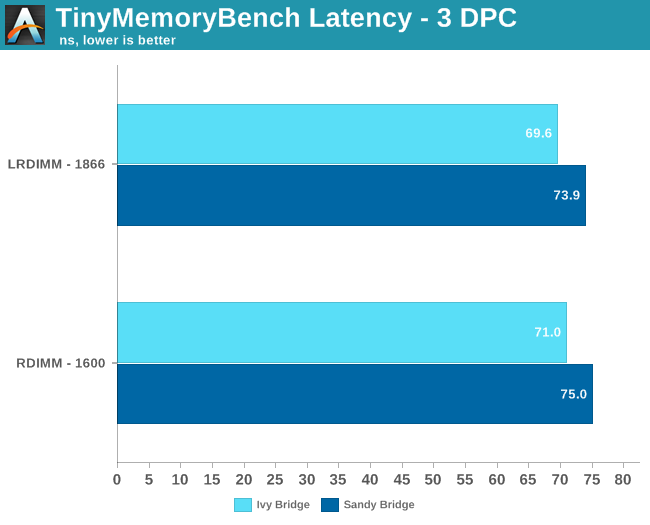
The small latency advantage that RDIMM had is gone. In fact, LRDIMMs seem to have a very small latency advantage over the RDIMMs in this case. Again, memory performance of the Ivy Bridge Xeon is a bit better, but the small clock speed advantage (2.8 vs 2.7 GHz) is probably the simplest and best explanation.
In summary, the differences in latency and bandwidth are pretty small between similar LRDIMMs and RDIMMs. And in that case, it will be nearly impossible to measure any tangible effects on real world applications.
Originally published at https://www.anandtech.com/show/7479/server-buying-decisions-memory (Wayback Machine).