
Microsoft Surface 2 Review
Battery Life
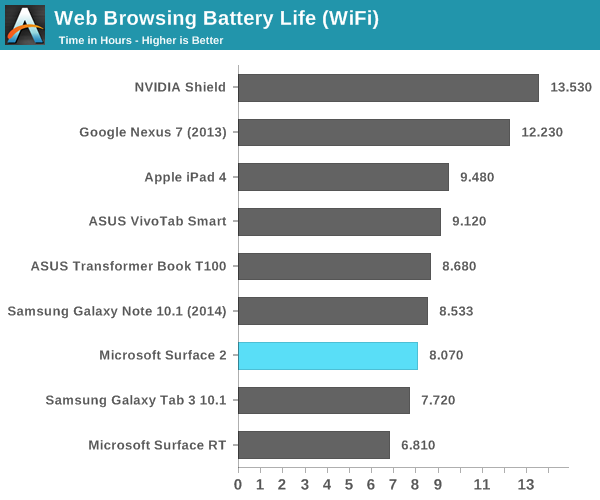
Performance isn’t the only benefit that comes with Tegra 4 – NVIDIA and Microsoft also enjoy a smaller/lower power process: TSMC’s 28nm HPL. Of course four high-clocked Cortex A15 cores drives max power consumption higher than on Tegra 3, but idle power consumption and power efficiency at lower clock speeds should be better. As with most present day mobile devices, the move from Surface to Surface 2 comes with an increase in dynamic range of power consumption. I put Surface 2 (as well as Surface RT) through our 2013 tablet/smartphone web browsing battery life test and came away with around 8 hours of use on a single charge. That’s definitely not the lowest power that we’ve seen, but it is an improvement over the 6.8 hours Surface RT managed in the same test.
As with all modern Tegra SoCs there’s one extra “companion” core designed to be used for lower power/performance operation. Unlike under Android, there’s no hot plugging of CPU cores under Windows RT – there are always four Cortex A15s presented to the OS/scheduler, regardless of whether or not the companion core is active. Microsoft tells me the companion core is used on Surface 2 (unlike its predecessor), however specifics are tough to come by. Microsoft claims the companion core is used during full screen video playback. The only thing I can think of is that the hardware migrates the companion core in under certain circumstances, taking the place of one of the four A15s, and software specifically sets processor affinity in this case. I tried confirming whether or not this was the case by playing a movie and inspecting the process under task manager, unfortunately I came up empty handed. The video playback process wasn’t set to run on any one core in particular, it was allowed to run on all four exposed cores.
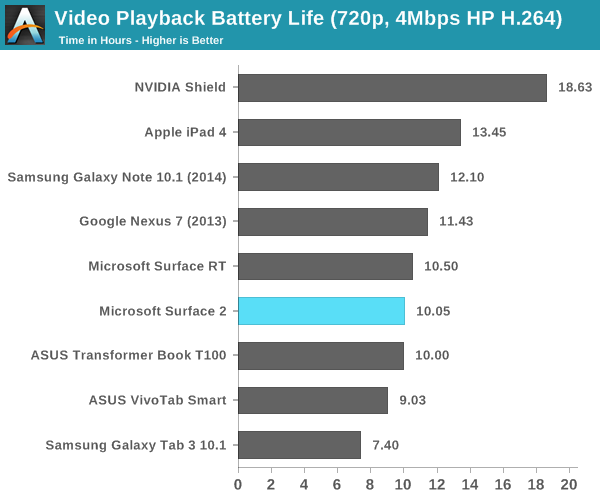
However it’s used, the impact seems to work relatively well. Surface 2 managed just over 10 hours of battery life in our video playback test. It’s not the best we’ve seen in this test, but it’s definitely competitive with other flagship devices.
Software
Surface 2 ships with Windows RT 8.1, and similarly absorbs all of the improvements that 8.1 brought to x86 machines as well. A number of ARM specific optimizations are under the hood, which should help improve both performance and power consumption.
The biggest issue with Surface 2 remains on the software front. Developer support for Windows Store applications is no where near where I thought it would be by now. There are some big ones (Netflix, Facebook), but there’s still no good Twitter client, no amazing IM client, and of course you don’t get good integration of Google services anywhere (outside of leveraging Mail for Gmail access).

Without opening up classic desktop APIs to developers, we won’t see alternative web browsers like Chrome or Firefox on Windows RT 8.1 either. Although IE11 does a relatively good job on the touch front, I find that heavy multitasking with IE11 on Surface 2 can result in a lot of hangs and crashes within tabs or the application itself. I can understand Microsoft’s hesitation on this front (better control over the platform if you don’t open it up), but I can’t see a future where Windows RT is successful and Microsoft doesn’t allow developers to access both sides of the platform.
Originally published at https://www.anandtech.com/show/7439/microsoft-surface-2-review (Wayback Machine).