
Microsoft Surface 2 Review
SoC, CPU & Performance
At the heart of Microsoft’s Surface 2 is a quad-core NVIDIA Tegra 4 SoC. That’s four usable ARM Cortex A15 cores running at up to 1.7GHz (1.9GHz with only a single core active), behind a shared 2MB L2 cache. You also get NVIDIA’s most powerful ultra mobile GPU to-date, a 72-core implementation of its ultra low power GeForce architecture. The combination of the two gives Microsoft a much better platform than the original Surface RT device.
The difference is immediately apparent. While Surface RT felt slow, Surface 2 feels fast enough for most light workloads. Typing in Word now typically consumes < 20% of all available cores/CPU cycles, compared to 20 – 40% on last year’s Tegra 3 based model. I can still get CPU utilization as high as 50% by pounding on as many keys as fast as possible, but that’s the exception not the rule.

If you remember back to my first Surface RT review I talked about how I could sometimes type quicker than the system would be able to process and display my text. I’m happy to say that’s no longer an issue, although I’m not sure how much of it is software vs. hardware improvements. Needless to say that for general Office work, Surface 2 is a much better device than its predecessor.
Application launch times are also a bit better compared to Surface RT at launch. Some apps still take longer to initialize than their equivalents under Android or iOS, but the improvements over the past year have been significant. Applications that used to take 5 – 7 seconds to launch now take 2 – 4 seconds. That’s compared to the < 2 seconds for most of the core apps on iOS, but it’s movement in the right direction at least.
On the CPU side we don’t have a ton of great performance tests to let us compare platforms (not yet at least), but we do have our standard suite of js benchmarks. Since we’re dealing with Windows RT, the only browser option is Internet Explorer 11 – which is both a blessing and a curse depending on what benchmark you’re looking at.
I’ll start with SunSpider since that appears to be the best case for IE11. Here we see just how much software can influence the overall performance of these browser based benchmarks.
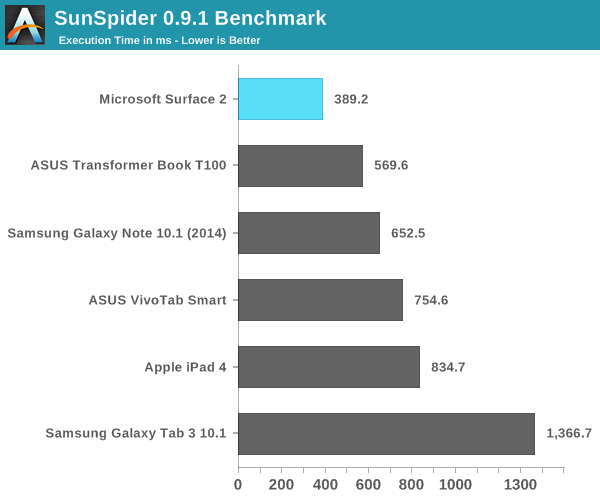
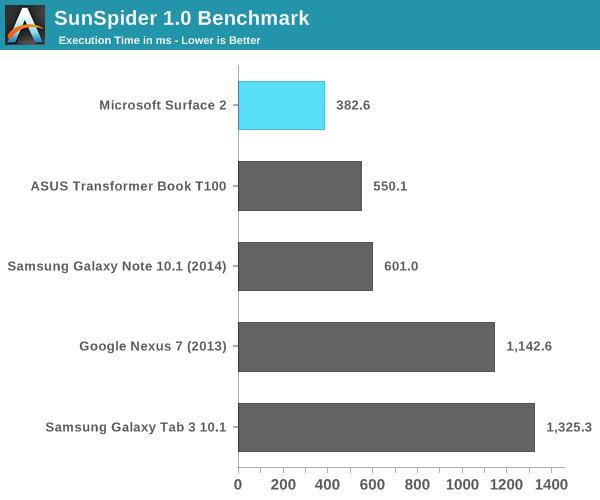
Tegra 4 running IE11 posts a better SunSpider score than even the A7 based iPhone 5s. Looking at the rest of the tests it’s very clear that SunSpider was an optimization target for Microsoft, as we don’t see this sort of performance leadership repeated anywhere else.
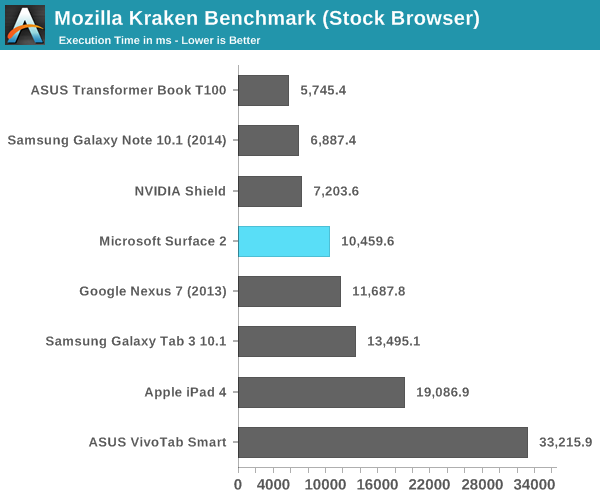
The Kraken results look decent but clearly behind high-end Android devices running Chrome. This is a huge improvement over where Microsoft was last year with Surface RT. Surface 2 can now complete the Kraken test in roughly 1/5 of the time it took Surface 1/RT to do the same work at launch. Obviously we’re seeing the benefits of IE11 in addition to Windows RT 8.1 being better optimized for ARM architectures (as well as a faster SoC), but the new tablet is just significantly faster than its predecessor.
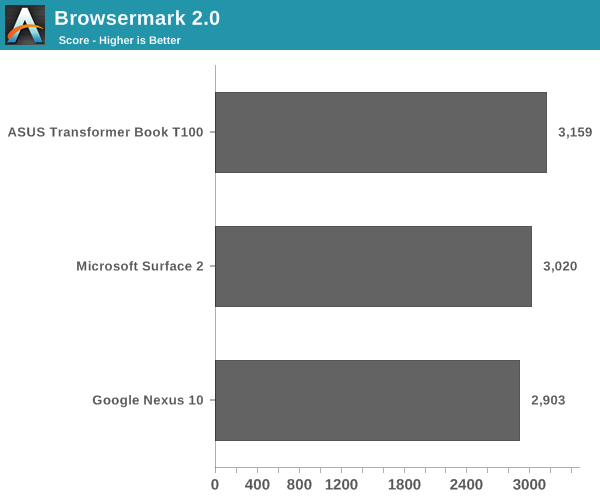
Browsermark 2.0 gives us a good idea of where Surface 2 falls in terms of overall browsing performance. In general we’re dealing with a platform that is roughly comparable in performance to modern Android devices, but it’s not pushing the limits of performance in any way.
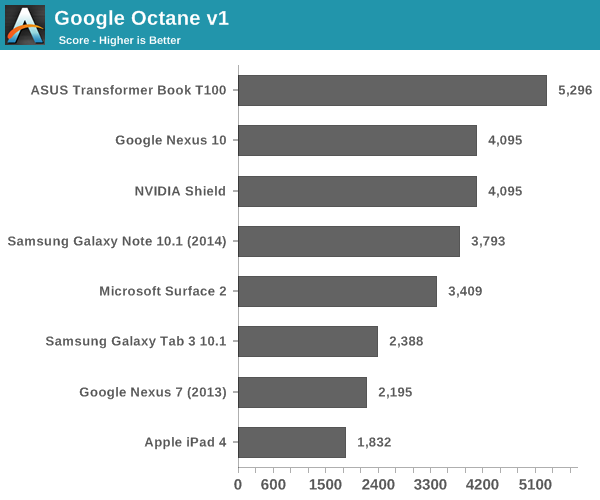
Google’s Octane test is obviously best optimized for Chrome, and here we see solid performance although clearly behind the fastest Android and Bay Trail devices.
GPU Performance
All of the Windows RT devices that launched last year had pretty terrible GPU performance. It didn’t matter if you had something with NVIDIA or Qualcomm inside, GPU performance wasn’t great at all. Even Intel’s competing Clover Trail solution was a huge let down on the GPU front. Clover Trail was so bad that I even noticed differences in animation frame rate between the Atom Z2560 and Qualcomm’s APQ8060A running Windows RT.
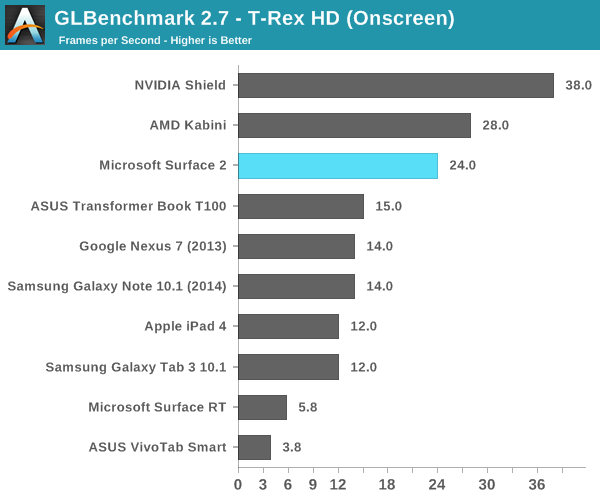
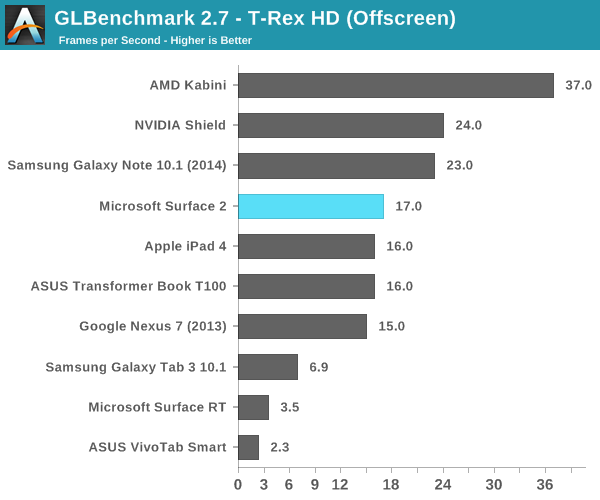
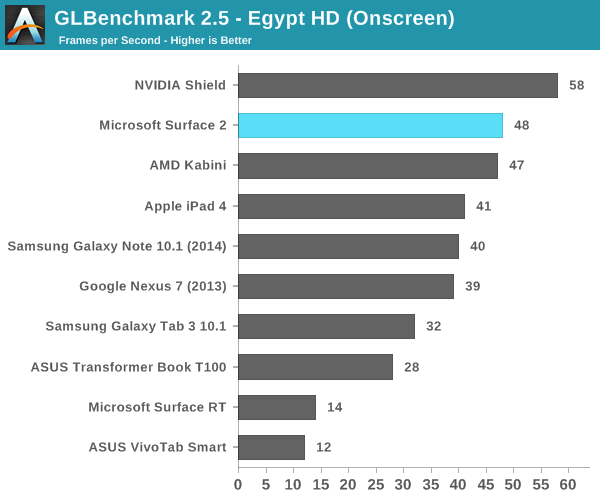
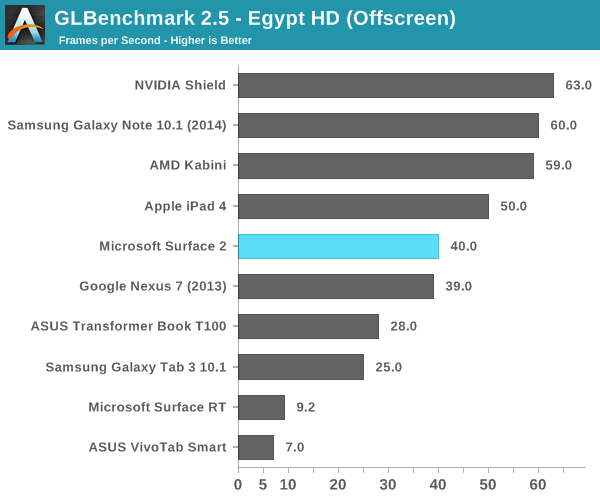
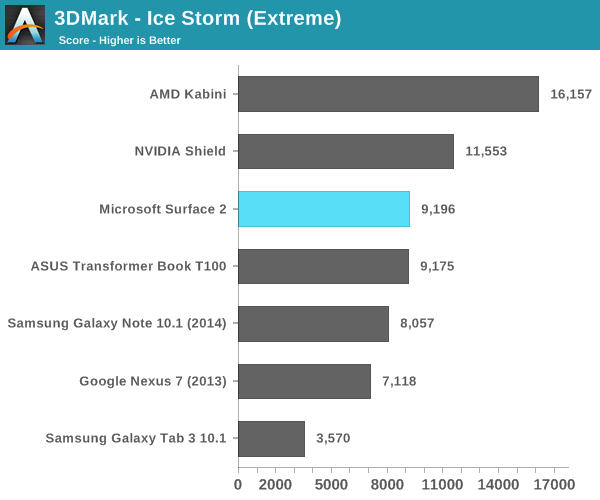
Tegra 4’s GPU on the other hand seems well suited for the task at hand. I doubt many users will be playing 3D games on Surface 2, but GPU performance is improved substantially over its predecessor. In the grand scheme of things we’re talking about roughly iPad 4 class GPU performance, all while driving a lower resolution screen.
Originally published at https://www.anandtech.com/show/7439/microsoft-surface-2-review (Wayback Machine).