
Sony VAIO Pro 13: Exceptionally Portable
A Great Display
Wrapping up our testing, we have the display along with some figures for temperatures and noise levels. Starting with the display, I actually have a problem with my i1 Display2 colorimeter – it reports numbers, but the calibration is all messed up. I have another colorimeter, an older DTP-94 that still works well, but it doesn't work with ColorEyes Display Pro under 64-bit Windows. What I ended up doing was measuring the white and black levels with the DTP-94 using a separate PC (an old laptop running Windows XP), which also give me contrast, but I don't have Delta E or gamut numbers right now.


At some point we will be moving towards a better test regimen for laptop displays, similar to what we do on tablets and smartphones. Most users don't have a colorimeter, so the out-of-box experience is far more important than the calibrated result – and nearly all displays calibrate fairly well. This will hopefully help to encourage the laptop manufacturers to put more effort into delivering good quality calibrated displays, similar to what we've seen from Apple with their latest iPad, iPhone, iMac, and MacBook Retina products. And with that said, here are the brightness and contrast graphs.
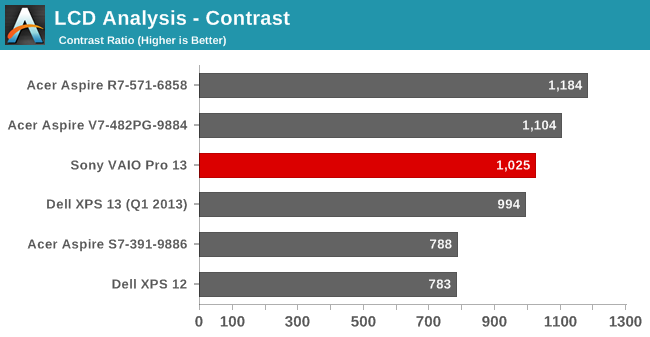
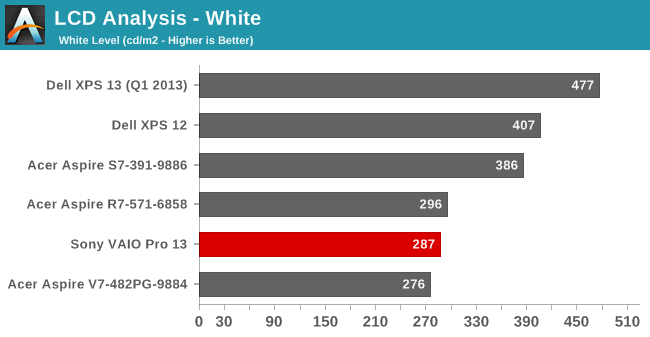
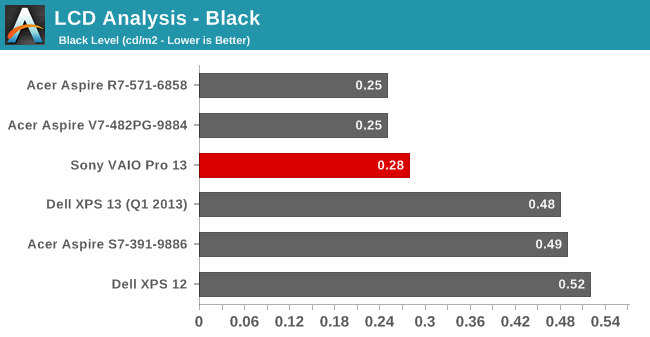
The VAIO Pro 13 has a reasonably bright backlight, but we still would like to see maximum white levels of 400 nits, as that helps with outdoor use. This laptop is so targeted at mobility that the lack of a brighter display could definitely be seen as a drawback. As for black levels and the resulting contrast, the LCD does very well, with a contrast ratio of over 1000:1. Acer's S7 potentially has a slightly better display, based on these results, but I think the colors on the Sony are actually a bit better and hopefully I can get the colorimeter situation sorted out soon enough to update this section. Anyway, I do like the Sony display quite a lot and think it's one of the best aspects of the VAIO Pro 13.
Temperatures and Noise Levels
Considering the apparent throttling that was taking place in some tests – at the very least the CPU/GPU are not running anywhere near maximum Turbo speeds – I was curious to see what the temperatures looked like under load. We've seen many an Ultrabook hit 90C or higher under load, but Sony bucks that trend in a serious way. I don't think it's just the cooling either, as the laptop doesn't get exceptionally loud. Instead, it's Sony's firmware favoring lower Turbo Boost levels in order to keep temperatures down. Here's what we found in our stress testing:
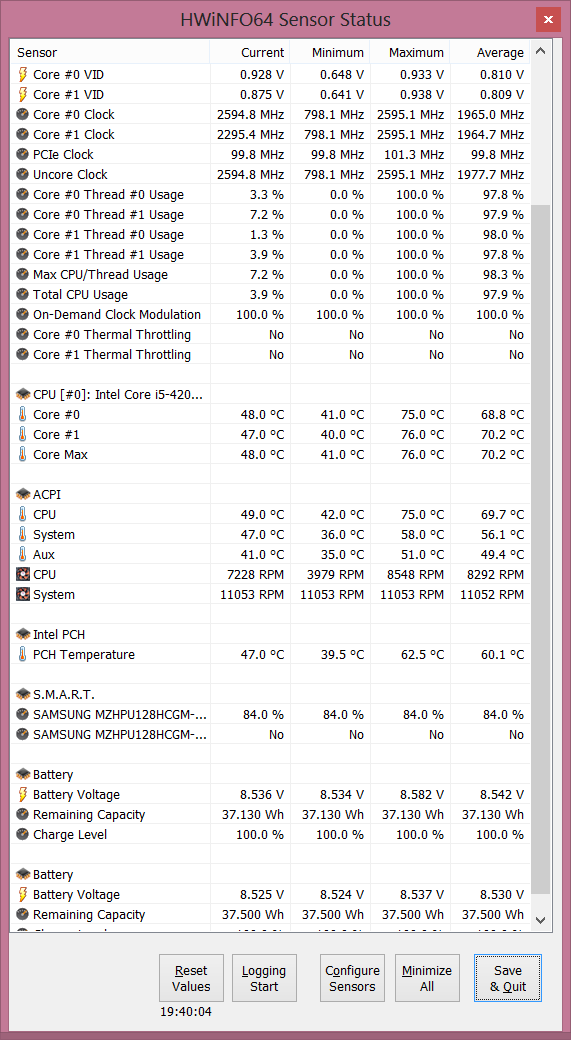
After running our stress test all night (and then some), the maximum package temperature ended up at just 76C. That's a result more than a few desktops would be happy to equal, and we're dealing with an extremely thin chassis. Even the airflow from the vent on the side doesn't feel that hot, and covering it with my hand didn't get uncomfortable – and it didn't increase the noise levels or temperatures either! Instead, clock speeds dropped slightly and the system continued chugging happily along at 76C or less.
As for noise levels, at idle and light loads the fan is off and thus the VAIO Pro 13 is completely silent. Once the CPU temperature hits I think 40C or more, the fan begins to spin, and in most cases it will be at the minimum speed, which results in a noise level of 32dB from a distance of around 18 inches (45cm). The fan speed and resulting noise levels begin ramping up until the fan is running at maximum at 50C or higher, with a resulting noise level of 42dB. It's a gradual ramp in fan speed as well, which is nice to see – a lot of laptops have three or four discrete speeds with a substantial difference in noise levels at each speed. Considering this isn't really a laptop designed for complex computational tasks (not that it can't do some of them, but it's no mobile workstation), most users will find the laptop typically runs at very low fan speeds or even silently.
Originally published at https://www.anandtech.com/show/7417/sony-vaio-pro-13-exceptionally-portable (Wayback Machine).