
NEC PA242W Monitor Review
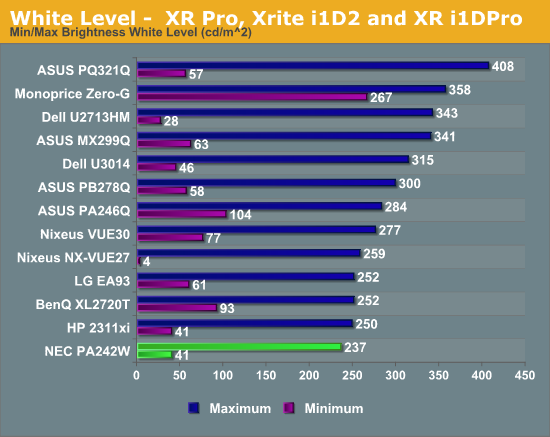
As noted on the previous page, NEC limits the upper level of the PA242W backlight to 240 cd/m2. You can go beyond this, but the control turns red to let you know that overall performance is suffering. The construction of the PA242W is designed to make it as uniform and even a display as possible. Pushing the backlight too far will reduce that. No one that is using this monitor in a professional setting would need light output beyond that, so I used that level for the maximum setting here.
If you want to go beyond that, the NEC can produce 287 cd/m^2 at maximum. The minimum setting produces 41.19 cd/m^2, very close to the on screen reading of 40 cd/m^2. The 240 cd/m^2 setting produces 236.7 cd/m^2, also very close. You can adjust this to any level between in 1 cd/m^2 increments. For white level control, the NEC PA242W is unmatched in my experience.
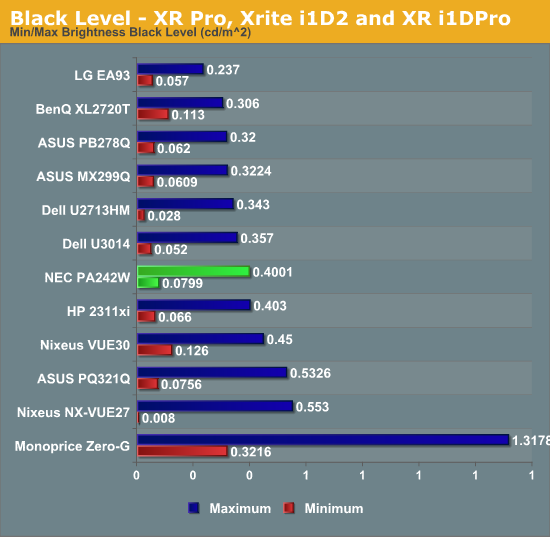
Black level is not quite as good as white level. At the 240 cd/m^2 level we have a black level of 0.4001 cd/m^2 and at the minimum setting we see a level of 0.0799 cd/m^2. That is a very low minimum, but no other monitor has a minimum setting of only 40 cd/m^2 either.
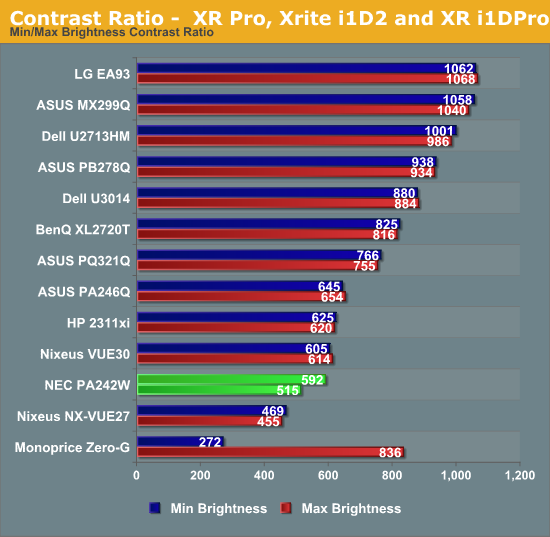
The contrast ratios that result from the above are only fair, 515:1 for the minimum setting and 592:1 for the 240 cd/m^2 level. Curiously the maximum setting produces a contrast ratio of 699:1 indicating that the NEC can do better if you sacrifice uniformity. For movies and TV people typically value contrast ratio above all, but for production work, uniformity might be more important. We will see if this sacrifice winds up being worth it later.
Originally published at https://www.anandtech.com/show/7336/nec-pa242w-monitor-review (Wayback Machine).