
BenQ XL2720T Gaming Monitor Reviewed
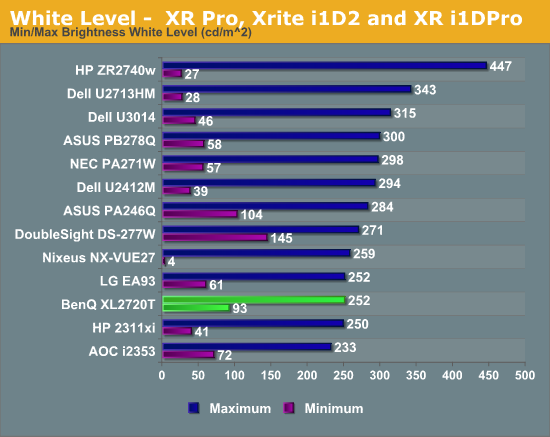
BenQ says that the maximum light output of the XL2720T is 300 nits, but the most I could record is 252 nits while not totally crushing whites. It might be possible to set the contrast to 100 and record a higher number, but with that setting the top white shades, from around 230 until 255, all blend into a single shade. No one would ever use a display this way, so it’s a bit impractical for me to measure them this way. The lowest white level I could get was 93 nits, which helps to explain the contrast ratio issue on the sRGB test. If we are targeting 80 nits, and the lowest level the display can natively do is 93 nits, then the video card LUT has to be lowered to bring that brightness down. Anytime you lower the peak of the LUT, you then start losing contrast range, which is why we try to get the monitor set as close as possible before calibration, or use DDC to have it automatically do it correctly.
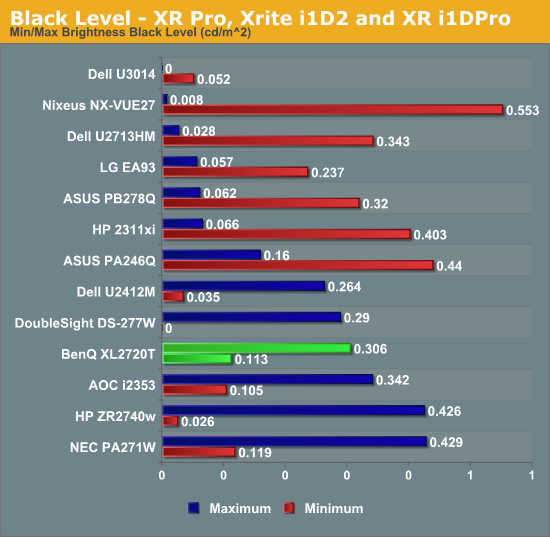
The black level was fine on the XL2720T, though not exceptional as TN isn’t known for being great at blocking out light. It isn’t a bad number, but black level is really all about contrast ratio and on its own doesn’t mean much unless we also know the white value.
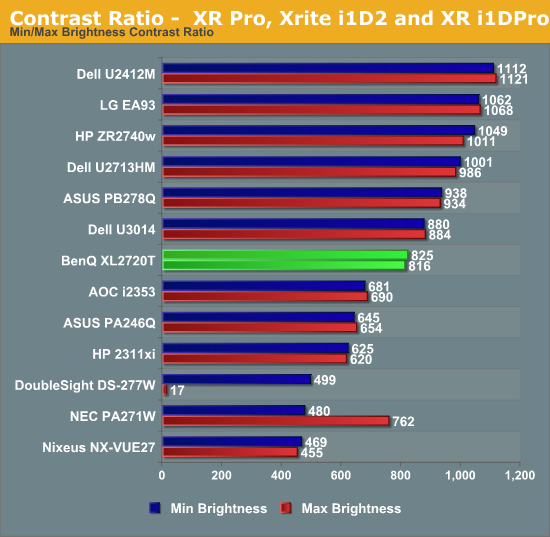
The contrast ratio on the BenQ comes out at right around 820:1 at maximum or minimum light level. The lower number we saw on the sRGB calibration was due to targeting a light output level below what the monitor can do natively. If you aren’t trying to go below the 95 nits light level that I saw on the white testing, you will get a contrast ratio right around 820:1 from the XL2720T.
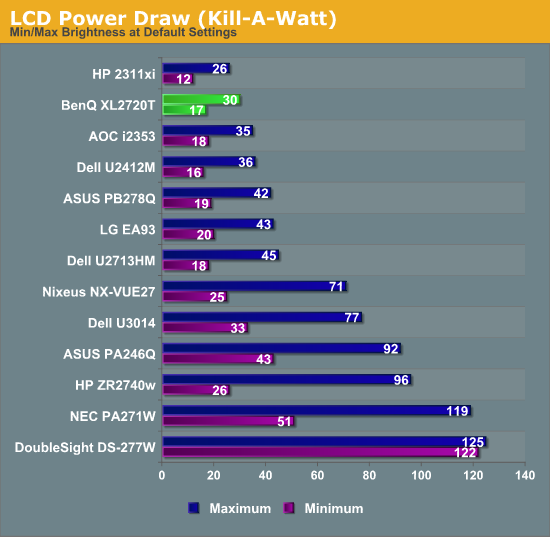
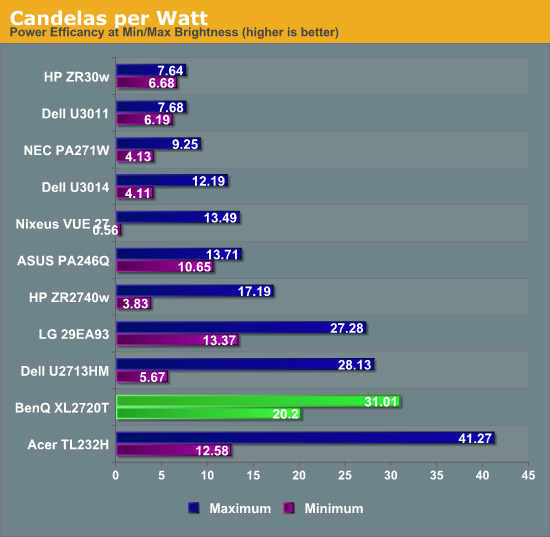
The BenQ XL2720T also does well on power usage, consuming very little at maximum or minimum backlight levels. Other than the Acer touchscreen model, the BenQ is the most efficient monitor for which I have calculated the Candelas per Watt number, which takes into account screen size, power use, and light output to normalize the data. I have a feeling the BenQ benefits by having a lower resolution 27” panel than most of the 27” monitors I’ve tested, but with the small number of data points I have so far that is all conjecture at the moment. Whatever the cause of it, the power use of the BenQ is very low.
Originally published at https://www.anandtech.com/show/6963/benq-xl2720t-gaming-monitor-reviewed (Wayback Machine).