
BenQ XL2720T Gaming Monitor Reviewed
Our second calibration target is designed for print work, with a light output of 80 nits instead of 200 nits, and the sRGB gamma curve instead of the 2.2 Power Curve.


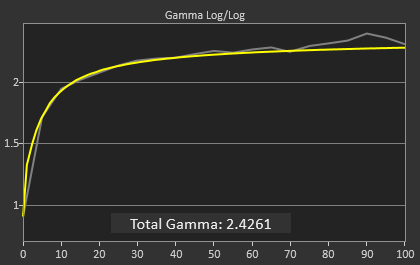
The grayscale continues to be excellent, even better than with the first calibration but you wouldn’t be able to tell even if they were side-by-side. There is a bit of a spike in the gamma that keeps it from being perfect, but even that spike doesn’t cause the dE2000 to rise at all. The biggest problem is that the contrast ratio has fallen down to 488:1 from the prior 820:1 level. Possibly the LED backlight doesn’t dim enough for the darkest settings, or the maximum light output was still too high and the LUTs had to be heavily lowered, either of which will cause a loss of contrast ratio. That issue aside, the grayscale calibration is very good.
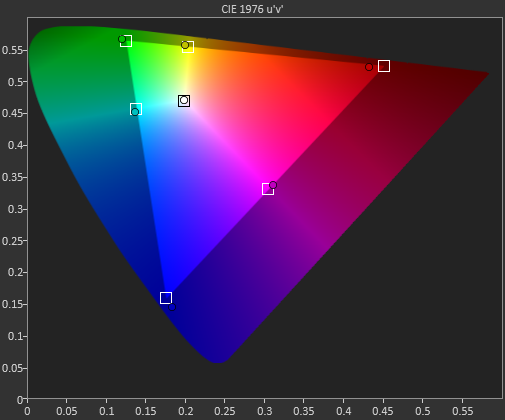


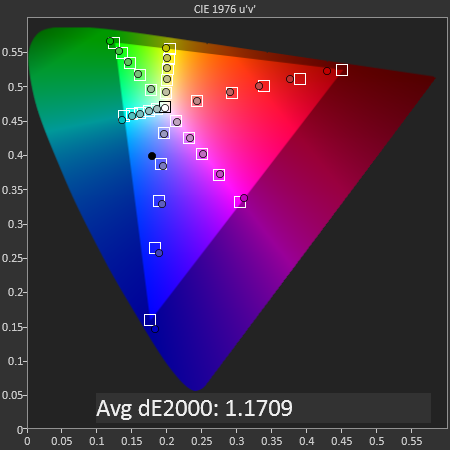
Color gamut is almost identical to at 200 nits. Too low of luminance in green, too little saturation in red, otherwise pretty good.
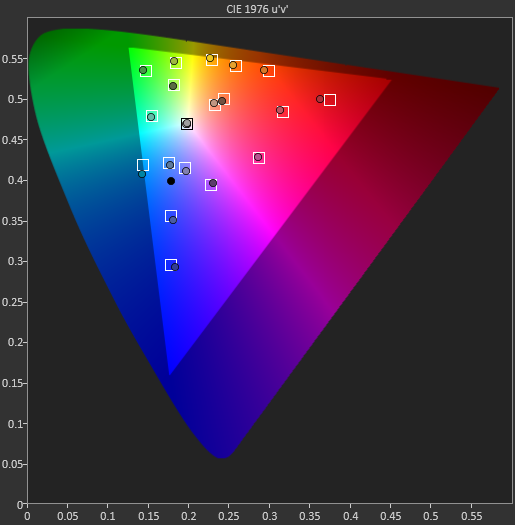
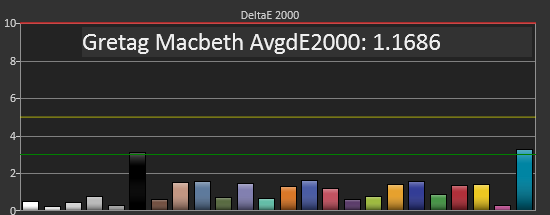
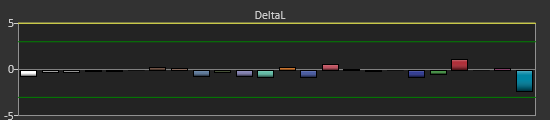
The colorchecker data here really surprises me. The yellow-orange shades that have been causing us such issues are no longer a problem. Now that shade of blue that lies on the edge of the sRGB target is causing the issue. I imagine the blue issue is related to the lack of green luminance, which affects cyan shades because of that. At lower light output levels, the error level in blue readings can be higher, since their light output is low to begin with, and if the green component is low in luminance, that can cause a much larger drop in the light output, leading to a larger error. Looking at the DeltaL chart for this measurement shows that it is quite low in luminance, which is almost certainly causing most of that color error. As to why orange-yellow shades improved so much, I have absolutely no idea.
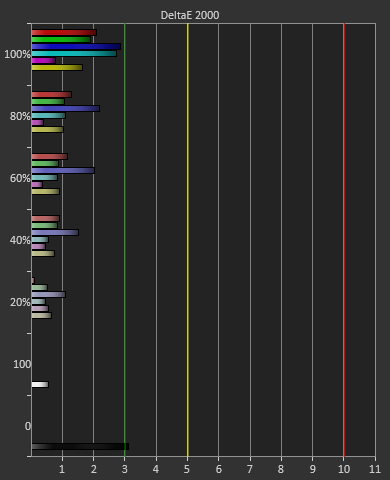
Saturations are much like they are on the last calibration, with 100% having the largest error and the numbers falling from there. 100% numbers are harder to correct since those saturations might be lacking luminance or saturation, which can’t be corrected. If a saturation below 100% is lacking saturation, we can increase that to compensate, which will reduce error, but that can’t be done with the 100% values.
Overall the sRGB target calibration is also very good, with a couple issues that came up. The biggest concern to me is that the contrast ratio drops so much, which will lead to a flatter, more washed-out image in appearance, but I didn’t see a way to correct it in several more calibration attempts.
Originally published at https://www.anandtech.com/show/6963/benq-xl2720t-gaming-monitor-reviewed (Wayback Machine).