
NZXT H630 Silent Case Review
- Posted in
- Cases/Cooling/PSUs
- NZXT
- ATX
Assembling the NZXT H630
While we're still not quite at Corsair levels of obscene ease of assembly, NZXT's designers are still pretty clearly thinking about the end user and how to make their life as easy as possible. That means an included fan hub with both of the included fans already connected and carefully wired, motherboard standoffs already installed, and smartly routed header cables. With all of that in mind, it should come as no surprise that assembly went mostly smoothly.
Popping the I/O shield in was a non-issue, and about the only thing NZXT has left to do to make motherboard installation easier is to place an alignment stud at the center mounting point as Corsair has taken to doing. Clearance around the testbed board was good, and the right-angled SATA ports were easy to connect without issue. The H630 is a pretty decently sized case, but that size is mostly well utilized.
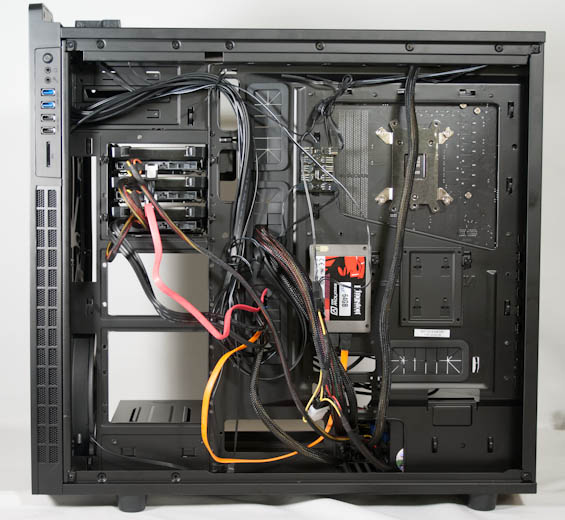
I'm not completely sold on having the drive sleds oriented to enter from behind the motherboard tray instead of above it. NZXT's logic is that you'll only really use them when you're installing and removing drives and thus need to cable everything anyhow, and their logic is sound. At the same time, the area behind the motherboard tray is almost always a no man's land in any case, and when I tinker with my desktop (and I tinker often) I typically avoid removing that side panel at all costs. So while I prefer having the drive trays slide out from above the motherboard tray, I can see where they're coming from.


The 2.5" drive trays that hang out behind the motherboard tray are a fantastic addition and perfect for SSDs, though. These are held into place on rails and a single thumbscrew each, and they're very secure. I've chided NZXT for their flimsy 3.5" trays in the past, though, and I regret to inform you that those flimsy trays are still present in the H630. The modular drive cages themselves are all held in place by four thumbscrews each, and they're on rails. For review purposes I removed the bottom two to clear airflow from the 200mm intake fan. Due to the way drives enter the drive cages, a right-angled SATA connector can't be used for the bottom-most drive in the cage, and clearance for bending SATA power leads is far less than ideal.
As I mentioned, the front panel on my review unit just wasn't coming off, so unfortunately I can't comment on how easy or difficult a 5.25" drive would be to install. The shields for the 5.25" bays are actually screwed into place, which I appreciate for security's sake but it does make my job a little bit more difficult.
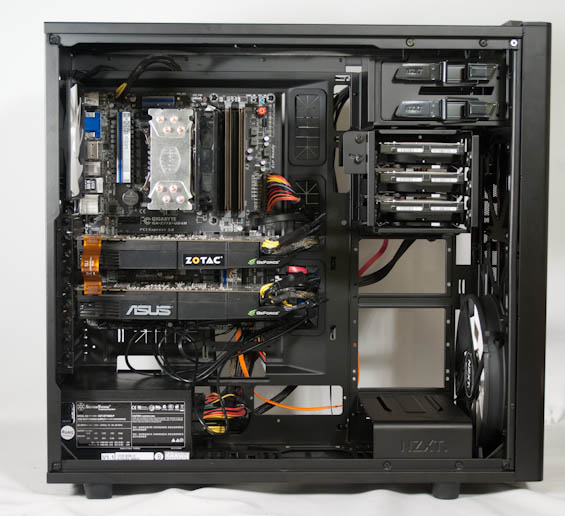
Finally, installing the expansion cards and power supply and then wiring everything up was for the most part pretty easy. I think NZXT runs into a little trouble with routing the AUX 12V lead, as the holes in the motherboard tray for routing that cable are narrow. I'm also concerned that while the H630 should support 360mm radiators in both the front and the top of the enclosure, clearance in the top may be problematic. Since the fan mounts are hidden by the top panel, it would've made more sense to either increase the height of the case or shift the 120mm and 140mm mounts closer to the outside of the case rather than dead center. As it stands a radiator or fans will run the risk of butting up against VRM cooling or RAM slots; our testbed has enough clearance, but it's extremely tight.
It's hard to complain too much about the H630's interior, but this isn't quite the kind of progress we saw when NZXT moved to the Phantom 630. The H630 is using essentially the same internal chassis as the Phantom 630, but the Phantom's more elegant drive cage system is missing. It honestly seems like NZXT wasn't entirely sure what to do with the extra real estate afforded by dropping down to two 5.25" bays when it came time to design the drive cages.
Originally published at https://www.anandtech.com/show/6951/nzxt-h630-silent-case-review (Wayback Machine).