
3DMark for Windows Launches; We Test It with Various Laptops
3DMark for Windows Overview
After a two-year hiatus, Futuremark is back with a new version of 3DMark, and in many ways this is their most ambitious version to date. Instead of the usual PC graphics benchmark, with this release, dubbed simply “3DMark” (there’s no year or other designation this time), Futuremark is creating a cross-platform benchmark—Windows, Windows RT, iOS, and Android will all be capable of running the same graphics benchmark, sort of. Today’s release is for Windows only, and this is the most feature-packed of the 3DMark releases with three separate graphics benchmarks.
Ice Storm is a DX9-level graphics benchmark (ed: specifically D3D11 FL 9_1), and this is what we’ll see on Android, iOS, and Windows RT. Cloud Gate is the second benchmark and it uses DX10-level effects and hardware, but it will only run on standard Windows; it’s intended to show the capabilities of Windows notebooks and home PCs. The third benchmark is Fire Strike, and this is the one that will unlock the full potential of DX11-level hardware; it’s intended to showcase the capabilities of modern gaming PCs. Fire Strike also has a separate Extreme setting to tax your system even more.
Each of the three benchmarks, at least on the Windows release, comes with four elements: two graphics tests, a physics test, and a demo mode (not used in the benchmark score) that comes complete with audio and a lengthier “story” to go with the scene. I have fond memories of running various demo scene files way back in the day, and I think the inclusion of A/V sequences for all three scenes is a nice addition. Another change with this release is that all resolutions are unlocked for all platforms; the testing will render internally to the specified resolution and will then scale the output to fit your particular display—no longer will we have to use an external display to test 1080p on a typical laptop, hallelujah! You can even run the Extreme preset for Fire Strike on a 1366x768 budget notebook if you like seeing things render at seconds per frame.
As has been the case with most releases, 3DMark comes in three different versions. The free Basic Edition includes all three tests and simply runs them at the default settings; there’s no option to tweak any of the settings, and the Fire Strike test does not include the Extreme preset. When you run the Basic Edition, your only option is to run all three tests (at least on Windows platforms), and the results are submitted to the online database for management. For $24.99, the Advanced Edition adds the Extreme Fire Strike preset, you can run at custom settings and resolutions, and you can individually benchmark the three tests. There are also options to loop the benchmarks and 3DMark has added a bunch of new graphs; you can also save the results offline for later viewing. Finally, the Professional Edition is intended for business and commercial use and costs $995. Besides all of the features in the Advanced Edition, it adds a command line utility, an image quality tool, private offline results option, and it can export the results to XML.
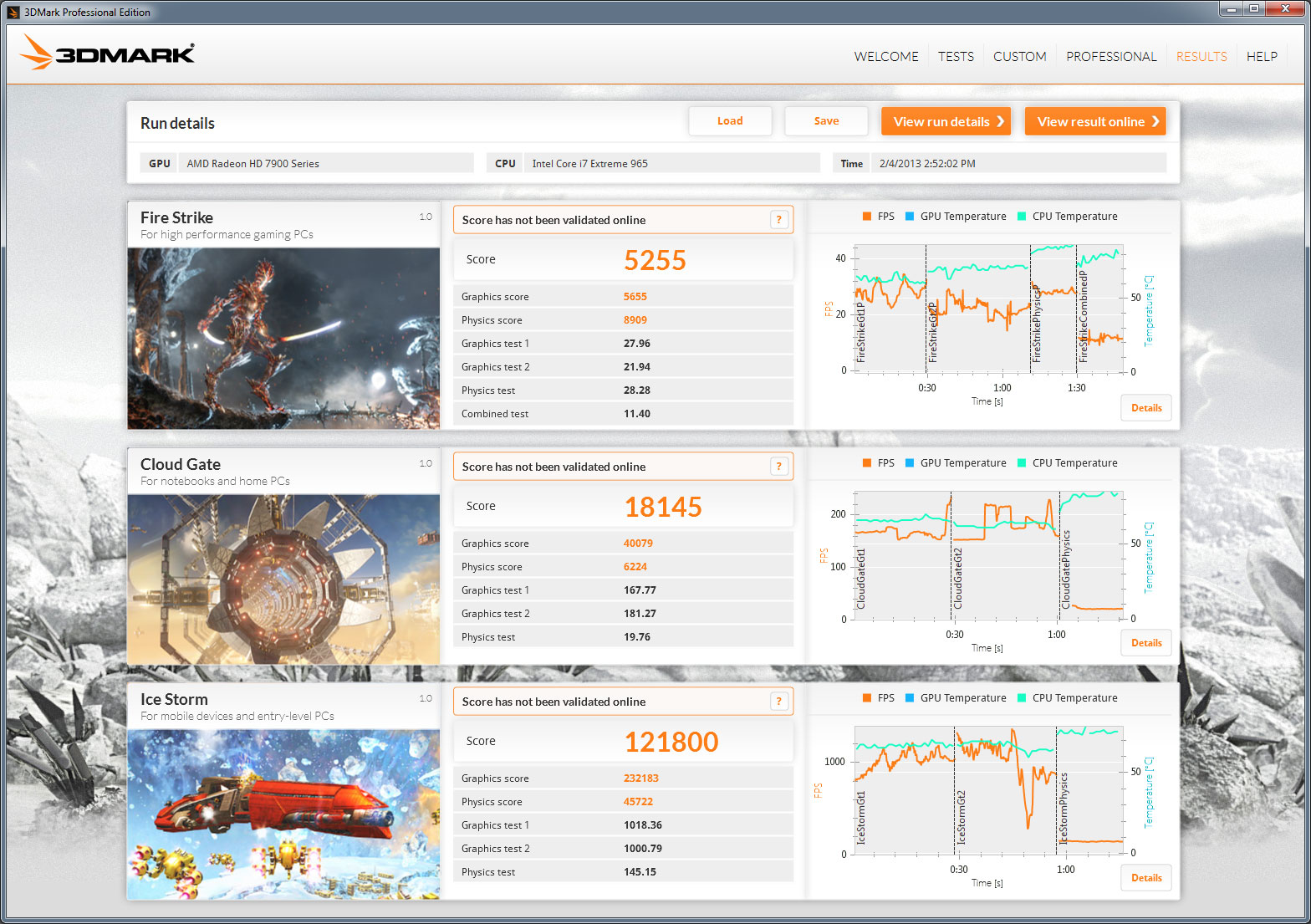
Before we get to some initial results, let’s take a look at one of the cool new features with the latest 3DMark: graphs. Above you can see the post-benchmark results from my personal gaming desktop with a slightly overclocked i7-965X and HD 7950, and along with the usual scores there are graphs for each test showing real-time frame rates and CPU and GPU temperatures. Something I’ve noticed is that the GPU temperatures don’t show up on quite a few of my test systems, and hopefully that will improve with future updates, but this is still a great new inclusion. Each graph also allows you to explore further details:
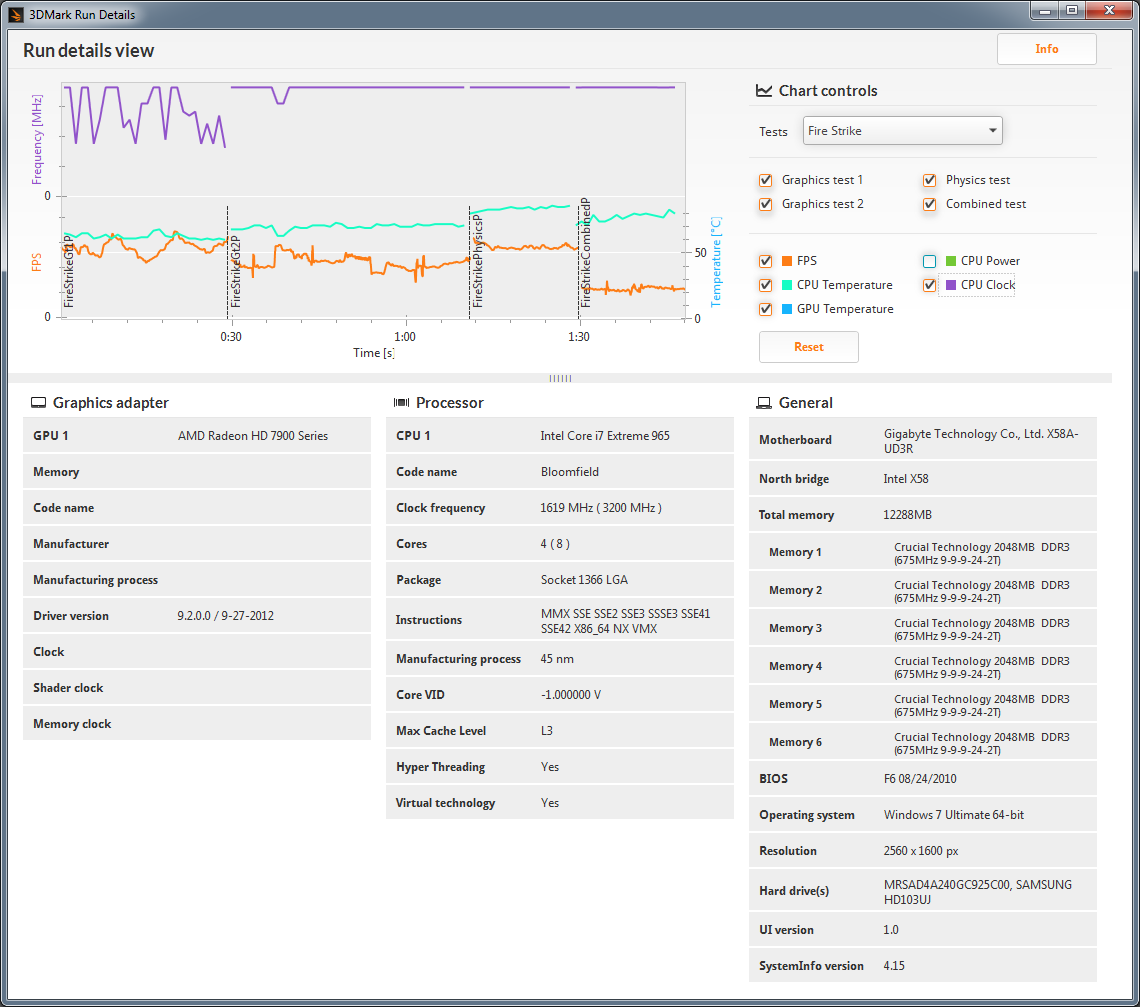
Along with the FPS and temperature graphs, the detailed view also adds the option for CPU clocks and CPU power (though again, power at least isn’t always available depending on the platform, e.g. it’s missing again on my Bloomfield desktop). Something you can’t see with the images is that you can also mouse over and select any of the points on the graphs to get additional details (e.g. frame rate at a specific point), and you can zoom in/out as well. It’s too bad that only paying customers (or press) will be able to get full access to the graphs, but for ORB and overclocking enthusiasts these new features definitely make the $25 cost look more palatable.
Along with the various updates, the UI for 3DMark has change quite a bit as well, presumably to make it more tablet-friendly. I’m not sure how it will work on tablets specifically, but what I can say is that there are certain options that are missing, and the new UI takes some getting used to. For example, even with the Professional Edition, there’s no easy way to run all the benchmarks without the demos. You can run the Ice Storm, Cloud Gate, and Fire Strike benchmarks individually, or you can do a custom run of any of those three, but what I want is an option to run all three tests with custom settings in one batch. This was possible on every previous 3DMark release, so hopefully we get an update to add this functionality (or at least give the Advanced and Professional versions a “run all without demo” on the Welcome screen). Besides that minor complaint, things are pretty much what we’re used to seeing, so let’s do some benchmarking.
Originally published at https://www.anandtech.com/show/6726/3dmark-for-windows-launches-we-test-it-with-various-laptops (Wayback Machine).