
ECS A85F2-A Golden Review: All That Glitters
- Posted in
- Motherboards
- ECS
- FM2
- A85X
ECS A85F2-A Golden In The Box
So far in our FM2 coverage, as the price of the motherboards has been sub-$150, the boxes tend to be a little light. No-one is willing to parade a board in a ton of extra USB 3.0 so no USB 3.0 brackets are put in place, neither is a drive for WiFi apart from a few select models. Given the fact that ECS shift a large amount of product compared to Zotac, EVGA and to a certain extent Biostar, I would assume that what they can put in box would be an organised procurement of stuff that could go into every box.
What we get is:
Rear IO Panel Shield
User Manual
Driver CD
Seven SATA cables
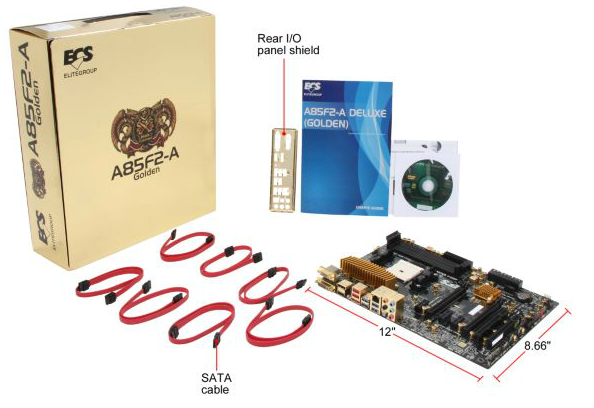
As kind of expected, while ECS does not go beyond a bunch of SATA cables, we get plenty of them. Seven cables covers all the onboard SATA ports which is great if a user wants to go down the storage route.
ECS A85F2-A Golden Overclocking
Experience with ECS A85F2-A Golden
Given the memory issues that have plagued my testing of this motherboard, I was not expecting much in terms of CPU overclocking. There are no automatic overclocking presets, and the OS software deals with BCLK/FSB only, meaning we are to dive straight into the BIOS. Even when using the options there, basic tests that would pass on all other boards fail to pass here. The voltage range itself is a little odd, being from 1.495 V to 1.975 V in 0.020 V increments. Normally for FM2 we start at a 44x multiplier at 1.400 volts and go from there.
Methodology:
Our standard overclocking methodology is as follows. We select the automatic overclock options and test for stability with PovRay and OCCT to simulate high-end workloads. These stability tests aim to catch any immediate causes for memory or CPU errors.
For manual overclocks, based on the information gathered from previous testing, starts off at a nominal voltage and CPU multiplier, and the multiplier is increased until the stability tests are failed. The CPU voltage is increased gradually until the stability tests are passed, and the process repeated until the motherboard reduces the multiplier automatically (due to safety protocol) or the CPU temperature reaches a stupidly high level (100ºC+). Our test bed is not in a case, which should push overclocks higher with fresher (cooler) air.
Manual Overclock:
Using the BIOS, we took a similar approach to overclocking as with the other A85X motherboards tested with this processor. We start at 1.4 volts on the CPU in the BIOS and a CPU multiplier of 44x for all cores. Here are the results:

All other settings were left at default apart from CPU Multiplier and CPU Voltage. As shown, performance on the ECS is rather poor, requiring 1.575 V for 4.4 GHz to pass 5 minutes of OCCT. While a five minute test is not a complete and thorough stability test in every sense of the word (is a system that crashes after 50 days at full load ‘stable’?), it provides a reference point with out other reviews for comparison and is a mid point for review time limitations.
Originally published at https://www.anandtech.com/show/6626/ecs-a85f2a-golden-review-all-that-glitters (Wayback Machine).