
Gigabyte F2A85X-UP4 Review – Are PowIRStages Needed with Trinity?
- Posted in
- Motherboards
- Gigabyte
- FM2
- A85X
Many thanks to...
We must thank the following companies for kindly donating hardware for our test bed:
OCZ for donating the 1250W Gold Power Supply and USB testing SSD
Micron for donating our SATA testing SSD
G.Skill for donating our memory kits
ASUS for donating AMD GPUs and some IO Testing kit
ECS for donating NVIDIA GPUs
Test Setup
| Test Setup | |
| Processor |
AMD Trinity A10-4800K APU 2 Modules, 4 Threads, 3.8 GHz (4.2 GHz Turbo) |
| Motherboards |
ASUS F2A85-V Pro ASRock FM2A85X Extreme6 MSI FM2-A85XA-G65 Gigabyte F2A85X-UP4 |
| Cooling | ThermalRight Copper TRUE |
| Power Supply | OCZ 1250W Gold ZX Series |
| Memory | G.Skill TridentX 4x4 GB DDR3-2400 9-11-11 Kit |
| Memory Settings | 2133 9-11-11 |
| Video Cards |
ASUS HD7970 3GB ECS GTX 580 1536MB |
| Video Drivers |
Catalyst 12.3 NVIDIA Drivers 296.10 WHQL |
| Hard Drive | Corsair Force GT 60 GB (CSSD-F60GBGT-BK) |
| Optical Drive | LG GH22NS50 |
| Case | Open Test Bed - DimasTech V2.5 Easy |
| Operating System | Windows 7 64-bit |
| SATA Testing | Micron RealSSD C300 256GB |
| USB 2/3 Testing | OCZ Vertex 3 240GB with SATA->USB Adaptor |
Power Consumption
Power consumption was tested on the system as a whole with a wall meter connected to the OCZ 1250W power supply, while in a dual 7970 GPU configuration. This power supply is Gold rated, and as I am in the UK on a 230-240 V supply, leads to ~75% efficiency > 50W, and 90%+ efficiency at 250W, which is suitable for both idle and multi-GPU loading. This method of power reading allows us to compare the power management of the UEFI and the board to supply components with power under load, and includes typical PSU losses due to efficiency. These are the real world values that consumers may expect from a typical system (minus the monitor) using this motherboard.
While this method may not be ideal for XYZ, and you feel these numbers are not representative due to the high wattage power supply being used (we use the same PSU to remain consistent over a series of reviews, and the fact that some boards on our test bed get tested with three or four high powered GPUs), the important point to take away is the relationship between the numbers. These boards are all under the same conditions, and thus the differences between them should be easy to spot.
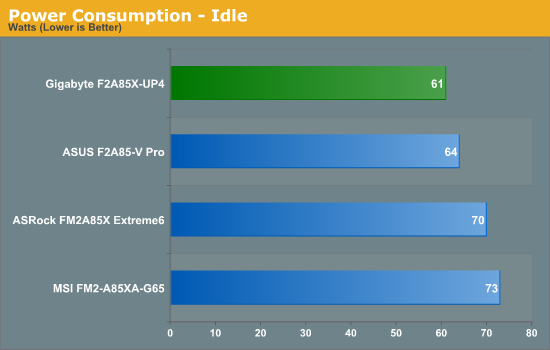
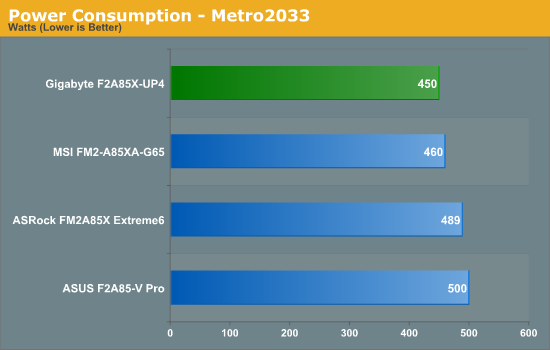
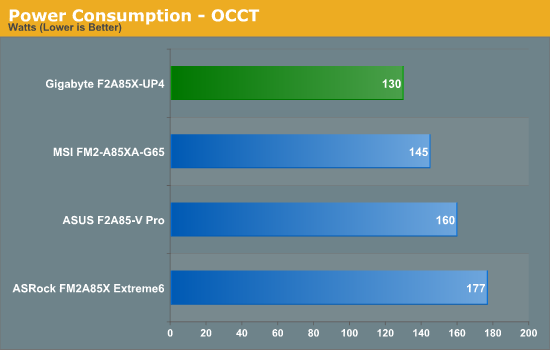
In the Power Consumption tests, it is clear to see the Gigabyte take a commanding lead. This should be derived from the efficiency of the power delivery used on board.
POST Time
Different motherboards have different POST sequences before an operating system is initialized. A lot of this is dependent on the board itself, and POST boot time is determined by the controllers on board (and the sequence of how those extras are organized). As part of our testing, we are now going to look at the POST Boot Time - this is the time from pressing the ON button on the computer to when Windows starts loading. (We discount Windows loading as it is highly variable given Windows specific features.) These results are subject to human error, so please allow +/- 1 second in these results.
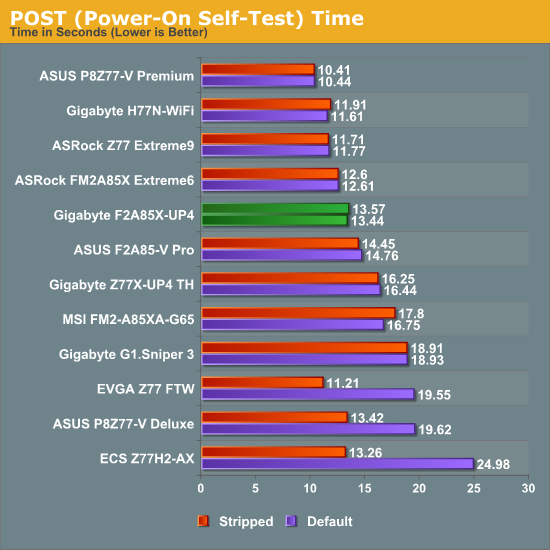
In the grand scheme of going through POST in our dual GPU scenario, we put an ideal line around 12 seconds for a great POST time. The Gigabyte F2A85X-UP4 just misses this, and attempts to reduce the time by disabling controllers had no effect. Compared to other FM2/A85X motherboards we have tested, only the ASRock is faster than the Gigabyte.
Originally published at https://www.anandtech.com/show/6511/gigabyte-f2a85xup4-review-are-powirstages-needed-with-trinity (Wayback Machine).