
Gigabyte F2A85X-UP4 Review – Are PowIRStages Needed with Trinity?
- Posted in
- Motherboards
- Gigabyte
- FM2
- A85X
Gigabyte F2A85X-UP4 In The Box
If the previous FM2/A85X packages are anything to go by, we should not expect much in the Gigabyte box. So far the previous packages have all contained four SATA cables, with the odd one or two adding extra connectors to aid the Front Panel connector placement.
In the Gigabyte F2A85X-UP4, we get:
Driver Disk
Manuals
Rear IO Panel
Six SATA cables
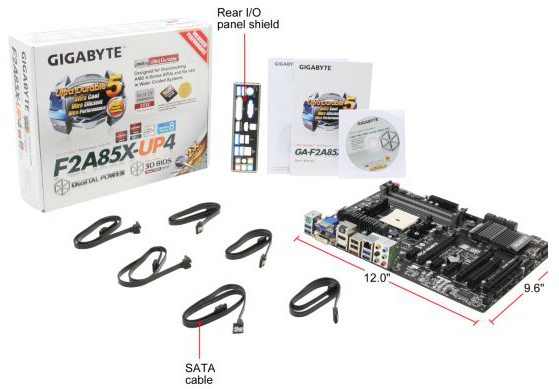
Gigabyte has a one-up on the other boxes so far, by virtue of two extra SATA cables. With a chipset that gives out eight SATA ports, having six in the box is a nice touch.
Gigabyte F2A85X-UP4 Software
The software stack at Gigabyte HQ is in a little bit of flux right now. On one hand they have software which has been part of the package for a few iterations, which we will examine later. On the other are extra bits of software that do not come on the install CD, but are available to download through the website. In an ideal world, the software would all be on the disk, and have an automatic updater included to download the latest releases of drivers and all software.
The Driver CD itself is easy to use – the first screen gives an option of deselecting software (such as the anti-virus) and an option to install everything.

After the driver and non-Gigabyte software install, another dialog appears asking if the user would like the Gigabyte utilities installed. Technically this should be singular, as only one utility is installed – EasyTune6.
EasyTune6
EasyTune has been with us in various guises over the years. The latest version is number six, which has been part of the main Gigabyte software package for at least two years now. The premise of EasyTune is simple – a single interface in order to get all the information about the system, perhaps do some overclocking, adjust some fan settings and monitor what is going in under the hood. While it is a nice goal, it leaves a little to be desired in terms of implementation.
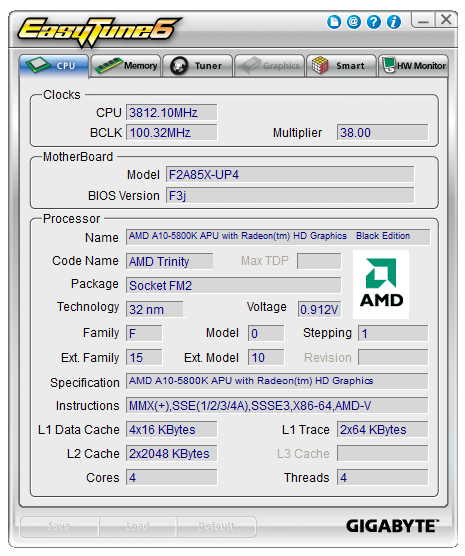
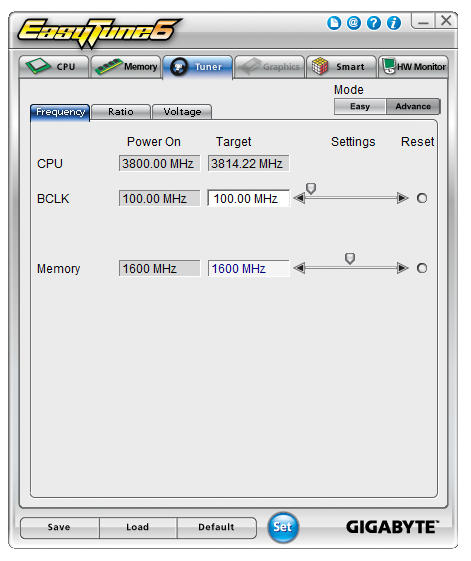
One element lacking in the land of Trinity processors with EasyTune6 is the options relating to automatic overclocking. It has been customary for Gigabyte to include several overclocking options in EasyTune for users to click one button and settings to be applied. No such luck – the only overclocking through ET6 is via the manual options. Users can adjust the BCLK, memory strap, base and turbo multipliers and also the voltages throughout the various menus.
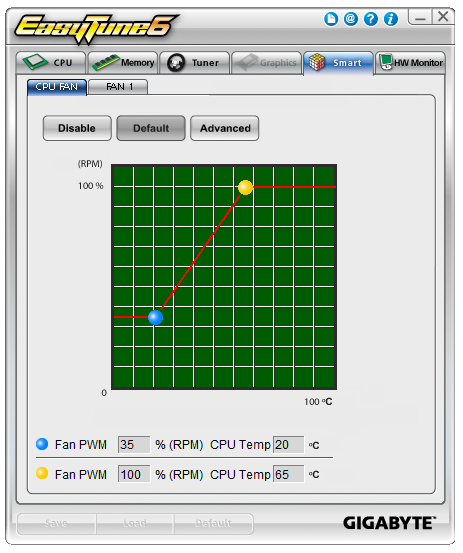
We can also control the fans in ET6, and this time we actually get a chance to play around with a gradient. This is only a two-point gradient, where the y-axis says RPM and the x-axis gives temperature. What is interesting is that below this are the actual numbers, whereby it says ‘Fan PWM, 35% (RPM)’. This is an erroneous statement – fan speeds are not directly proportional to the power applied. Typically a fan will start at a minimum RPM on low power, then after a threshold it will start to rise linearly. But not in the fashion that Gigabyte’s software suggests.
The final part of ET6 is the monitoring tool. This gives a small graphical output for voltages, although the scale of the graph could be frustrating as it tries to take into account low voltages such as the CPU along with the +12 V rail in the same graph. The default scan time of 3 seconds causes concern in our DPC Latency test, whereby we would score over 1000 microseconds when ET6 was running. This could lead to audio issues when recording, thus it is recommended to disable ET6 when audio processing.


Gigabyte F2A85X-UP4 Overclocking
Methodology:
Our standard overclocking methodology is as follows. We select the automatic overclock options and test for stability with PovRay and OCCT to simulate high-end workloads. These stability tests aim to catch any immediate causes for memory or CPU errors.
For manual overclocks, based on the information gathered from previous testing, starts off at a nominal voltage and CPU multiplier, and the multiplier is increased until the stability tests are failed. The CPU voltage is increased gradually until the stability tests are passed, and the process repeated until the motherboard reduces the multiplier automatically (due to safety protocol) or the CPU temperature reaches a stupidly high level (100ºC+). Our test bed is not in a case, which should push overclocks higher with fresher (cooler) air.
Automatic Overclock:
As mentioned above, the Gigabyte F2A85X-UP4 has no automatic overclocking methods. I am as shocked as you are, but the current Gigabyte policy is to only offer methods through ET6. As ET6 does not have any, all overclocking must be manual.
Manual Overclock:
Using the BIOS, we took a similar approach to overclocking as with the other A85X motherboards tested with this processor. We start at 1.4 volts on the CPU in the BIOS and a CPU multiplier of 44x for all cores. Here are the results:

At 4.4 GHz we required a BIOS setting of 1.550 volts, which gave a load voltage in the OS of 1.488 volts. This passed OCCT and gave a PovRay score of 737.96.
At 4.5 GHz we required a BIOS setting of 1.650 volts, which gave a load voltage in the OS of 1.584 volts. This passed OCCT and gave a PovRay score of 754.96.
At 4.6 GHz, no setting was OCCT stable all the way up until 1.750 volts. This is higher than we have pushed any of our Trinity processors in other reviews, and thus I was uncomfortable pushing it further.
Originally published at https://www.anandtech.com/show/6511/gigabyte-f2a85xup4-review-are-powirstages-needed-with-trinity (Wayback Machine).