
Lenovo ThinkStation D30 Workstation Review: 16 Cores and 32 Threads Under Your Desk
This month is a massive rush of new hardware. Users fond of high-powered portables are probably losing their minds; while Windows 8 and RT are of questionable value to desktop users, hardware designed to take advantage of them is flooding onto the market. Likewise, the SoCs powering smartphones continue to advance at a breakneck pace that hasn't really been seen since the dawn of the Pentium era. It's easy to forget that for how powerful portable technology has become, the potential for desktops and desktop workstations is downright monstrous.
For the foreseeable future, there will always be a need for CAD, video, and 3D rendering workstations. Basic desktop users see grossly diminishing returns on performance after about four logical cores (eight threads), but workstation tasks can still soak up every last ounce of performance you can throw at them. For major businesses where time very truly is money, that means needing the fastest hardware you can find and maintaining uptime for as long as humanly possible. That, in turn, means finding a workstation that's both reliable and easy to service. Lenovo hopes to address these needs with the ThinkStation D30, a dual-socket workstation capable of sporting up to sixteen cores and dual NVIDIA workstation cards (including the Quadro 6000 and Tesla cards for Maximus support).
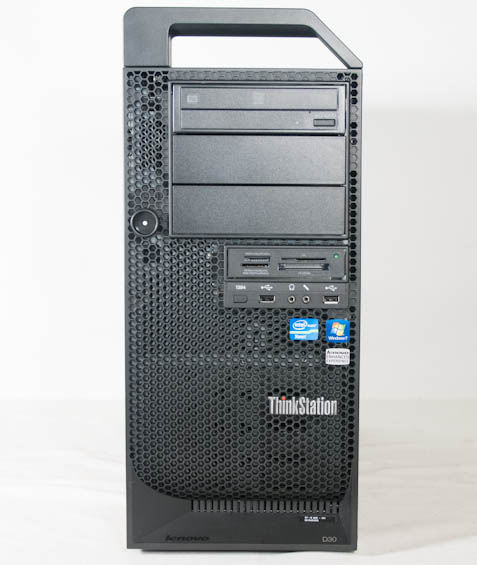
In Lenovo's lineup, the D30 really is as big as it gets. We've seen more modest workstations from Dell and HP and even tested Intel's powerful Xeon E5-2687W, but this is the first dual-socket monster we've gotten our hands on. Our review unit is configured with a pair of E5-2687W processors along with a single NVIDIA Quadro 5000 graphics card. I want to be clear: this level of performance is probably available from other vendors (at what cost is another matter entirely), and Lenovo does have to contend with Dell's excellent desktop workstation designs as well as HP's stellar enterprise-class notebooks.
| Lenovo ThinkStation D30 Specifications | |
| Chassis | Custom Lenovo |
| Processor |
2x Intel Xeon E5-2687W (8x3.1GHz, Turbo to 3.8GHz, 32nm, 20MB L3, 150W) |
| Motherboard | Custom C600 Board |
| Memory | 8x2GB ECC DDR3-1333 (four per CPU) |
| Graphics |
NVIDIA Quadro 5000 2.5GB GDDR5 (352 CUDA Cores, 513MHz/1026MHz/3GHz core/shader/RAM, 320-bit memory bus) |
| Hard Drive(s) | Seagate Savvio 15K.3 300GB 15000-RPM SAS 6Gbps HDD |
| Optical Drive(s) | TSSTCorp SH-216AB DVD+/-RW |
| Power Supply | 80 Plus Bronze ATX PSU |
| Networking |
Intel 82574L Gigabit Ethernet Intel 82579LM Gigabit Ethernet |
| Audio |
Realtek ALC662 Speaker, line-in, and mic jacks |
| Front Side |
Optical drive Card reader 2x USB 2.0 Mic and headphone jacks |
| Top Side | Handle |
| Back Side |
Serial port 8x USB 2.0 2x Gigabit ethernet 2x USB 3.0 Mic, line-in, and headphone jacks DVI-I 2x DisplayPort 6-pin FireWire |
| Operating System | Windows 7 Professional 64-bit SP1 |
| Dimensions |
8.27" x 23.7" x 19.09" (210mm x 602mm x 485mm) |
| Extras |
Card reader vPro |
| Warranty | 3-year onsite parts and labor |
| Pricing |
Starts at $1,399 Review system configured at $10,852 |
I've reviewed beefy, expensive hardware before, but never anything that went into the five figures. Enterprise-class systems often have absurd premiums attached to them, though, and those premiums help cover the cost of onsite service as the need arises. The Intel Xeon E5-2687W has an OEM price of nearly two large on its own, a TDP of 150W, and is basically the most powerful workstation chip Intel currently produces. Lenovo shipped our review unit with two, and each has 8GB (4x2GB) of ECC DDR3-1333 attached to it running in quad-channel for a total of 16GB of RAM.
On the GPU side is NVIDIA's Quadro 5000. The Quadro 5000 is a cut-down GF100, but remember that big Kepler, the GK110, was just released into the wild as a Tesla card and still has no workstation GPU equivalent. It has a maximum rating of 152 watts, substantially lower than desktop Fermi ever really hit, and has a nearly $1,800 price tag at retail. For this card, Lenovo only charges a modest upgrade premium, while the Xeons are marked up roughly 1/3 more than they list for.


Interestingly our review unit came with a single 2.5" SAS mechanical hard drive instead of an SSD, and I'm not entirely sure why they went this route. The drive has a $300 premium on its own; SSDs with similar capacity can be had at a similar price, but Lenovo's SSD storage options are severely limited. On their configuration page, only a 128GB SSD is available, and that's $200 more expensive than the SAS HDD. If Lenovo wants to be more competitive, they need to offer better choices for the storage subsystem than one 128GB SSD. When editing video, storage speed can become very important in a hurry; if your system is bottlenecked by your storage subsystem, your CPU won't be able to stretch its legs, and I can see that issue exacerbated on a 16-core, 32-thread demon like this one.
Originally published at https://www.anandtech.com/show/6456/lenovo-thinkstation-d30-system-review-16-cores-and-32-threads-under-your-desk (Wayback Machine).