
13-inch Retina MacBook Pro Review (Late 2012)
General Performance
The 13-inch rMBP is a very fast system thanks to its combination of good silicon and a very fast SSD. Anyone looking to upgrade a MacBook Pro released before 2011 will see a measurable increase in performance. Where the decision is more difficult is if you're comparing a quad-core 15-inch MBP to the dual-core 13-inch rMBP.
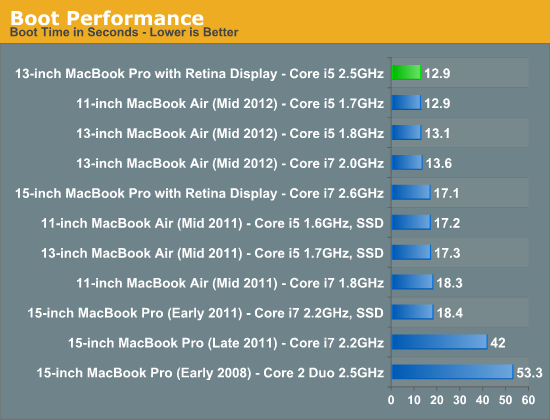
The 13-inch rMBP manages to boot much quicker than any other stock MacBook Pro, including the 15-inch model. Boot time is actually on par with the 2012 MacBook Air, which makes sense given the very similar internal hardware. The missing dGPU likely shaves off some pre-boot initialization time in addition to reducing the actual OS load time. The end result is a system that can boot (and reboot) incredibly quickly.
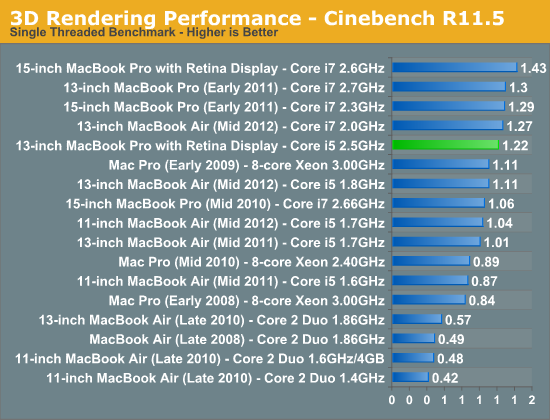
Raw CPU performance is good, but clearly behind the 15-inch rMBP. The 15-inch model I'm comparing to here is the $2799 configuration with 2.6GHz quad-core CPU (max turbo = 3.6GHz). The single threaded Cinebench 11.5 test really shows the difference in single threaded performance here (+17%) which maps almost perfectly to the difference in max turbo (+16%). I would assume that the upgraded Core i7 option for the 13-inch rMBP would erase this gap since it can also turbo up to 3.6GHz. If you're comparing to a pre-2011 15-inch MacBook Pro, the 13-inch rMBP is faster which is a good point for those looking to upgrade an older machine and want a lot more portability.
Compared to the 2012 MacBook Air, the 13-inch rMBP is slightly faster than the base configuration although it lags behind the upgraded Core i7 part in the upgraded 13 (a similarly upgraded rMBP would be faster however). This really serves to show the strength of Intel's Turbo Boost. Even though the MBA ends up using 17W parts, available thermal headroom allows it to hit clock speeds that equal the 13-inch rMBP.
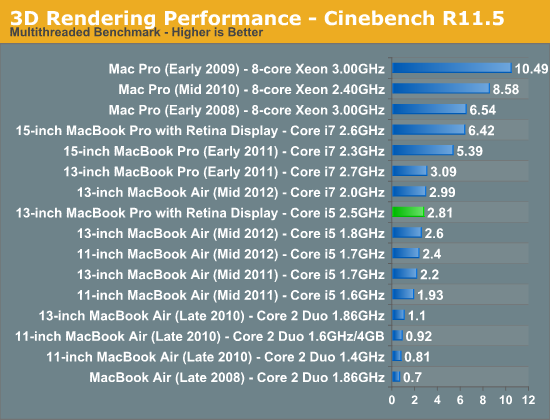
Although single threaded performance is clearly competitive, it's multithreaded performance where the quad-core 15-inch rMBP really pulls ahead. The multithreaded Cinebench 11.5 test really shows the best case scenario for the 15-inch rMBP, but there are still big deltas if we look at our video transcoding tests using iMovie:
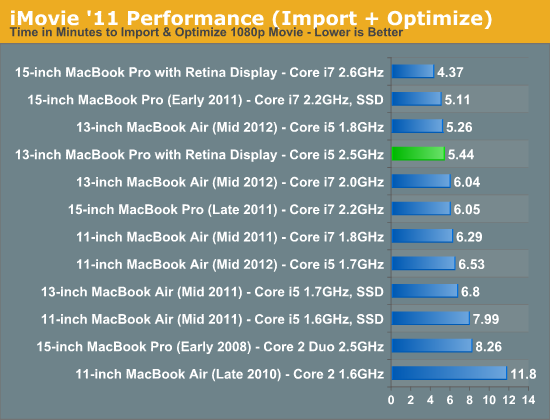
Importing isn't as heavily threaded and thus the performance advantage for the quad-core 15 is only 24%.
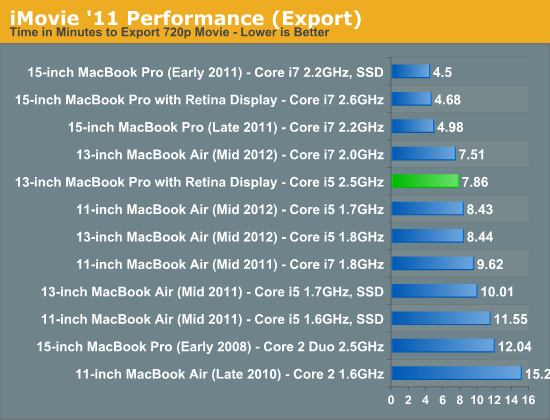
The export task takes 75% longer however.
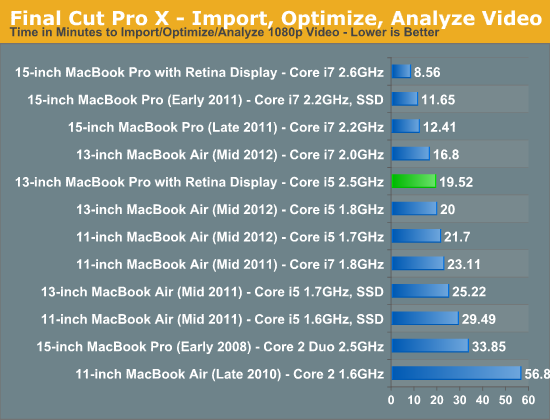
If you're an active Final Cut Pro X user, you'll want to opt for the 15-inch rMBP. The added performance offered by twice the cores (and in this case, even higher clocks) just can't be ignored. Anyone doing real video work is going to want four cores.
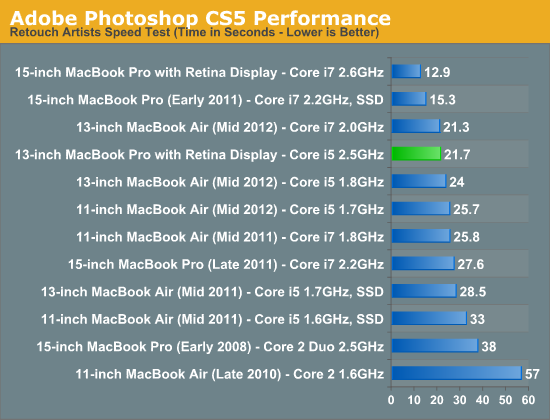
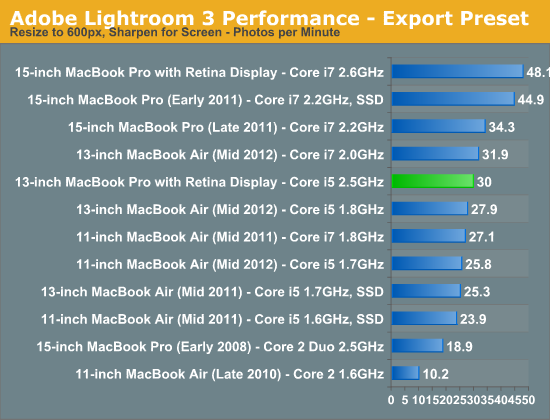
Our photo workloads are no less forgiving. The 13-inch rMBP is clearly a fast machine thanks to its integrated SSD, but the 15-inch model is just significantly faster. The MacBook Air comparison is very close across the board. Although there's more thermal headroom offered by the 13-inch rMBP chassis, max turbo frequencies are very similar between the MBA and 13-inch rMBP models which results in peak performance looking very similar. What makes the 13-inch rMBP a "Pro" machine is really about the display first, not performance.
Originally published at https://www.anandtech.com/show/6409/13inch-retina-macbook-pro-review (Wayback Machine).