
13-inch Retina MacBook Pro Review (Late 2012)
Thunderbolt Performance
Similar to its 15-inch brother, the 13-inch rMBP integrates Intel's DSL3510L Cactus Ridge Thunderbolt controller. This is Intel's most capable Thunderbolt SKU as it takes four PCIe 2.0 lanes combined with DisplayPort and muxes them into four Thunderbolt channels (2 up/2 down) with two DP outputs.
As we've seen in the past, a single Thunderbolt channel is usually good for nearly 8Gbps although you'll have a hard time reaching that without a decent array of SSDs. With two Thunderbolt ports on board, it shouldn't be too difficult to go beyond 10Gbps if you've got the right devices.
For a sanity check I dusted off Promise's Pegasus J2 (in AC power mode) and measured peak sequential reads/writes between it and the 13-inch rMBP. Performance, as you'd expect, is near identical to what we've seen on the 15-inch model:

This is a final J2 sample that hasn't been battered as much as my original J2 review sample, so write speed looks a lot better. Either way it's pretty effortless to break 6Gbps over Thunderbolt on the 13-inch rMBP.
Thunderbolt behavior continues to be a point of contention with all new machines that implement the spec unfortunately. Of those involved (Apple, Intel and Microsoft), only Apple appears to be doing a somewhat good job of delivering a consistent experience with all devices available on the market today. Even then however, the experience isn't perfect.
I still encounter issues where plugging a sleeping 13-inch rMBP into Apple's Thunderbolt display won't always wake it up. Wake up latency is also highly inconsistent when using Thunderbolt in this manner as well. A big motivation behind Thunderbolt is its ability to let you quickly transition a notebook into a docked, desktop-mode, which is why this is so important.
Apple appears to be getting better with plug and play Thunderbolt compatibility with each new device however. The 15-inch rMBP was noticeably better in random plug testing than the 2011 MacBook Pro, and the 13-inch rMBP appears to be a bit better than the 15-inch model as well.
There are some software issues that I wish Apple would focus on as well. Right now OS X windows don't maintain their proportional size when you switch between resolutions, which can be a problem if you're frequently switching between using the rMBP in notebook mode and when docked to an external display. The result is that when you switch between displays (or even resolution settings on the same display) you often have to go in and resize all of your windows. Ideally I'd like for all windows to retain their proportional size when switching between displays at least. It's an annoying blemish to the Thunderbolt experience.
WiFi
Like its larger sibling, the 13-inch rMBP features a dual-band 3x3:3 802.11n WiFi powered by Broadcom's BCM4331. Peak link rate is unchanged at 450Mbps (5GHz, 40MHz channels, short guard intervals).
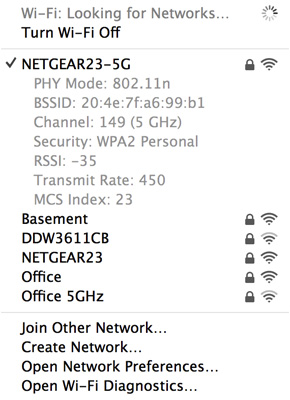
Range and performance seem relatively similar to the 15-inch rMBP, which was also a very good performer.
| 13-inch MacBook Pro with Retina Display WiFi Performance | ||||
| 5.0GHz | 2.4GHz | |||
| Location 1 (Next to AP) | 299.5Mbps | 158.9Mbps | ||
| Location 2 (Down the Hall from AP) | 117.1Mbps | 25.2Mbps | ||
| Location 3 (Across House from AP) | 36.5Mbps | 33.2Mbps | ||
| Location 4 (Edge of Coverage Test) | - | 2.3Mbps | ||
Peak performance was just under 300Mbps right next to the access point.
Originally published at https://www.anandtech.com/show/6409/13inch-retina-macbook-pro-review (Wayback Machine).