
ASUS F2A85-V Pro Review: A Look at FM2 with A85X
- Posted in
- Motherboards
- Asus
- Trinity
- FM2
- A85X
USB Speed
For this benchmark, we run CrystalDiskMark to determine the ideal sequential read and write speeds for the USB port using our 240 GB OCZ Vertex3 SSD with a SATA 6 Gbps to USB 3.0 converter. Then we transfer a set size of files from the SSD to the USB drive using DiskBench, which monitors the time taken to transfer. The files transferred are a 1.52 GB set of 2867 files across 320 folders – 95% of these files are small typical website files, and the rest (90% of the size) are the videos used in the Sorenson Squeeze test.
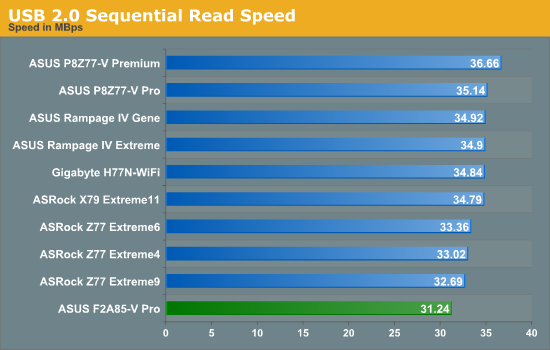
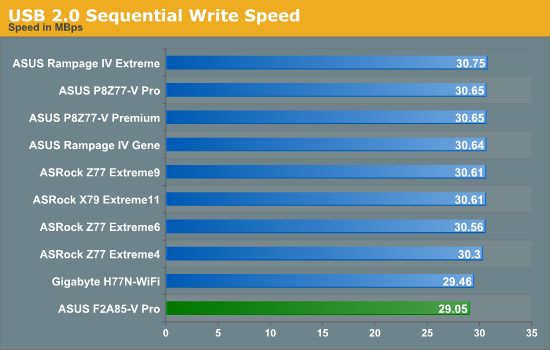
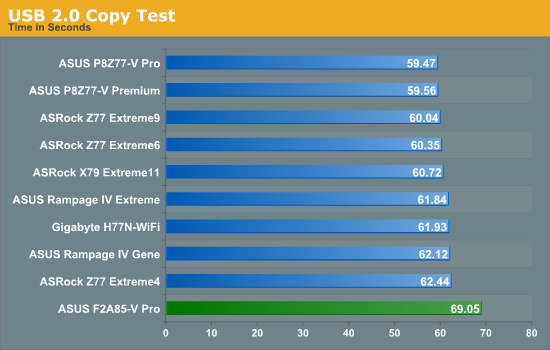
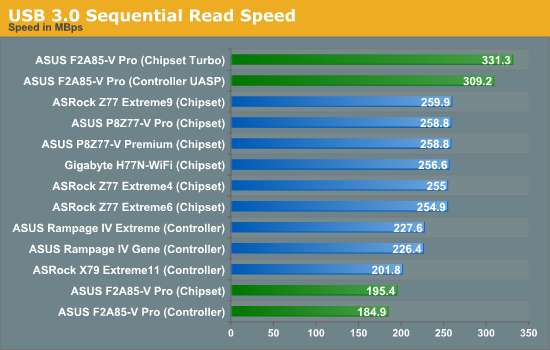
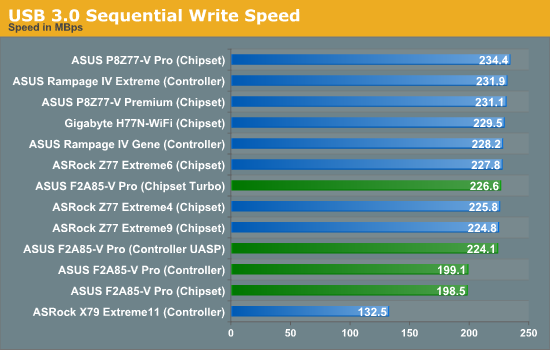
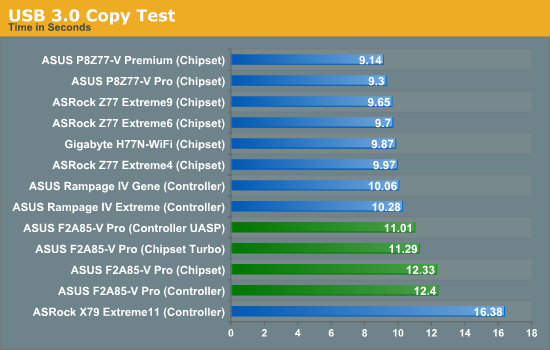
For whatever reason, our standard USB testing regimen on AMD systems shows a slight speed deficiency compared to the Intel systems. In USB 3.0 our copy tests are more than 10% slower on an AMD system.
SATA Testing
We also use CrystalDiskMark for SATA port testing on a C300 drive. The sequential test (incompressible data) is run at the 5 x 1000 MB level. This test probes the efficiency of the data delivery system between the chipset and the drive, or in the case of additional SATA ports provided by a third party controller, the efficiency between the controller, the chipset and the drive.
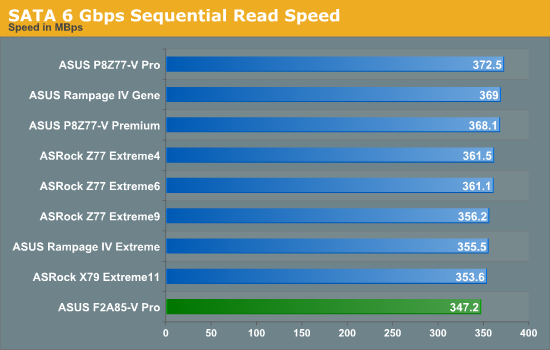
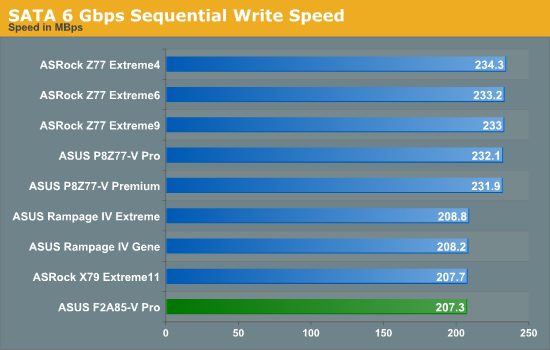
I really like the fact that the AMD chipset is SATA 6 Gbps only, although we see that SATA peak write speeds on this board are slightly lower than that of most Intel boards. Previously this is normally attributed to BIOS settings at default.
DPC Latency
Deferred Procedure Call latency is a way in which Windows handles interrupt servicing. In order to wait for a processor to acknowledge the request, the system will queue all interrupt requests by priority. Critical interrupts will be handled as soon as possible, whereas lesser priority requests, such as audio, will be further down the line. So if the audio device requires data, it will have to wait until the request is processed before the buffer is filled. If the device drivers of higher priority components in a system are poorly implemented, this can cause delays in request scheduling and process time, resulting in an empty audio buffer – this leads to characteristic audible pauses, pops and clicks. Having a bigger buffer and correctly implemented system drivers obviously helps in this regard. The DPC latency checker measures how much time is processing DPCs from driver invocation – the lower the value will result in better audio transfer at smaller buffer sizes. Results are measured in microseconds and taken as the peak latency while cycling through a series of short HD videos - under 500 microseconds usually gets the green light, but the lower the better.
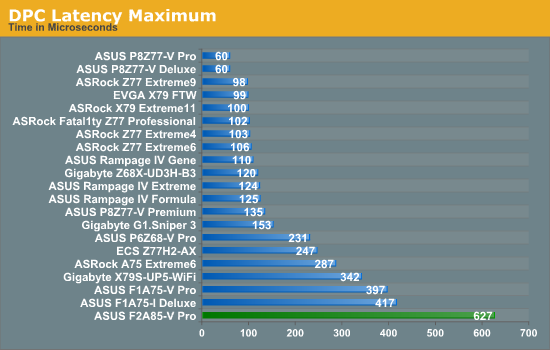
Normally our DPC Latency tests can be affected by monitoring software, producing a value north of 1000 microseconds. Anything under 500 is acceptable, and under 200 is great. However the F2A85-V Pro gets a value in the 600s. During the test, the DPC would hover between 100 and 200 most of the time, but every now and again would peak in the 600 region for whatever reason. The system was rebooted a couple of times but this behavior was persistent across boots. As of the 5104 BIOS this would be slightly worrying for audio work.
Originally published at https://www.anandtech.com/show/6360/asus-f2a85v-pro-review-a-look-at-fm2-with-a85x (Wayback Machine).