
LG Google TV Review
We’ll start with an overview of the device itself, and a quick display analysis. LG Display, the conglomerate's panel making subsidiary, has had enormous success technologically and in sales. Their high density displays have been behind many of the “retina” displays that have crossed our bench, and their effectiveness in larger panels has panned out to include commercializing larger OLED panels and making the most of LED lighting in their more traditional TFT-LCD displays.
The LG Google TV features an edge-lit LED 1080p panel, that can do 120Hz and offers passive 3D with the included glasses. As always, thin is in, and there really is very little to this television that isn’t display. The LED’s around the screen's edges must take up almost no space, as the bezels are quite thin at around an inch and at its thickest the set is just 1.4 inches deep. The brushed silver bezels are matched to a brushed silver stand, which makes for a simple but attractive design. All that brushing is an effect, though; both bezel and stand are plastic, not aluminum.

Around back you’ll find four HDMI ports, one component, one RGB (VGA), three USB 2.0, one 100 Mbit ethernet port, an auxiliary audio port, and a port for an IR blaster. That’s plenty of connectivity for any setup, and the multiple USB ports means local storage can be attached alongside other accessories. Capacitive buttons make up the on device controls and run along the bottom right edge of the display, alongside a status LED.

I’m not an ISF certified display calibrator, like our man Chris, but I know my way around a CIE chart. So I took to characterizing the display. In broad strokes, there are two kinds of TV viewers; those that like them bright and blue, or those that prefer them accurate. Many are oblivious, certainly, but there is a preponderance of buyers that fall closer to the bright and blue. It isn’t their fault, really; it's a conditioned behavior. In an effort to draw our eyes to the dozens of TVs on display in a big electronics box store, manufacturers crank up the brightness and aim for vividness rather than accuracy in their colors. The effect is eye catching, but in the same way as a 10 foot Christmas tree. And like such a tree, once you get it in the house it might not look quite right. The two key standards that display calibrators live by are color temperature and gamut.
Color temperature refers to the balance of colors represented in a white screen. Since individual pixels are made up of red, green and blue subpixels, the white you see on your screen is actually made up of varying amounts of colors. Our eyes perceive colors differently, though, so it’s not simply a matter of turning the gain up on all three subpixels; rather, a balance is sought so that white doesn’t become vaguely blue nor slightly red or green.
Color gamut puts those subpixels to the test forming the rest of the colors, and, rainbows not withstanding, there are an awful lot of colors. Various charts are used to represent color gamut, but each has one thing in common, a reference frame. We’re providing two forms of CIE charts, and in each you’ll find a black triangle, this represents the sRGB color space. The white triangle is the actual measurements from the device being tested, and when we refer to color gamut, we’re referring to the percentage of the reference triangle that is overlapped by the test triangle. So how’d LG’s Google TV do?
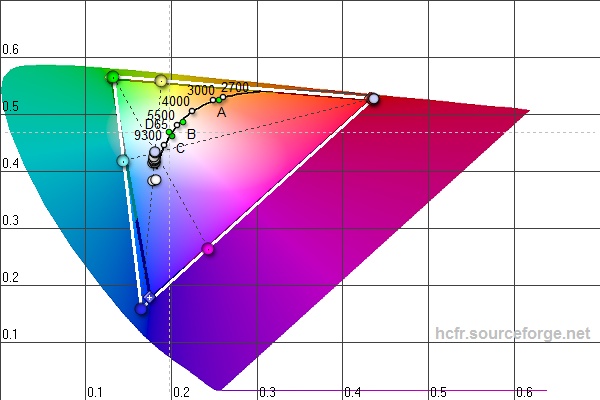


When we took our measurements with the set in its default configuration the results weren’t surprising. The color temperature was off the charts above 12000K, and the brightness was an impressive 342 nits. The color gamut chart looked very good, a little askew of the reference green, and a little beyond the reference blue. That extra blue tone probably explains the excessive color temperature; lower temperatures are called “warmer” because they bring the white balance further towards the red reference. In use, the television isn’t assaulting, thanks in large part to the good color gamut, but whites do take on a curious hue.
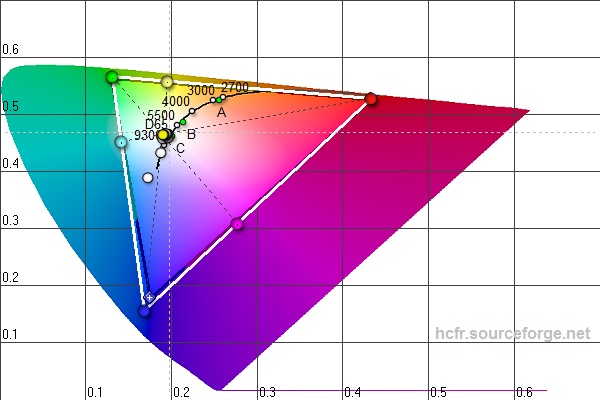


Dig through the settings menus for a little while and you’ll come across another option. Alongside Vivid and Sports, lies the ‘ISF expert’ presets. LG takes the time to roughly characterize their sets and program a decent batch of settings that bring the display closer to the ISF standard. Characterizing the display yielded vastly different results, but it was almost uniformly good. The color temperature averages about 8000K and could be tweaked further, though it’s noticeable that where you’d most notice the color temperature (between 30% and100% brightness) the value hovers right around 7000k. The penalty for this configuration is a brightness that doesn’t break 100 nits. Watching a movie with the shades down and the lights off, this configuration really elevates this display to exceptional. Turn the lights on and open the shades on a sunny day and you might run into some washed out images.
A little more tweaking and we would probably be able to get the brightness closer to 200 nits without sacrificing color temperature. And a visit from a display calibrator could bring this set much closer to ISF standards, but all told, it’s enough to say that without much work at all, this set looks great. All the dynamic this and that is nothing if the images just look bad. Not something you’ll likely worry about with this set.
Originally published at https://www.anandtech.com/show/6287/lg-google-tv-review (Wayback Machine).