
Dell XPS 15 L521X: A Detailed First Look
Dell XPS 15 LCD: Decent Contrast and Brightness, Mediocre Colors
Dell’s XPS line has had a bit of an on-again, off-again relationship with good LCDs. The M1710 and M1730 way back in the day had good WUXGA panels for the time, and the Studio XPS 16 was the first laptop to offer an RGB LED backlit panel (at least to my knowledge). More recently, the XPS 15 and 15z 1080p panels have been good, but the 768p displays in the XPS 13, 14, 14z, 15, and 15z have all been run of the mill offerings. Thankfully, the new XPS 15 sticks with the pattern of offering a decent 1080p display. It’s not great and has a definite bluish tint, but contrast is pretty good. If you don’t demand accurate colors (which is easily answered by answering this question: do you own a hardware colorimeter?), then the XPS 15 should be good enough to keep you happy. Even with a colorimeter, however, color accuracy remains relatively poor compared to other panels.
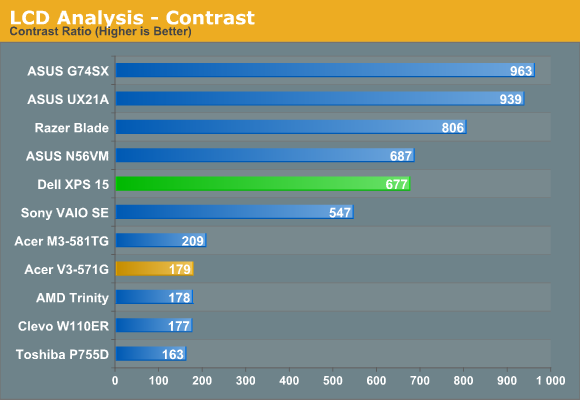
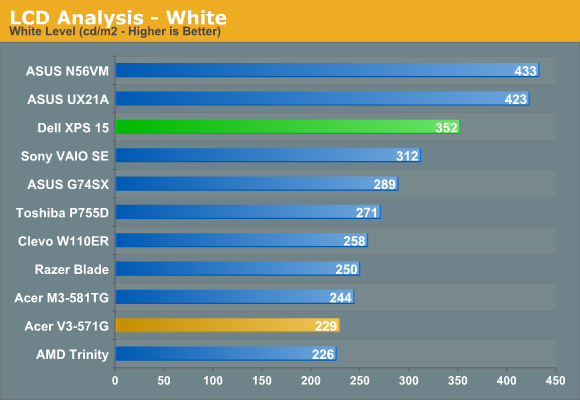
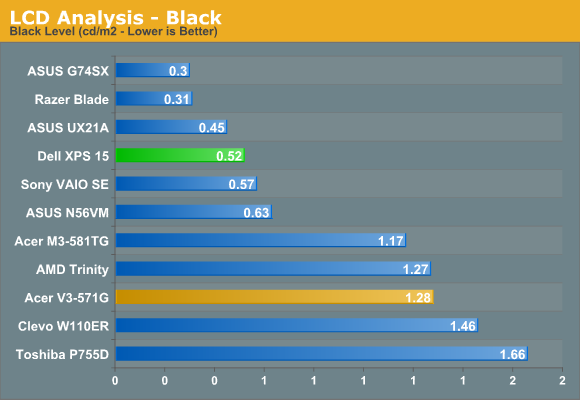
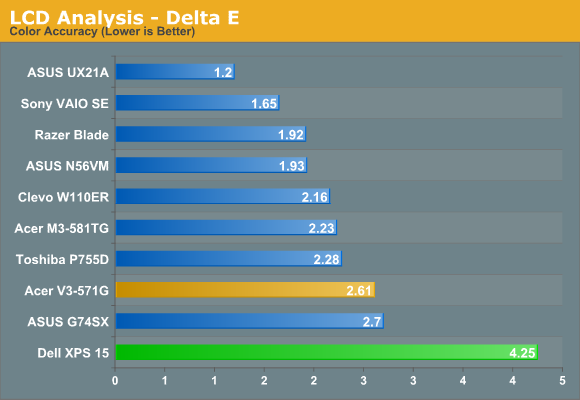
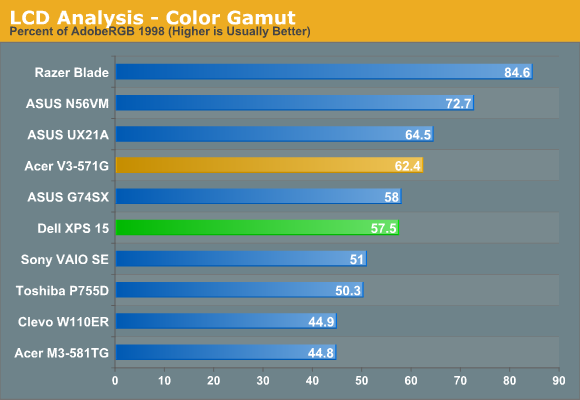
Contrast checks in at 677:1, which is better than average but not exceptional. The maximum white level is 350 nits, but that’s with a very strong blue component. Once you calibrate to remove that, the maximum white level drops substantially down to just 250 nits. If you prefer “cool” colors, the LCD will probably make you happy, but those who prefer natural or warmer colors will immediately notice something is off. As noted above, delta E even after calibration is quite poor—just like the XPS 15z. That would make sense, as the two models appear to use the same AU Optronics B156HW03 panel. Color gamut is likewise middling, at 57% of Adobe RGB.


The minor complaints with the panel continue when we look at viewing angles. I’ve seen some TN panels that do a lot better in terms of vertical viewing angles; this LCD isn’t one of those. Viewed from above or below, you get severe color shifting and loss of contrast. There’s still a decent viewing arc where the LCD looks good, but this is on the lower end of the 1080p LCDs that we’ve tested. I also noticed a fair amount of “shimmer” on the edges of windows when moving them around, which appears to come from the 6-bit to 8-bit color interpolation. That’s almost always present to varying degrees, but here it’s as noticeable as on lesser LCDs like that in the Acer V3-571G.
While the IPS panels in laptops like the UX21A, Sony VAIO SE, HP Envy 15, and Lenovo X220 aren’t perfect by any means, they’re still a substantial upgrade from panels like this—and this panel in turn is a substantial upgrade from the poor quality 1366x768 panes. We’d love to see more vendors push for IPS panels, and that goes double (triple even!) for high-end laptops like this XPS 15. If you’re paying under $1000 for a laptop, we understand the need to make some compromises, but ASUS has managed to get 1080p IPS displays into their new 11.6” and 13.3” Ultrabooks so there’s really no excuse for using a lower quality TN panel in a $1300+ laptop. And it almost goes without saying that Apple’s new 2880x1800 Retina MacBook Pro is in a league of its own.
Originally published at https://www.anandtech.com/show/6103/dell-xps-15-l521x-detailed-first-look (Wayback Machine).