
Biostar TZ77XE4 Review: Dichotomy by Default
- Posted in
- Motherboards
- Biostar
- Z77
Biostar TZ77XE4 In The Box
With Biostar being a well-enough known budget brand, it is fair to presume that we should not get that much in the box to tantalize us. However, the TZ77XE4 is the high end Biostar SKU, so we could always be in for a surprise.
Driver CD
User's Manual
Rear IO Shield
Four SATA Cables
Rigid 3-slot SLI Bridge
3-Slot Crossfire Bridge
USB 3.0 Panel (USA Special Offer Only)
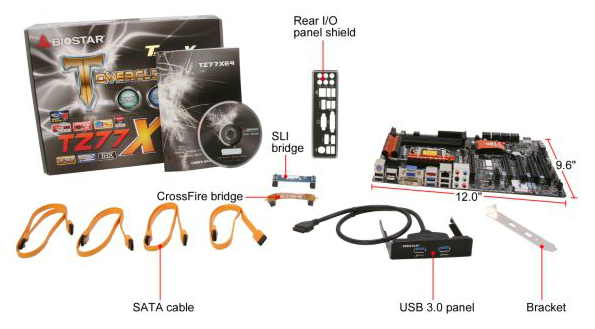
I was initially confused, as the review sample I received did not correlate with the Newegg image of what is in the box as shown above - I did not get in a USB 3.0 panel. I discussed this with Biostar, who state that it is a USA specific promotion to include the USB 3.0 panel. At the MSRP for the motherboard, I would have expected every sample to include that USB 3.0 panel to sweeten the deal.
Aside from the panel, Biostar have included a CrossFire bridge in the bundle. Usually CrossFire cables are supplied with GPUs and not the motherboard, so it is a welcome addition.
Voltage Readings
After my first publication of OCCT voltage readings, a few readers responded with a more in-depth reasoning behind some of the results we were seeing. With this in mind, I would like to re-describe what we are doing with this test, and how it comes about.
Much of what an enthusiast overclocker does is monitor CPU temperature and voltage. Whatever settings a user places in the BIOS or OS is at the mercy of the motherboard - in terms of actually setting the values and reporting the values back. As an enthusiast, we have to rely on what readings we get back, and hope that motherboard manufacturers are being honest with their readings.
Take CPU voltage. What we as a user see in CPU-Z or OCCT is a time-averaged value that hides voltage ripple (if any) for power delivery. It is very easy for a motherboard manufacturer to hide this value, or to disregard slight deviations and report a constant value to the user. The CPU voltage reading can be taken at a variety of places on the power plane, which can vary between motherboards and manufacturers, meaning that each reading is essentially not comparable with the other. Nevertheless, as an enthusiast, we will constantly compare value A with value B.
Whether or not I can achieve 4.7 GHz with 1.175 volts on a particular board is inconsequential - your motherboard may perhaps produce the same result with a reading at 1.200 volts. The only way to test the actual value is with consistent methodology is via an oscilloscope connected to similar points on each board. This may sound like taking an OCCT reading is therefore redundant.
However, motherboards have settings relating to load line calibration. As load is applied to the CPU, the voltage across the processor decreases (VDroop). Load Line calibration essentially attempts to control this level of droop, by increasing voltage when voltage drops are detected away from a fixed value. Manufacturers have different ideas on how to modify LLC with respect to load, or whether the level of modification should be controlled by the user. Some manufacturers offer the option at a variety of levels, such that overclockers can be sure of the applied setting (even if it increases peak voltage, as explained by AnandTech in 2007).
By doing a full load OCCT test, we are essentially determining both how aggressive the motherboard is reporting the CPU voltage under load and how aggressive load line calibration is performing (from the point of view of the user without an oscilloscope or DVM). If someone has one of the motherboards we have tested and you have a different one, variations in load voltage should describe the offset you may require for overclock comparisons.

| Reported Load Voltage / V | |
| ASRock Fatal1ty Z77 Professional | 0.956 |
| ASRock Z77 Extreme4 | 1.050-1.058 |
| ASRock Z77 Extreme6 | 1.040-1.048 |
| ASUS P8Z77-V Deluxe | 1.085 |
| ASUS P8Z77-V Pro | 1.090 |
| Biostar TZ77XE4 | 1.036 |
| Gigabyte Z77X-UD3H | 1.067 |
| MSI Z77A-GD65 | 1.020 |
Originally published at https://www.anandtech.com/show/6097/biostar-tz77xe4-review-dichotomy-by-default (Wayback Machine).