
AZZA Genesis 9000 Case Review: Building It Every Way
- Posted in
- Cases/Cooling/PSUs
- ATX
- AZZA
In and Around the AZZA Genesis 9000
Big cases draw a lot of attention and even can draw some consternation due to their sheer size, and I can see how the styling of the AZZA Genesis 9000 may not be for everyone. As far as gaudy enthusiast cases go I actually don't mind the Genesis 9000 as much, and users not bullish on the white-and-blue motif can pick up a black-and-red version for the same price.
Looking at the front of the case, you can immediately pick up on two things. First, the front of the case is almost entirely 5.25" bays, reminiscent of Cooler Master's Stacker line. That means that there are no front intake fans on the Genesis 9000, which is unusual in a modern enclosure. There's also a bottom vent held in place by plastic and thumbscrews, but behind that is actually one of the power supply bays complete with a cable that routes to the back of the enclosure. The blue plastic accents aren't just for show, either; when the fan controller's "high" setting is enabled, they actually glow.
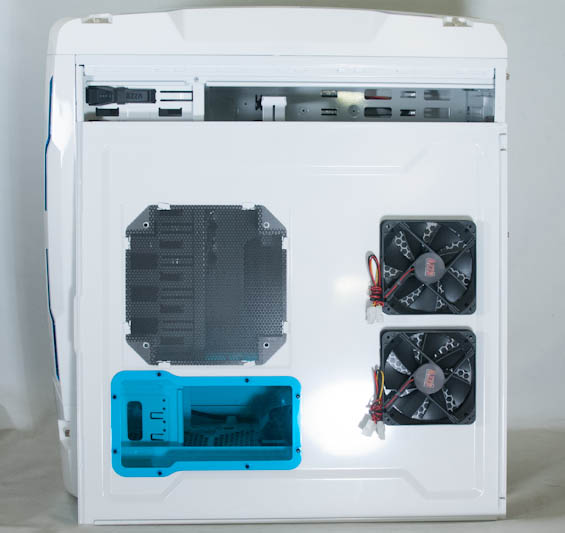
The sides of the Genesis 9000 are just as revealing. The two side panels are interchangeable, with the windowed panel tinted blue. It also includes two 120mm intake fans powered by 4-pin molex connectors and a 200mm fan mount. The less ostentatious side panel just includes two 120mm fan mounts. What AZZA got right that cases like Lian Li's PC-A55 didn't was the ventilation in the bottom: there are venting holes along the sides of the bottom of the case to allow the bottom intake fans to do their jobs.
The top of the case hides two 230mm exhaust fans under slanted vents as well as housing the fan controller, I/O cluster, power and reset buttons, and fan speed/LED toggle. You can also remove the top panel via the thumbscrews, but it's still largely held in place by virtue of having to disconnect all the fans and headers that come plugged in by default. Still, you can do it, and that's how you can install a massive radiator to the top of the case. The blue strips up top also illuminate when the "high" fan speed is enabled.
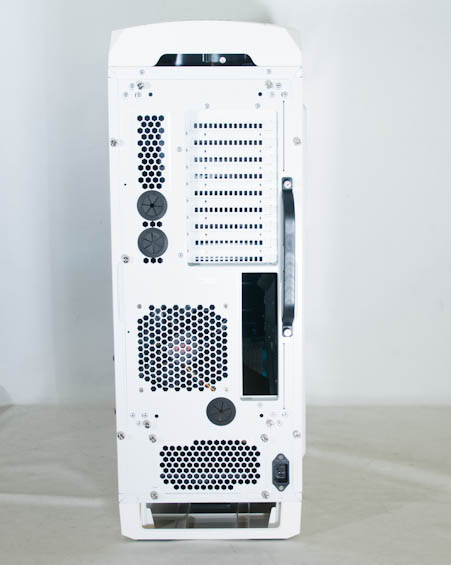
When you get to the back of the case, you can see the handle for the removable, rotatable motherboard tray held in place with six thumbscrews along with the routed power cable for a front-mounted power supply. There's also a removable bracket for a rear-mounted power supply, but when we open up the Genesis 9000 you'll see that space is occupied by one of the two ducted 140mm intake fans.
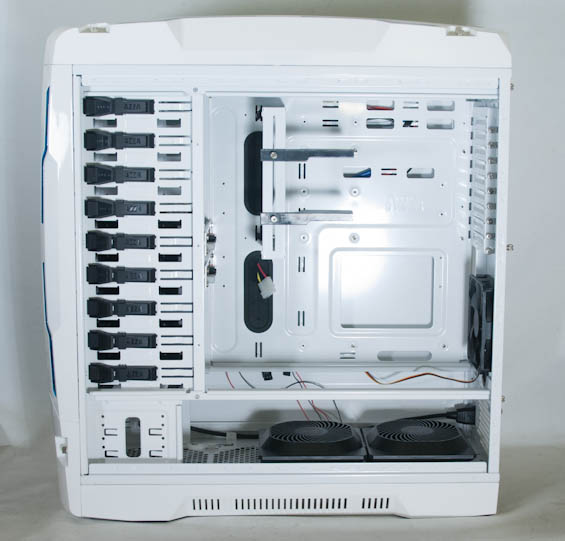
By default the Genesis 9000's motherboard tray is actually mounted in an inverted configuration as opposed to the standard ATX style, and the internal cabling is very neatly tied to the back of the tray. You can also see the removable support bar for extra heavy video cards. What's changed for the Genesis 9000 since the last era of removable motherboard trays, though, is that we now route cables behind the tray for cleaner internals. That means that if you need to rotate the tray, you're going to need to do all the routing you've already done.


AZZA also includes ducts above the included 140mm fans for both directing air and reducing noise, and these easily snap on and off of the fans. You should also pay close attention to just how much space there is in the bottom for installing newer, more powerful fans. Theoretically you could set up quite a little wind tunnel inside the Genesis 9000, or alternatively a healthy amount of watercooling. Note, too, that the front power supply bay (which is admittedly preferable for most installations) can also house two 3.5" drives.
What we have, essentially, is an extraordinarily flexible enclosure design the likes of which I haven't seen since NZXT's Switch 810. NZXT sells the Switch 810 for $169, but the AZZA Genesis 9000 is in many ways a more high quality enclosure with even more flexibility for the same price; I'm surprised to see a vendor try to undercut NZXT. You'll see the Genesis 9000 also offers solid performance, but we'll get there soon enough.
Originally published at https://www.anandtech.com/show/6088/azza-genesis-9000-case-review-building-it-every-way (Wayback Machine).