
ASUS Republic of Gamers and X79 ROG Review – Rampage IV Gene, Formula and Extreme
- Posted in
- Motherboards
- Asus
- X79
- ROG
Rampage IV Extreme Overview
In my brief from ASUS regarding the Extreme, and from their marketing materials, we are to assume that the Rampage IV Extreme (RIVE) is something quite mad. All the more esoteric features are to be plunged on the board – and as a result, it is larger than the standard ATX specifications, reaching into E-ATX (but not full E-ATX). That gets the user 12 inch x 10.7 inch (305 mm x 272 mm) of real estate compared to 12 inch x 9.6 inch (305 mm x 244mm).
When using the Extreme, it is hard to escape the feeling that you are using the best high end motherboard that ASUS make. Throughout all my testing, this was the expectation – the RIVE would be fast, easy to use and have that something extra that no other motherboard has. In terms of performance, due to the MultiCore Enhancement that ASUS use to boost turbo clock speeds, we do have an extremely fast system on our hands, beating other X79 and even the Gene and Formula in most circumstances.
Feature wise, a user is spoiled for choice. Note that instead of gamers being the primary focus of the Extreme (but are still welcome to purchase), the intention of the RIVE is to set a new level of innovation, performance and control in the motherboard arena. If it is used by the best to achieve the best results, then other more moderate users will see this and buy ASUS products in turn. To a large extent this is true in most marketing fields of components. It is hard to do this with motherboards, because each individual feature needs to innovate, which costs money. With margins being very slim, all the small costs add up and pass onto the user. That is why the RIVE comes in steaming at $450 MSRP (currently $420 on Newegg) – an expensive product before you hit double processor motherboards, but cheaper than the $600+ price tag exhibited by some last generation motherboards.
For your big pile of green, ASUS comes bursting with features for the overclockers. Of important note in this overview should be the OC Key, a hardware implementation which provides an active overlay of the key speeds of the system which are also adjustable on-the-fly (for both monitoring and overclocking without opening up the case to see Debug numbers). We also have VGA Hotwire, which allows GPUs to be monitored and adjusted in a similar fashion by extending the voltage control (GPU, Memory) to the operating system - ASUS have designed some of their high end VGA range to aid in VGA Hotwire operation. There is also SubZero Sense, a feature which allows overclockers to add in their on k-type thermocouple and forgo the need to purchase Flukes or similar to monitor sub-zero temperatures. Normal users get the benefits of the Formula in the Extreme, with the addition of a full complement of 8 DIMMS, but not the enhanced Audio for day-to-day usage.
It is very hard to please everyone with a Halo product – some users would have preferred a full complement of USB 3.0 on the rear, or dual Intel NICs, or a dedicated sound card, or perhaps onboard WiFi or mSATA. There could be room in the range for another product above the Extreme, but there is a reason we do not see consumer motherboards reach $1000+ - demand. Users are more than welcome to add their own add-in cards (high-end audio, RAID) to satisfy that need. The core market for the Extreme (i.e. overclockers and enthusiasts with money) is already very small. The investment needed to make a board have everything ever would result in the sale of very few. But some companies do try!
As with all ROG products, the Rampage IV Extreme comes with a (NA) 3-year warranty and is part of the ASUS Premium Service program for North America.
Visual Inspection
Out of the box, the Extreme feels bigger than its ROG brethren – the extra inch on the width does help add to this effect. The initial thing noticeable over the Gene and the Formula are the additional memory slots, as we move up from eight to four. The heatsinks are thus moved around slightly, with heatpipes connecting all of them together. The chipset heatsink, as shown, has a small fan attached to aid with the overall cooling of the heatpipe assembly (this fan was essentially inaudible over other noises in the system). Ultimately this fan is not needed, and is fully controllable through the BIOS or software provided.
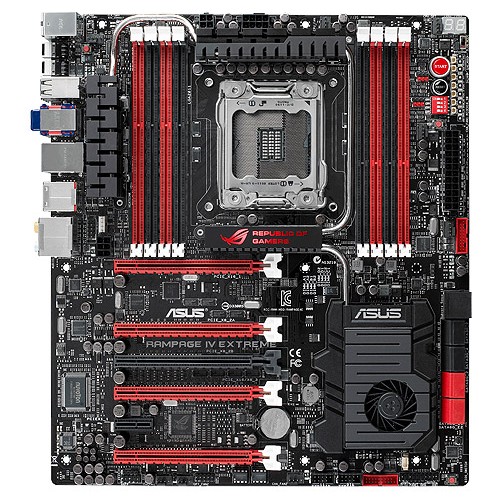
As with other X79 boards which use eight memory slots, the slots are designed to be filled in from the outside first, leaving more space for CPU coolers. The RIVE is up to the Intel standard socket size from top to bottom, but the filling of memory gives a little extra room side-to-side for those beefier coolers. One change from the RIVG and RIVF is the power delivery to the CPU – previously we only had one 8-pin 12V connector. But as the RIVE is aimed at the extreme overclockers, we can expect a higher power draw (300W+) and thus another 4-pin 12V connector is included.
Fan headers on the board are as abundant as those on the Formula, with a total of eight of them, all 4-pin. In the local area of the socket, we have three to the top – one to the top left near the IO panel, another behind the top heatsink (the CPU fan), and a third to the top right next to the two-digit debug. There are a further two 4-pin headers to the right of the memory slots, one beside the PCIe switches and another further down. The final three 4-pin fan headers are found on the bottom of the board.
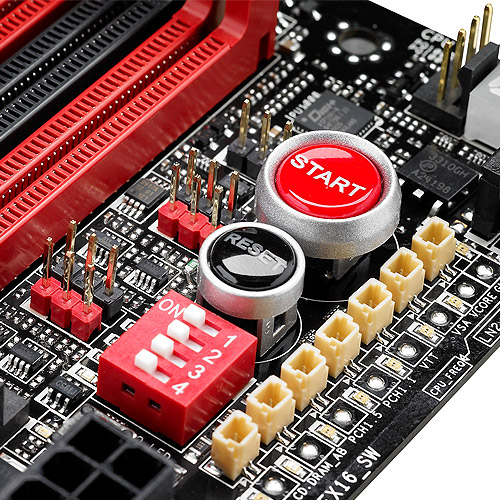
The top right of the board is very interesting. As shown on the picture above, we have a pair of power/reset buttons, and underneath this is a set of switches to enable/disable the PCIe lanes. For extreme overclockers, this is a nice feature to have to ensure no instability is caused by these other lanes. To the right is a series of voltage checking points (ASUS calls this ‘Probe It’ which I keep misreading as 'Pro Belt') and to the left is another interesting feature – the red and black series of pins are for VGA Hotwire (more later in the review). Users will also notice the extra temperature headers on board.
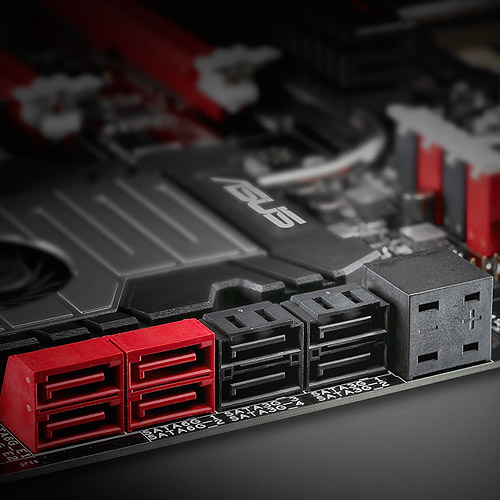
Further down is the SubZero Sense connector, shown next to the SATA ports. This essentially takes up the space of another controller on board for more SATA ports, but a typical user of this product should not need more than eight in total. Due to the size of the RIVE, ASUS have opted for an extra large chipset cooler with a fan. Due to the heatpipes connecting all the heatsinks together, an additional fan here should help a little with cooling.

The south side of the board is standard for an ROG product – USB 2.0 and USB 3.0 headers (note the USB 3.0 header on the RIVE is on the bottom of the board, rather than next to the 24-pin ATX power connector as on the Gene and Formula), a dual BIOS system and switch, and three fan headers. The audio here is not specifically isolated to the extent as shown on the Gene and Formula, but we still have the high end Realtek ALC898 solution.
PCIe ports are similar to the Formula, offering the following configurations with the red slots:
One GPU: x16/-/-/-
Two GPU: x16/-/x16/-
Three GPU: x16/x8/x16/-
Four GPU: x16/x8/x8/x8
The complication comes with the extra black slot, which is also x8 PCIe 3.0. This black slot and the red slot directly above it share lanes, and thus cannot be in use at the same time – this allows users two have a dual GPU system to use the black slot for a RAID card or PCIe SSD as required.
Still working our way around the board, just above the PCIe slots and to the left of the socket is a funky series of headers - one called ‘OC Key’ and two called ‘EZ Plug’. The EZ Plug is for additional power – one of them is a 4-pin white power connector (remember floppy power? Put that here) for memory, and the other is a 6-pin PCIe power connector for more GPU juice. The OC Key header is the attachment required to make the OC Key work – more about the details of this later in the review.
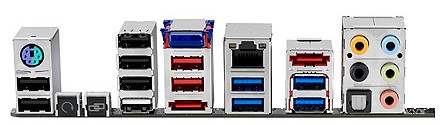
The rear of the board is not as Extreme as perhaps the rest of the product – a combination PS/2 port, two USB 2.0 ports (black), a USB BIOS Flashback button, an ROG connect button, four more USB 2.0 ports (white one is for ROG Connect and USB BIOS Flashback), a Bluetooth module, two USB 2.0 (red), eSATA, Intel gigabit Ethernet, four ASMedia USB 3.0 (blue), another eSATA, and audio jacks with a combined SPDIF optical output. Some of what I would call ‘extreme’ is missing here – another gigabit Ethernet port and a WiFi module would have been nice. But both of those would be turned off by extreme overclockers looking for records.
Originally published at https://www.anandtech.com/show/6082/asus-republic-of-gamers-and-x79-rog-review-rampage-iv-gene-formula-and-extreme (Wayback Machine).