
LRDIMMs, RDIMMs, and Supermicro's Latest Twin
Virtualized Cluster Testing
To fully understand the impact of adding more RAM, we test with both two tiles (72GB allocated) and three tiles (108GB). At two tiles, there will be some RAM left in the 64GB setup. ESXi allocates very little memory for the file system caches ("cached" in Windows) and gives priority to the active memory pages, the pages that are actually used by the most important application inside the VM.
To keep the benchmark results easily readable, we standardized all performance to the performance of the system configured with the LRDIMMs (128GB) and two tiles. So that system always scores 100 (%). All other performance numbers are relative to that.
First we check the total throughput. This is the geometric average of the standardized (a percentage relative to our LRDIMM system) throughput of each VM.
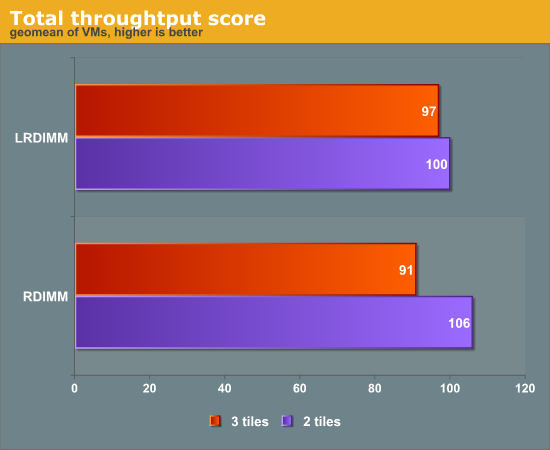
The 15% higher bandwidth and slightly better latency of the RDIMMs at 1600MHz allows the RDIMM configured server to outperform the one with LRDIMMs by 6% when running two tiles.However, once we place four more VMs (three tiles) on top of the machine, things start to change. At that point, ESXi had to create "Balloon memory" (10GB) and swap memory (4GB) on the 64GB RDIMM machine. So it is not like we went far beyond the 64GB of active memory. ESXi still managed to keep everything running.
The 128GB LRDIMM server is about 7% faster running three tiles instead of 6% slower (two tiles). That is not spectacular by any means, but it is interesting to delve a little deeper to understand what is happening. To do so, we check out the average latency. The average latency is calculated as follows: the average of the response time of each VM is divided by the response time of the same VM on the LRDIMM system (two tiles). We then calculate the geometric mean of all percentages.
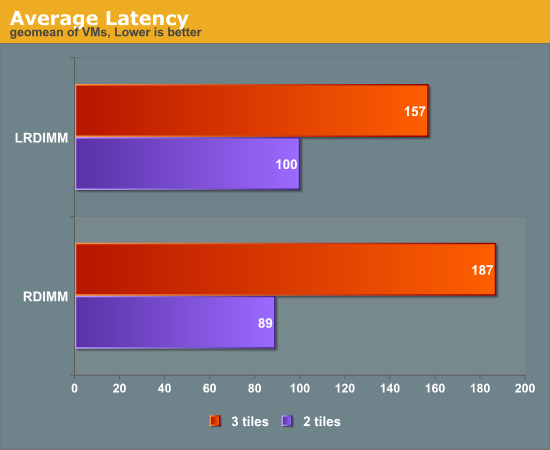
As soon as we add more VMs both systems suffer from higher response times. This shows that we made our test quite CPU intensive. The main culprit is SPECJBB, the VM that we added to save some time, as developing a virtualization test is always a dire and complex undertaking. But trying to save time unfortunately reduced the realism of our test. The problem is that SPECJBB runs the CPU at close to 100%, and as a result the CPU becomes the bottleneck at three tiles. In our final "vApus Mark Mixed" we will replace the SPECjbb test.
We decided to show you this data already until we develop a completely real world benchmark. We are currently evaluating a real world Ruby On Rails website and a Drupal based site. Please feel free to share your opinion on virtualization benchmarking if you are active in this field. Until then, can the extra RAM capacity help even if your applications are CPU intensive? 17% better response times might not be impressive, but there is more to it.
Originally published at https://www.anandtech.com/show/6068/lrdimms-rdimms-supermicros-latest-twin (Wayback Machine).