
Capsule Review: Thermaltake Meka Keyboards and Black Element Mouse
- Posted in
- Peripherals
- Mouse
- Keyboard
- Thermaltake
The Thermaltake Black Element Mouse
As someone who's been a fairly resolute Logitech user (and still enjoys the G500), I have to say Thermaltake has done a remarkably solid job with the Black Element Mouse. The Black Element uses a mostly ambidextrous design with a soft-touch plastic surface that isn't anywhere near as inducive to clammy palms as the material Razer uses (and by extension, the material used on the old Microsoft Habu). The ridges in the mouse buttons also don't feel quite as deep as the ones typically found on Razer mice, making the Black Element more comfortable in the hand overall.
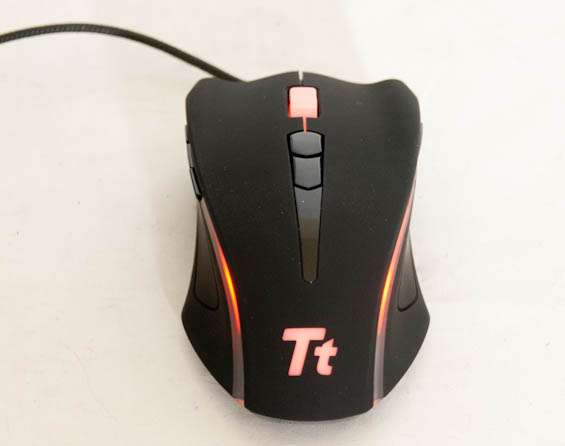
The top of the Black Element features two plastic buttons beneath the mouse wheel that default to toggling laser sensor polling speed, effectively changing the sensitivity of the mouse on the fly. Above them is a mouse wheel that feels like it has just the right amount of resistance, both in scrolling and in pressing as a middle mouse button. On the left side, where your thumb would rest, are three buttons in a row. This is one situation where I think Logitech's G500 definitely has a smarter layout in having the third button beneath the two instead of between them, as it felt like my thumb had to slightly reach to hit the uppermost button. Meanwhile, the right side of the Black Element has a single long button that you should be able to hit with your pinky without too much trouble. Flip the Black Element over and you'll find a button for toggling profiles as well as user-adjustable weights.

The software for the Black Element is a little obtuse at first, but most of the simple stuff is easy enough to get a hold of. Each of the mouse buttons is programmable, and you can individually adjust vertical and horizontal sensitivity. The mouse also supports up to four different DPI settings, and you can change the LEDs that light up the mouse to one of five colors: red, cyan, green, magenta, and blue. You can also disable LEDs individually, but unfortunately you can't choose different colors. Finally, you can program macros and button functions directly into the mouse, which is nifty in and of itself.


And how did the Black Element work in practice? Very well, actually, although there are some snags in the design. The default sensitivity of 3200dpi (vertical and horizontal) proved to be just right for me, and that's good because the mouse sensitivity buttons feel like they're a bit on the chintzy side. The same is true of the programmable buttons on the sides. They just don't have quite the same feeling of resistance and quality that the buttons on Logitech's G500 or Corsair's Vengeance mice do.
Originally published at https://www.anandtech.com/show/6043/capsule-review-thermaltake-meka-keyboards-and-black-element-mouse (Wayback Machine).