
Capsule Review: Thermaltake Meka Keyboards and Black Element Mouse
- Posted in
- Peripherals
- Mouse
- Keyboard
- Thermaltake
Thermaltake Meka and Cherry MX Black Switches in Practice
While the aggressively loud and wonderfully clicky Cherry MX Blue switches in Rosewill's RK-9000 leave a lasting and indelible impression as being ideal for any serious typing (and not sensitive enough for gaming), the difference between the Cherry MX Red switches in the Corsair Vengeance keyboards and the Cherry MX Black switches in Thermaltake's Meka keyboards is at least initially a little more difficult to articulate. I had to take the Pepsi Challenge to really tell, but the Black switches definitely feel a bit softer than the Reds. In many ways they feel like the next logical step up from using a good membrane keyboard.


That impression changed once I took the Meka G-Unit on a jaunt through Mirror's Edge, a game I continue to be unusually enamored with. The Meka G-Unit's (and by extension all of the Meka keyboards) Cherry MX Black switches have a springier quality to them that becomes much more evident in gaming than in regular typing, and as a result I felt like they performed much more like the Cherry MX Blues in the Rosewill keyboard. Hitting the quick keypresses for some of the jumps in Mirror's Edge seemed just a little bit harder to time with the Meka's keys.
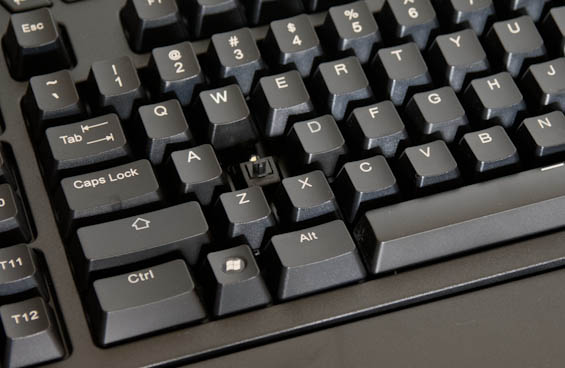
Meanwhile, typing up this review of the G-Unit on the G-Unit has for the most part been a fairly pleasant experience. The tactile response on the mechanical switches continues to be noticeably superior to basic membrane switches, but when it comes to layout I find that Thermaltake's Meka G1 is ultimately preferable. It's common for keyboard manufacturers to place the rows of macro keys directly to the left of the keyboard, but in practice this is a bullet that so far I've only seen Corsair dodge with their Vengeance K90. Even Alienware's M18x notebook has a problem with these keys. Basically, when you go for any of the keys in the lower left of the keyboard you're usually hunting for them by touch, and there were a couple of times in using the G-Unit where I was hitting macro keys when I really wanted to be hitting the Left Shift or Left Control keys. Corsair managed to avoid this by recessing the macro keys, placing them at a different z-height than the rest of the keyboard and thus making the difference clear from a tactile perspective.
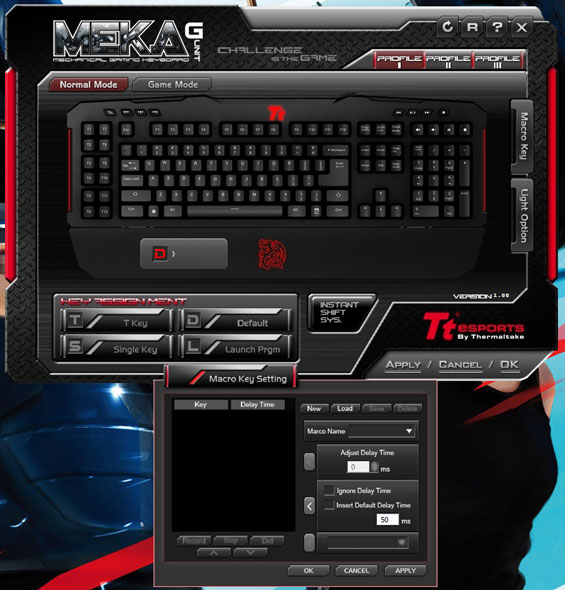
As for the software of the G-Unit, I was pleasantly surprised. Thermaltake's software is actually fairly light and includes an OSD that's very inobtrusive. You can also toggle between "Normal" and "Game" modes, which is basically a toggle for the Windows key. My chief problem with the software is that it's a bit obtuse, but not outside of the realm of comprehension for most users. The twelve "T" keys next to the main keyboard can be programmed to launch applications, enter keystrokes, or run macros, and the keyboard and software support three different sets of profiles.
Originally published at https://www.anandtech.com/show/6043/capsule-review-thermaltake-meka-keyboards-and-black-element-mouse (Wayback Machine).