
Amped Wireless R20000G, SR20000G, and UA2000: Routers, Repeaters, and Adapters (Oh My!)
SR20000G Repeater Performance
So far I’ve left off any discussion of the repeater performance, and for good reason: in most of the test locations, the fact that I could get a signal to the base router means that I already have better performance than I’ll get when going though the repeater. While in theory a repeater can be used to get a strong connection instead of a weak connection, in practice I found that the repeater was most useful in given me a moderate connection instead of no connection. Let me illustrate this first with some results from the second test location, with the repeater placed about 20 feet from the router and 20 feet from the test location.
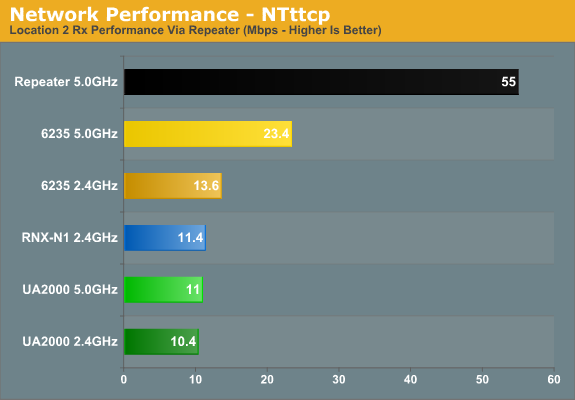
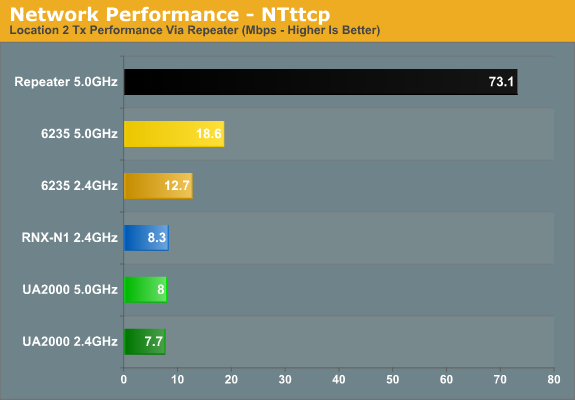
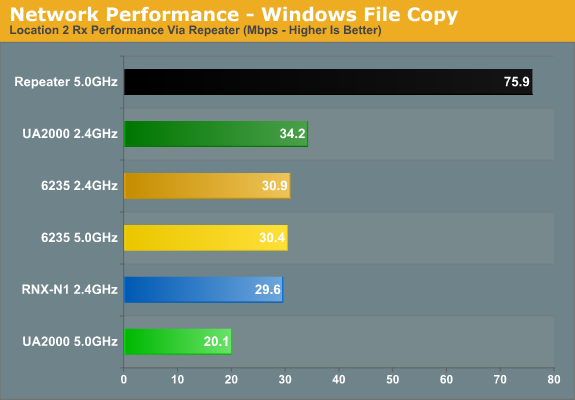
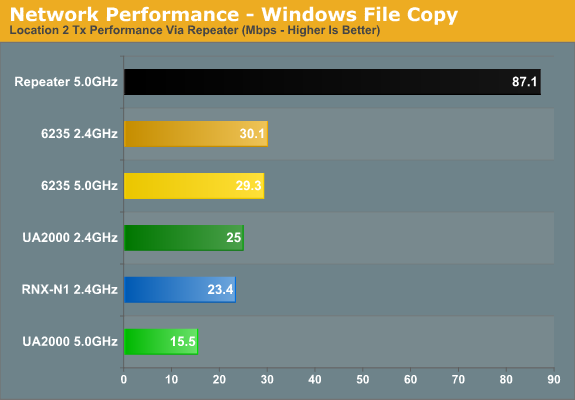
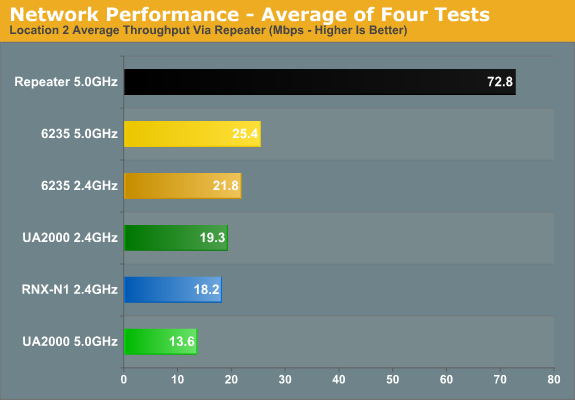
Throughput is way down on the NTttcp results, but that’s likely due to the way NTttcp works: to get maximum throughput (at least for most tests) I have six threads running simultaneously. That works well for Ethernet traffic, and it appears to work reasonably well for normal wireless traffic. With a repeater in place, however, I think it may simply generate more interference. The Windows File Copy charts agree, with throughput that’s generally two to three times higher than NTttcp. For average throughput, Intel’s 6235 actually comes out on top when sending traffic through the repeater, followed by the 2.4GHz UA2000 result, then the Rosewill adapter, and the UA2000 5GHz result comes in dead last by a fairly sizeable margin. If you look at the earlier Location B test results, you’ll see that every adapter ends up with far lower throughput at this test location when using the repeater.
As a second test of the impact of the added wireless traffic (from adapter to repeater and from repeater to base router, all happening simultaneously), I decided to test the SR20000G throughput without using a wireless adapter. This time, I connected a laptop via Gigabit Ethernet to the repeater and ran the same four tests with the repeater at Location B. As you can see, the SR20000G is able to send a lot of traffic to the router in this fashion, approaching 100Mb Ethernet speeds and nearly matching the UA2000 5GHz results while using omnidirectional wires. (If you don’t want to flip back, the UA2000 manages average throughput of 80Mbps with the Belkin N600 and 87Mbps with the R20000G.)
At this point, I decided that my initial positioning of the repeater made it less than useful, so I left it at Location B and conducted additional testing at Location C. For these tests, I should also note that I am only testing the SR20000G with the R20000G; I had no difficulty getting the repeater working with the other two routers using the latest firmware, but I didn’t think it was necessary to perform additional testing. Let’s start with RSSI to the repeater:
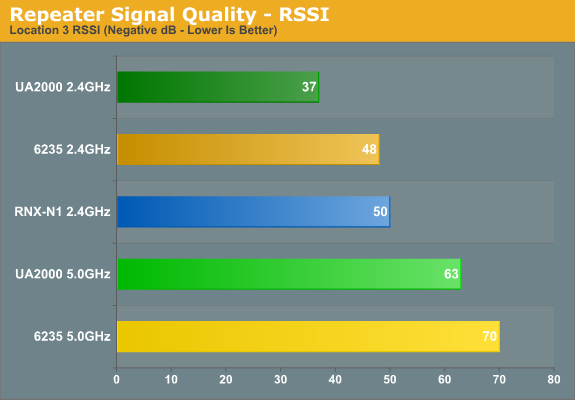
It would appear that despite being only thirty feet away from the repeater, the outer wall of my house doesn’t allow the signal to pass through unmolested. The UA2000 gets a clear 2.4GHz signal at -37dB and the 2.4GHz 6235 and RNX-N1 values aren’t too bad at 48dB/50dB, respectively, but the 5GHz signals are still relatively poor at -63dB and -70dB. But let’s see if we can actually get better throughput via the repeater than trying to talk directly to the main router.
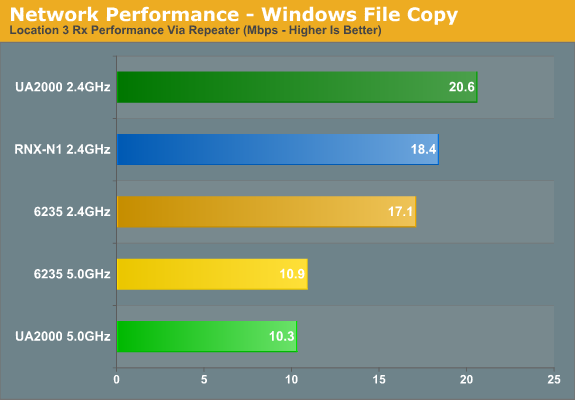
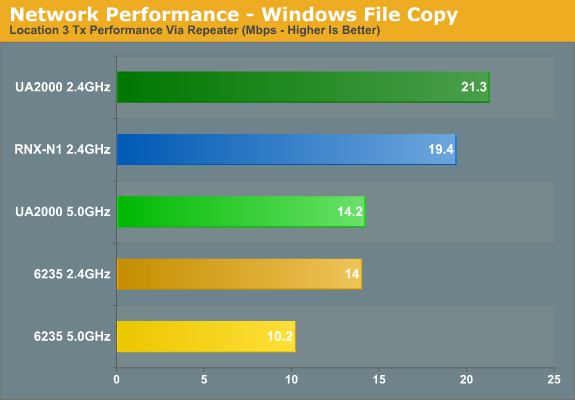
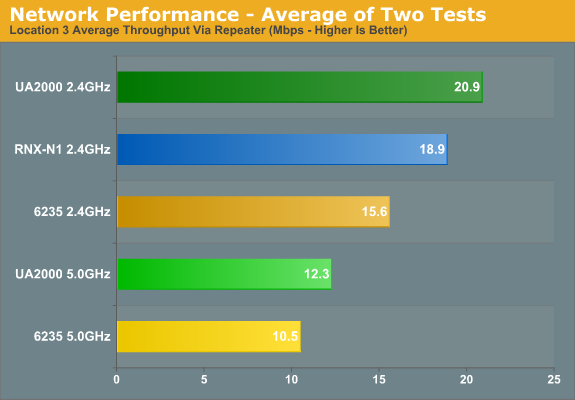
Unfortunately, the answer is than no, we do not significantly improve throughput. It’s up slightly in some cases, down in others, but overall it’s a net wash. What is improved, however, is the signal strength, which means that even when moving the laptop/adapters around out in my car, I never dropped the wireless connection—which is something I can’t say about connecting straight to the router(s). Range is also extended a fair amount—basically the thirty or so feet the repeater is located from the router extends the network another 30+ feet out into my neighborhood (or if I had a larger house, into more rooms).
If you’re only using the repeater to improve your connection and then surf the web, a setup like what I tested with here works quite well. I can’t connect to any of the 2.4GHz router signals with my iPod Touch 4th-gen at Location C, but I can walk out into the street and maintain a connection to the repeater quite easily. Sure, if I were using a laptop it might only be a connection capable of 10-20Mbit of throughput, but that’s more than enough for a 10-20Mbit broadband connection and surfing the web.
Originally published at https://www.anandtech.com/show/6034/amped-wireless-r20000g-sr20000g-and-ua2000-routers-repeaters-and-adapters-oh-my (Wayback Machine).