
Amped Wireless R20000G, SR20000G, and UA2000: Routers, Repeaters, and Adapters (Oh My!)
Test Location B Results: Performance at Moderate Distances
Our second test location ramps up the difficulty quite a bit—think Nightmare difficulty in Diablo III. Instead of being located in the same room, right next to the router, we’re now down a hallway, past a bathroom, and into the living room. A direct line from the test area (where my HTPC is located) to the router is around 30 feet, while walking is a slightly longer 40 feet. There are two/three sheetrock walls between the router and Location B, depending on how the signal propagates. You can get an idea of the interior layout of my house from the following (poorly put together) floor plan.

As before, we’ll start with a look at signal quality for this test location. I did spend several minutes (or more) with each adapter trying to orient it such that I got a best-case signal, but once we’re in different rooms the variability between testing runs starts to increase dramatically. As an example, one day I measured one set of results (it was a cooler, cloudy day in Washington), and the next day (sunny and warm) I got results that were 20% lower at the exact same location. It’s a bit maddening to say the least, but short of having a large isolated facility where you can rule out all external forms of interference (e.g. temperature, humidity, and other wireless signals) I’m not sure there’s much to be done about it other than to give the standard “grain of salt” caveat.
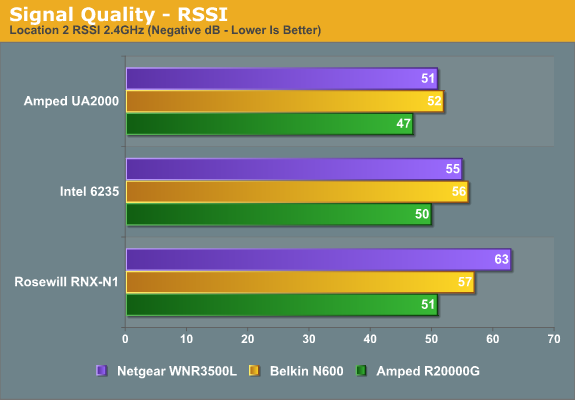
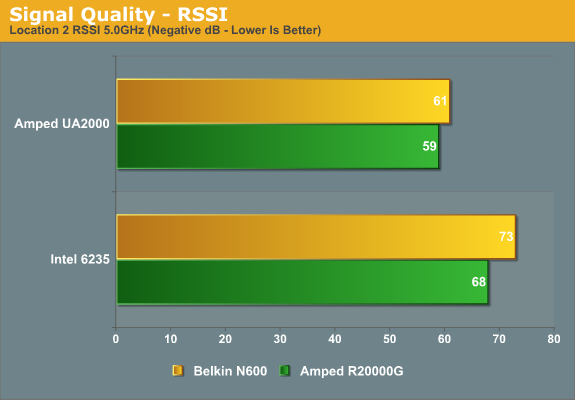
Yet again, Amped delivers on their claims of better signal quality. The R20000G router is 4-12 dB better on the 2.4GHz signal and 2-5 dB better on 5GHz. The UA2000 has similarly large leads, with 3-12 dB better RSSI than the other two adapters. There was at least some correlation between the better RSSI and throughput at Location A; will that hold true with our more demanding test locations? Let’s find out, again starting with the 2.4GHz results.
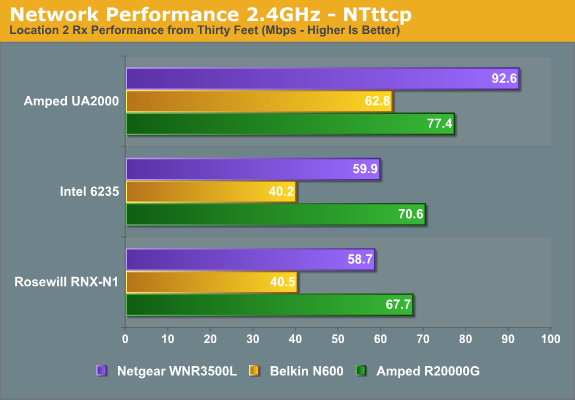
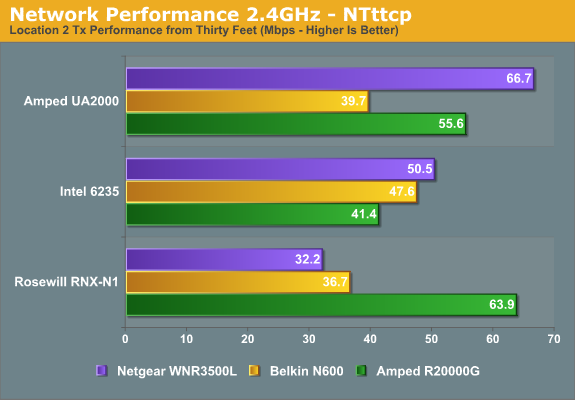
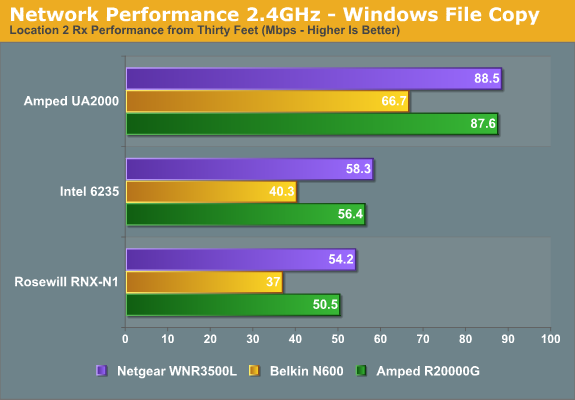
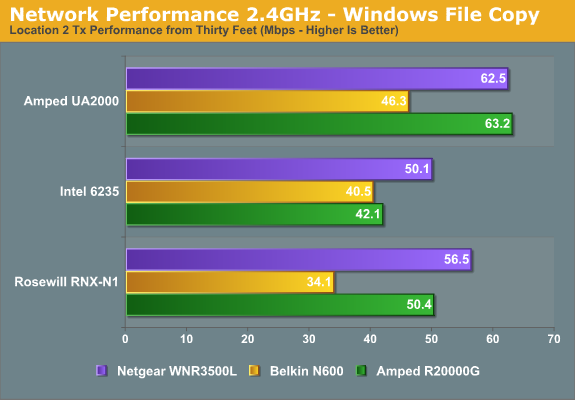
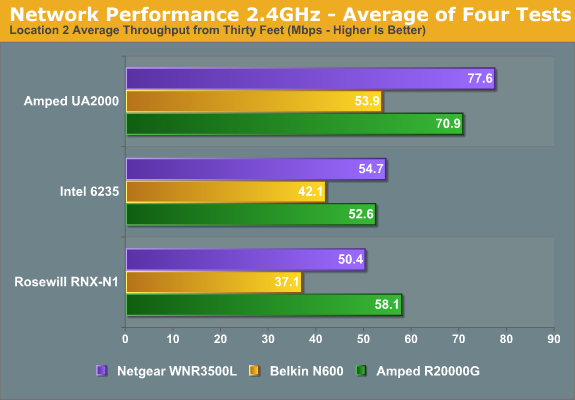
Things get a bit interesting this time around, with some of the adapters performing substantially better when paired with a specific router for some of the tests. Overall, the Netgear router appears to deliver the best throughput in our Rx/Tx file copy results, with the Amped R20000G coming very close. The Belkin router continues to offer substantially lower throughput in most of the charts, with the exception of the NTttcp Tx chart where it places second with two of the adapters. Given the variability of testing at this range, I’d say that the Netgear and Amped routers are more or less equal, and the average throughput across the three adapters agrees with that: the Netgear comes out 1% ahead.
The story for the adapters is far more clear cut, with the UA2000 delivering substantially better throughput than the other two adapters. There’s only one test results (NTttcp Tx) where the UA2000 places second to the Rosewill adapter, and the Windows Copy test doesn’t agree with that result. Average performance with the UA2000 is 35% better than the Intel 6235 across the three routers, and 40% better than the Rosewill RNX-N1. If you have a location with a single PC where you’d rather not run an Ethernet cable, the UA2000 at least approaches 100Mb Ethernet speeds over 2.4GHz wireless.
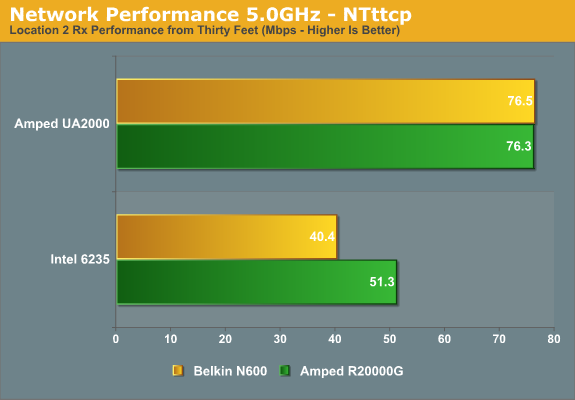
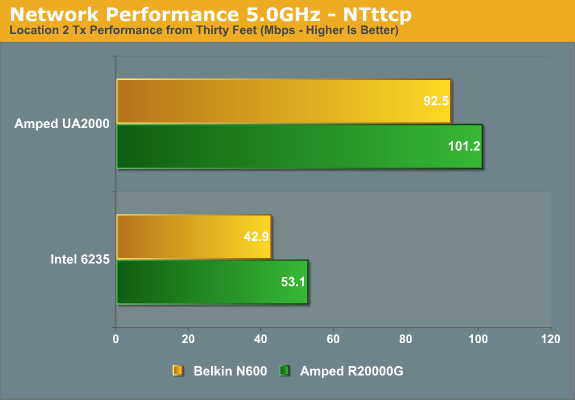
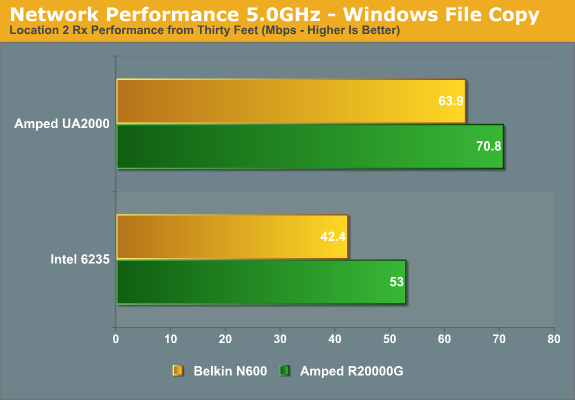
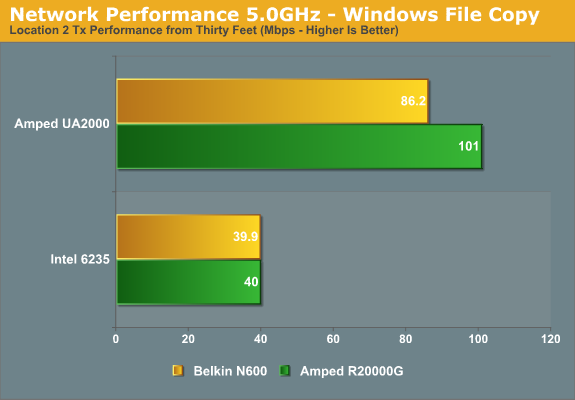
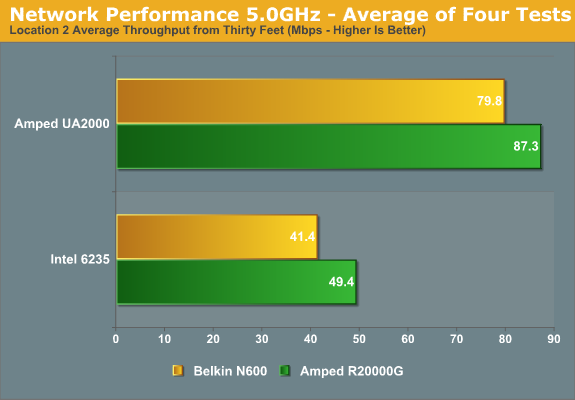
The 5.0GHz results echo the above, only this time the closest we get is a tie in NTttcp Rx rates with the UA2000. For all other comparisons, the R20000G router delivers slightly better performance than the Belkin N600, and the UA2000 adapter basically wipes the floor with the Intel 6235. Of course, directional wireless isn’t nearly as useful in something like a laptop where you’re moving around and unlikely to always end up facing the router, but for stationary PCs you can get excellent performance. On average, the Amped UA2000 is 84% faster than the Intel 6235 while the Amped R20000G is 13% faster than the Belkin N600.
Originally published at https://www.anandtech.com/show/6034/amped-wireless-r20000g-sr20000g-and-ua2000-routers-repeaters-and-adapters-oh-my (Wayback Machine).