
Intel Core i5 3470 Review: HD 2500 Graphics Tested
- Posted in
- CPUs
- Intel
- Ivy Bridge
- GPUs
Intel's first 22nm CPU, codenamed Ivy Bridge, is off to an odd start. Intel unveiled many of the quad-core desktop and mobile parts last month, but only sampled a single chip to reviewers. Dual-core mobile parts are announced today, as are their ultra-low-voltage counterparts for use in Ultrabooks. One dual-core desktop part gets announced today as well, but the bulk of the dual-core lineup won't surface until later this year. Furthermore, Intel only revealed the die size and transistor count of a single configuration: a quad-core with GT2 graphics.
Compare this to the Sandy Bridge launch a year prior where Intel sampled four different CPUs and gave us a detailed breakdown of die size and transistor counts for quad-core, dual-core and GT1/GT2 configurations. Why the change? Various sects within Intel management have different feelings on how much or how little information should be shared. It's also true that at the highest levels there's a bit of paranoia about the threat ARM poses to Intel in the long run. Combine the two and you can see how some folks at Intel might feel it's better to behave a bit more guarded. I don't agree, but this is the hand we've been dealt.

Intel also introduced a new part into the Ivy Bridge lineup while we weren't looking: the Core i5-3470. At the Ivy Bridge launch we were told about a Core i5-3450, a quad-core CPU clocked at 3.1GHz with Intel's HD 2500 graphics. The 3470 is near identical, but runs 100MHz faster. We're often hard on AMD for introducing SKUs separated by only 100MHz and a handful of dollars, so it's worth pointing out that Intel is doing the exact same here. It's possible that 22nm yields are doing better than expected and the 3470 will simply quickly take the place of the 3450. The two are technically priced the same so I can see this happening.
| Intel 2012 CPU Lineup (Standard Power) | |||||||||
| Processor | Core Clock | Cores / Threads | L3 Cache | Max Turbo | Intel HD Graphics | TDP | Price | ||
| Intel Core i7-3960X | 3.3GHz | 6 / 12 | 15MB | 3.9GHz | N/A | 130W | $999 | ||
| Intel Core i7-3930K | 3.2GHz | 6 / 12 | 12MB | 3.8GHz | N/A | 130W | $583 | ||
| Intel Core i7-3820 | 3.6GHz | 4 / 8 | 10MB | 3.9GHz | N/A | 130W | $294 | ||
| Intel Core i7-3770K | 3.5GHz | 4 / 8 | 8MB | 3.9GHz | 4000 | 77W | $332 | ||
| Intel Core i7-3770 | 3.4GHz | 4 / 8 | 8MB | 3.9GHz | 4000 | 77W | $294 | ||
| Intel Core i5-3570K | 3.4GHz | 4 / 4 | 6MB | 3.8GHz | 4000 | 77W | $225 | ||
| Intel Core i5-3550 | 3.3GHz | 4 / 4 | 6MB | 3.7GHz | 2500 | 77W | $205 | ||
| Intel Core i5-3470 | 3.2GHz | 4 / 4 | 6MB | 3.6GHz | 2500 | 77W | $184 | ||
| Intel Core i5-3450 | 3.1GHz | 4 / 4 | 6MB | 3.5GHz | 2500 | 77W | $184 | ||
| Intel Core i7-2700K | 3.5GHz | 4 / 8 | 8MB | 3.9GHz | 3000 | 95W | $332 | ||
| Intel Core i5-2550K | 3.4GHz | 4 / 4 | 6MB | 3.8GHz | 3000 | 95W | $225 | ||
| Intel Core i5-2500 | 3.3GHz | 4 / 4 | 6MB | 3.7GHz | 2000 | 95W | $205 | ||
| Intel Core i5-2400 | 3.1GHz | 4 / 4 | 6MB | 3.4GHz | 2000 | 95W | $195 | ||
| Intel Core i5-2320 | 3.0GHz | 4 / 4 | 6MB | 3.3GHz | 2000 | 95W | $177 | ||
The 3470 does support Intel's vPro, SIPP, VT-x, VT-d, AES-NI and Intel TXT so you're getting a fairly full-featured SKU with this part. It isn't fully unlocked, meaning the max overclock is only 4-bins above the max turbo frequencies. The table below summarizes what you can get out of a 3470:
| Intel Core i5-3470 | ||||||
| Number of Cores Active | 1C | 2C | 3C | 4C | ||
| Default Max Turbo | 3.6GHz | 3.6GHz | 3.5GHz | 3.4GHz | ||
| Max Overclock | 4.0GHz | 4.0GHz | 3.9GHz | 3.8GHz | ||
In practice I had no issues running at the max overclock, even without touching the voltage settings on my testbed's Intel DZ77GA-70K board:
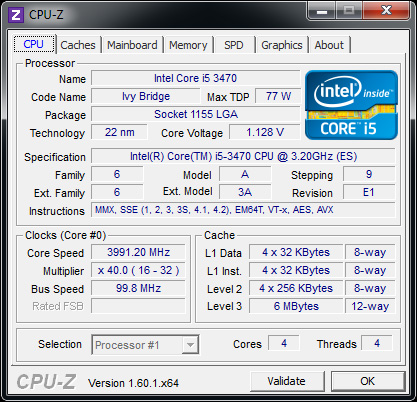
It's really an effortless overclock, but you have to be ok with the knowledge that your chip could likely go even faster were it not for the artificial multiplier limitation. Performance and power consumption at the overclocked frequency are both reasonable:
| Power Consumption Comparison | ||||
| Intel DZ77GA-70K | Idle | Load (x264 2nd pass) | ||
| Intel Core i7-3770K | 60.9W | 121.2W | ||
| Intel Core i5-3470 | 54.4W | 96.6W | ||
| Intel Core i5-3470 @ Max OC | 54.4W | 110.1W | ||
Power consumption doesn't go up by all that much because we aren't scaling the voltage up significantly to get to these higher frequencies. Performance isn't as good as a stock 3770K in this well threaded test simply because the 3470 lacks Hyper Threading support:
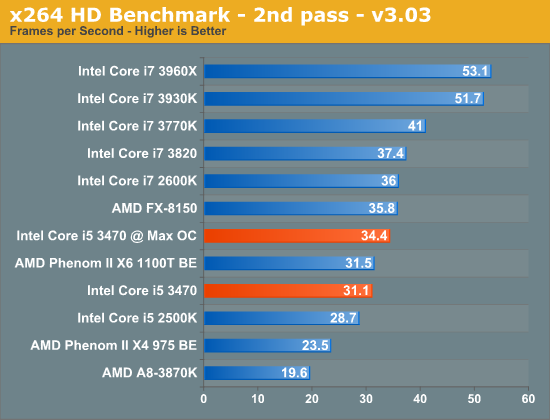
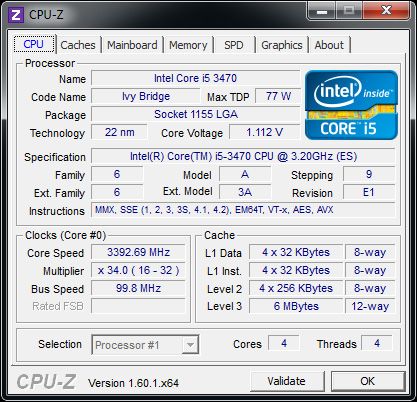
Overall we see a 10% increase in performance for a 13% increase in power consumption. Power efficient frequency scaling is difficult to attain at higher frequencies. Although I didn't increase the default voltage settings for the 3470, at 3.8GHz (the max 4C overclock) the 3470 is selecting much higher voltages than it would have at its stock 3.4GHz turbo frequency:
Originally published at https://www.anandtech.com/show/5871/intel-core-i5-3470-review-hd-2500-graphics-tested (Wayback Machine).