
LaCie's 2big NAS Review
- Posted in
- IT Computing
- Storage
- NAS
- LaCie
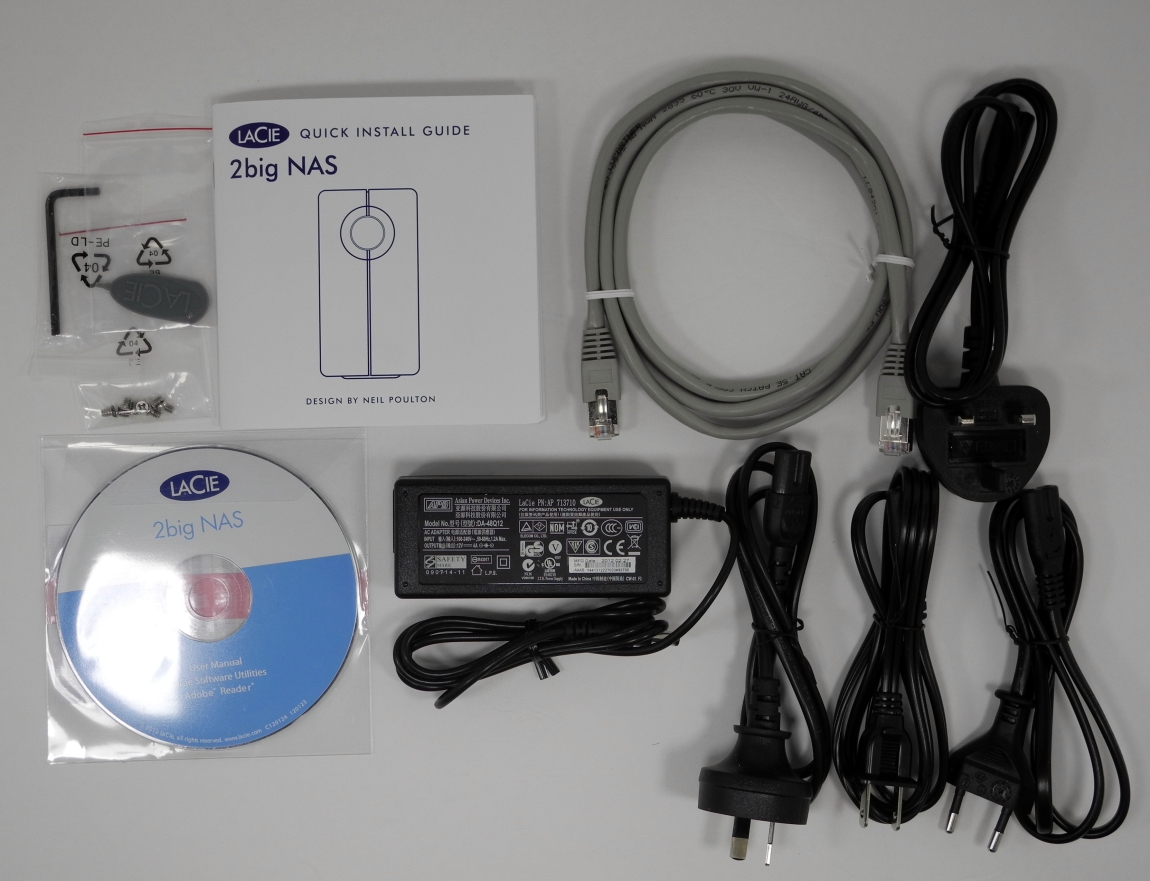
The LaCie 2big NAS comes in diskless and 6TB versions. Our review unit was the 6TB version with two Seagate 3TB disks pre-installed. NAS OS 2 was also already installed, and so, it was pure plug and play. The contents of the 2 x 3TB 2big NAS box are as below:
- LaCie 2big NAS chassis
- 2 x 3TB Seagate Barracuda 7200rpm [ ST3000DM001 ] drives inside the chassis
- Cat 5E Ethernet cable
- 48 W external power supply with multiple power cords (to support various types of power outlets across the world)
- CD with user manual and miscellaneous software (including license keys)
- Screws for hard disk installation / Plastic key to unlock drive bay / Allen key to mount or replace base
The LaCie 2big NAS retains the same industrial design of its predecessor, the 2big Network 2. Since we didn't review that unit, we will take this opportunity to provide praise for the 2big NAS's innovative design. The chassis is built of solid aluminium, and has a heat-sink type texture (raised fins) to it. This enables LaCie to utilize a very small and quiet fan inside the unit.


On a subjective basis, we have to say that the LaCie 2big NAS wins big on the noise factor compared to the other 2-bay NAS systems that we have evaluated. The unit is pleasing to the eyes, and can be positioned either on its side or upright (in which case, the supplied stand has to be attached). The front of the unit has the standard blue colored LaCie push button which remains blue during normal operation, but turns red when one of the drives goes kaput (i.e, the NAS enters a degraded mode). A thin opening from top to bottom in the middle of the front panel allows for air circulation.


On the rear side, we have four six square slots behind which the fan's exhaust pipe sits. The two drive bays are numbered and have LEDs on top. These LEDs stay solid blue when there is no disk activity, blink when there is disk access, and turn red if the drive is dead / missing. When rebuilding with a new drive, the LED blinks red and blue alternately. There is a physical ON/OFF switch between the drive bays. Beneath that, we have the RJ-45 port, a USB 2.0 port, an eSATA port and the power inlet. Overall, the 2big NAS has the best industrial design we have seen for a 2-bay NAS.
Moving on to the setup process, we find that the simplicity and elegance is carried over. On first boot, the NAS prompts the user to change the administrator password. It also allows for configuring the time zone settings and prompts the user to register (optional). The option to configure remote access (using LaCie's MyNAS DDNS service with an iPhone app / web browser) is also provided. After this, any available firmware updates are indicated.


All the basic NAS operations are easily accessible from the main page. These include general settings such as time and workgroup, users, groups, shares, network settings etc. For other operations which are not frequently used (such as Eco Management, RAID management, firmware update, download manager etc.), there are icons towards the bottom of the page on the right side.


The gallery above shows the various options available in the LaCie NAS OS 2. The OS also includes a torrent downloader, which is trivial to use.


Various types of shares can be set up on the LaCie 2big NAS. Support is provided for a single iSCSI target. Shared folders can be set up for access by various groups / users or in a public manner. The supported access protocols include SMB, AFP, NFS, FTP, SFTP, TimeMachine and Multimedia. These services have to be enabled in the General Settings first. Activating the Multimedia service for a folder enables the Twonky Media Server service to serve content from that folder over DLNA to the appropriate Digital Media Renderers / Digital Media Players.


This simplistic approach is sure to be appreciated by the average SMB user (which, incidentally, happens to be LaCie's target market). However, it leaves a lot to be desired for advanced users. For example, there is no way to get SSH/root access to the machine. Options available in the DS-211+ such as the ability to encrypt folders at a share level and the ability to create multiple iSCSI targets are not available in LaCie's NAS OS 2. It is also not immediately obvious whether it is possible to check up on the S.M.A.R.T status or even the temperature of the hard disks. In terms of ease of use and suitability for basic tasks, the OS is good enough, but, for power users, it leaves a lot to be desired.
Originally published at https://www.anandtech.com/show/5838/lacies-2big-nas-review (Wayback Machine).