
ASRock's High-End Vision 3D 252B HTPC Review
In the Intel Ivy Bridge HTPC review, we introduced our video decoding and rendering benchmarking methodology. These benchmarks provide an idea of the capabilities of the system with respect to usage of various video renderers in the Windows environment. Under Microsoft's DirectShow framework, there are a number of options for the video rendering filters. Amongst the native ones, EVR (Enhanced Video Renderer) is preferred. The native EVR mixer uses the DXVA video processing services to deinterlace and mix the video. So, this gurantees that the driver's post processing capabilities (if enabled) get utilized. Users of MPC-HC have EVR-CP (Enhanced Video Renderer - Custom Presenter) as the default. This is an open-source implementation of the interfaces provided by EVR and uses all of the driver's post processing capabilities except for the hardware scaler.
Our Ivy Bridge HTPC review presented CPU and GPU utilization during the playback of various types of clips (different codecs / resolution / interlacing characteristics etc.). We have further refined the methodology by including a 720p60 clip in the list. Also, we have changed the presentation scheme for the results. Comparing CPU usage directly has never been a fool-proof way to identify exactly how much more the system is stressed on a comparative basis (because the CPUs always tend to enter a lower clocked state under low loading conditions). Instead, the power consumed by the CPU package is a better comparison metric. In addition, we have also changed the presentation of the results. Instead of a table with numbers, we have usage graphs.
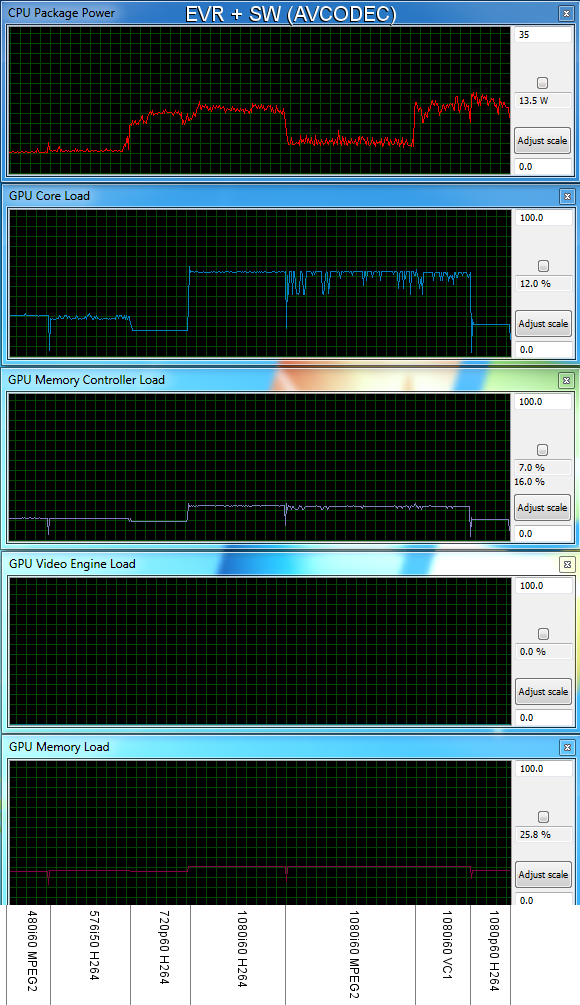
In this section, we will consider the usage of software decode as well as hardware decode when combined with EVR. As mentioned earlier, LAV Video Decoder was used. It has a native DXVA2 mode as well as a 'None' mode for hardware decoding which defaults to avcodec.
| Software Decode with EVR | Native DXVA2 with EVR |
 |
|
| Software Decode with EVR | Native DXVA2 with EVR |
Resource Usage Comparison - DXVA2 Hardware Decode vs. Software Decode with EVR
We tested a variety of clips (480i60 MPEG-2, 576i50 H.264, 720p60 H.264, 1080i60 H.264, 1080i60 MPEG-2, 1080i60 VC-1 and 1080p60 H.264) and the observed CPU package power, GPU core loading, GPU memory controller loading, GPU VPU loading and GPU memory loading are presented in the pictures above. You can roll over the mouse on the text at either the top or bottom of the picture to see how the characteristics change. In the case that you wish to download the images for further perusal, the appropriate plots are linked here [ Software Decode with EVR, Native DXVA2 with EVR ].

The results are not surprising. Playback of HD material benefits immensely from hardware decoding. With 1080p60 H.264, software decode takes up more than 50% of the CPU's allowed power consumption. (~19W, when the Core i5-2520M is rated for 35W). The GT 540M's core and memory controller loads are the same for both software and memory decode. However, the VPU gets loaded (almost 85% with the 1080p60 H.264 clip) in the DXVA decode mode. Extra memory (GPU RAM) is also taken up in the DXVA decode mode as the decoder moves frames in and out during the decode process. In the software decode mode, the GPU memory load is lesser because frames are delivered by the software decoder, get to the GPU's memory and are taken in for post processing (calls made by the EVR) and then delivered to the video output buffer. There is no need to move frames in and out for the decoding process itself. The amount of post processing done by EVR in both cases is the same, and that is the reason why there is no difference in the GPU's core load.
In the next section, we will see how the system fares under madVR, which is a much more demanding renderer compared to EVR.
Originally published at https://www.anandtech.com/show/5814/asrock-highend-vision-3d-252b-htpc-review (Wayback Machine).