
ASRock's High-End Vision 3D 252B HTPC Review
We have discussed madVR in extensive detail in the Discrete HTPC GPU Shootout piece. In all our HTPC reviews dealing with madVR, we restrict ourselves to the high quality settings suggested by Mathias Rauen (4-tap Lanczos for luma scaling and SoftCubic (softness 70) for chroma scaling). There is no quality tradeoff for performance, and deinterlacing is enabled (and forced to be active in doubtful cases). Full Screen Exclusive works better on the whole compared to Full Screen Windowed, and all the queues had to be put at the maximum value. In v301.24 of the NVIDIA drivers, madVR doesn't work if the presentation is done on a separate device. So, that option had to be turned off.
LAV Video Decoder can connect to the madVR renderer under the following hardware decode settings:
- None (Software decoding using avcodec)
- QuickSync (QS Decoder on supported systems - Intel Sandy Bridge and Ivy Bridge)
- NVIDIA CUVID
- DXVA2 Copy-Back (DXVA2 CB)
Note that the native DXVA2 mode doesn't connect to the madVR renderer. In our experiments, we tried out all of the above except QuickSync. The relevant graphs are presented below.
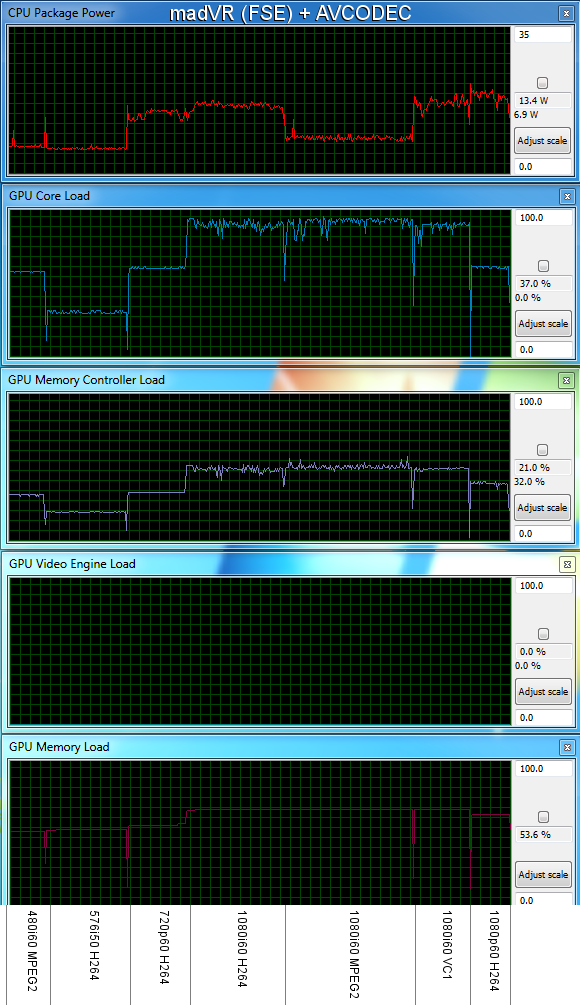
Resource Usage Comparison - Software Decode vs. DXVA2 Copy-Back vs. LAV CUVID (FSE & FSW) with madVR
In both software decode and DXVA2 CB mode, the GPU core utilization shot up over 90%. Generally, whenever there were sudden spikes above 90%, we saw that the presentation and the render queues in madVR dropped to alarmingly low levels, resulting in dropped frames. DXVA2 Copy-Back mode resulted in an increase in the memory controller load. LAV CUVID in FSE (Full Screen Exclusive) mode had the lowest GPU core utilization (around 83% was the maximum for the 1080i60 VC-1 clip). In FSW mode, the utilization went up slightly, but still remained below 90%. In any case, the take away from this section is that if the end user is going to use madVR as the renderer, CUVID should be the video decoder of choice, particularly for high frame rates and resolutions.The CPU utlization when using madVR is slightly more than what is seen when using EVR.
An important point to note with respect to the settings is the fact that both LAV Video Decoder and madVR have deinterlacing options. It is best to turn off the deinterlacing in LAV Video Decoder (set Hardware Deinterlacing to Weave (none)). Performing the deinterlacing closer to the presentation stage (i.e, in the madVR renderer) reduces the memory / controller loading and is generally easier on the GPU (lesser chance of dropping frames).
Originally published at https://www.anandtech.com/show/5814/asrock-highend-vision-3d-252b-htpc-review (Wayback Machine).