
Intel Z77 Motherboard Review with Ivy Bridge - ASRock, ASUS, Gigabyte, and MSI
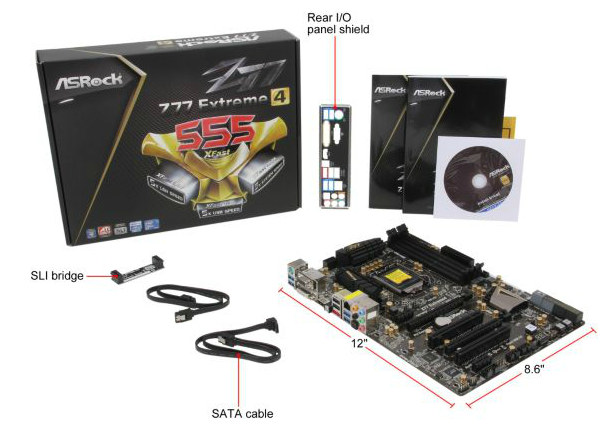
ASRock Z77 Extreme4 - In The Box
Driver CD
User Manual
IO Shield
2 locking SATA cables
3-slot SLI bridge
Uncharacteristically from ASRock, we do not have a lot to shout about regarding the contents of the box. Previously with the P67 products we had a USB 3.0 bracket, but this time we are limited to just a pair of SATA cables. This is unfortunate, but perhaps was required to hit a price point.
Voltage Readings
Using OCCT we monitor the voltage change of the motherboard under load. This represents the direct correlation between the Load Line Calibration and how the processor/motherboard deals with voltage requests while under load. This is not to be confused with the quality of power delivery, but more an indication of how aggressive the default LLC settings are on a motherboard.

The CPU voltage at load for the ASRock board seems to vary more than the other boards in this review, which may be a result of the price difference. Nevertheless, this is not a series of massive jumps to be concerned over.
Overclocking
Note: Ivy Bridge does not overclock like Sandy Bridge. For a detailed report on the effect of voltage on Ivy Bridge (and thus temperatures and power draw), please read Undervolting and Overclocking on Ivy Bridge.
As the first explanation of overclocking results on a platform, I would highly suggest you read my article on overclocking performance on Ivy Bridge. As the successor to Sandy Bridge, people may expect similar to Sandy Bridge. However, there are a number of key differences, especially in terms of heat generation and applied voltages.
Auto Overclocking: ASRock comes with several automatic overclocking features, however these are all in the BIOS – ‘Enhanced Turbo 30’ and ‘Optimized CPU Setting’. Enhanced Turbo 30 initially calls upon preloaded settings – 4.7 GHz on the CPU, 1600 MHz on the iGPU, +0.085 volt offset on the CPU and CPU load line calibration (LLC) set at ‘Level 1’. This setting did not do anything to the memory, and made the machine run rather hot – 92ºC during OCCT causing it to stop, and 97ºC during PovRay. Both of these temperatures were on the test bed outside a case, so I would not recommend them inside a case!
The Optimized CPU Settings offers CPU speeds in 200 MHz increments. When selected, it adjusts the CPU multiplier but leaves all else on automatic.
- At the 4.4 GHz setting, this gave 1.112 volts on load, 72ºC during PovRay and 70ºC for Blender.
- At the 4.6 GHz setting, this gave 1.192 volts on load, 85ºC during PovRay and 86ºC for OCCT.
- At the 4.8 GHz setting, this gave 1.240 volts constant at LLC Level 1. This caused the blue screen of death on boot.
Manual Overclocking: Given the overview of overclocking on Ivy Bridge, choosing your maximum voltage to aim for a speed is critical. The best combination I achieved on the ASRock Z77 Extreme4 was 4.7 GHz at 1.175 volts, using LLC Level 1. This gave 86ºC during both PovRay and OCCT, which is essentially near the limit as to what I would suggest on Ivy Bridge.
Originally published at https://www.anandtech.com/show/5793/intel-z77-motherboard-review-with-ivy-bridge-asrock-asus-gigabyte-and-msi (Wayback Machine).