
HP Folio 13 Review: Deviating From the Norm
- Posted in
- Laptops
- Intel
- HP
- Sandy Bridge
- Ultrabook
The initial bum rush of ultrabooks resulted in, with limited exception, a lot of designs that took most of their cues from Apple's MacBook Air. Even Dell's XPS 13, otherwise very different from what came before it, still maintained that wedge shape. Yet HP went a bit of a different route with their Folio 13 and demonstrated the same kind of outside the box thinking that many of the larger vendors are demonstrating these days.
HP's engineers took a look at Intel's ultrabook spec and, rather than see how small they could get their design, opted to see just how much they could pack into the spec. The result is the Folio 13, an ultrabook designed to bridge their consumer and business lines and offer the best an ultrabook can offer.
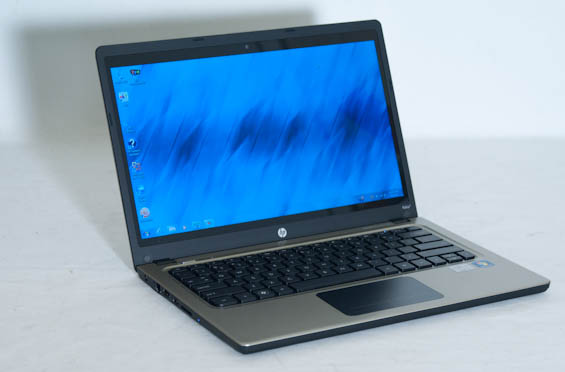
The ultrabook spec is pretty well defined without much in the way of wiggle room for the hardware itself, leaving vendors to differentiate largely on overall chassis design and price. The initial rush of ultrabooks included systems from Toshiba, Asus, and Acer that largely aped Apple's MacBook Air wedge shape and aluminum shell design, but HP and Dell played things close to the chest initially. HP's Folio 13 actually predates Dell's XPS 13, but both are intriguing designs that deviate from the norm in their own ways. Let's start with the specifications of our Folio 13 review unit.
| HP Folio 13 Specifications | |
| Processor |
Intel Core i5-2467M (2x1.6GHz + HTT, Turbo to 2.3GHz, 32nm, 3MB L3, 17W) |
| Chipset | Intel HM65 |
| Memory | 1x4GB Micron DDR3-1600 (Maximum 1x4GB) |
| Graphics |
Intel HD 3000 Graphics (12 EUs, up to 1.15GHz) |
| Display |
13.3" LED Glossy 16:9 768p LG Philips LP133WH4-TJA1 |
| Hard Drive(s) | Samsung PM810 128GB mSATA SSD @ SATA 3Gbps |
| Optical Drive | - |
| Networking |
Intel Centrino 1030 802.11b/g/n Realtek RTL8168/8111 Gigabit Ethernet Bluetooth 2.1+EDR |
| Audio |
IDT 92HD99BXX HD audio Stereo speakers Headphone/mic combo jack |
| Battery | 6-Cell, 11.1V, 60Wh |
| Front Side | - |
| Right Side |
USB 2.0 Headphone/mic combo jack |
| Left Side |
AC adaptor Ethernet jack HDMI USB 3.0 SD card reader |
| Back Side | Exhaust vent |
| Operating System | Windows 7 Professional 64-bit SP1 |
| Dimensions |
12.54" x 8.67" x 0.7" (WxDxH) 319mm x 220mm x 18mm |
| Weight |
3.3 lbs 1.5kg |
| Extras |
Webcam USB 3.0 Card reader Backlit keyboard |
| Warranty | 1-year limited |
| Pricing |
Starts at $899 As configured: $1,019 |
While most of HP's notebooks allow some level of customization, the Folio 13 really only has one internal hardware configuration, and you're looking at it. While some of the exterior elements are certainly a fresh approach for ultrabooks, HP has strangely opted to be much more conservative with speccing their ultrabook than other vendors have, and there are a few places where the Folio 13 is going to definitely lag behind the competition.
The Intel Core i5-2467M processor isn't slow by any stretch of the imagination, but it's the only ULV Core i5 we've tested this generation, with other vendors either just going for the cheapest chip (Toshiba's i3) or an expensive but faster i7. At a 1.6GHz nominal clock speed and able to turbo up to 2.1GHz on both cores or 2.3GHz on a single core, it's not a total slouch but it's also not the fastest chip around either.
HP also inexplicably uses only one memory channel on the i5's controller, and while the DDR3 is clocked higher at 1600MHz that can't make up for halving the memory bus width. Ultimately this shouldn't be a huge detriment to performance, but it's still performance left on the table. That single channel is populated by 4GB of RAM, too, which is enough for most tasks but is still shy of what can be achieved with most modern notebooks and even some modern ultrabooks.
Handling SSD storage duties is a Samsung PM810 running at SATA 3Gbps. Anecdotally, in real world usage I've found most of the benefit of running an SSD is felt just by virtue of the difference in responsiveness between an SSD and a mechanical hard disk drive. Connectivity is thankfully pretty good for this class of notebook, though: HP includes a USB 3.0 port and HDMI on top of the usual ports we've come to expect, along with a gigabit ethernet port for wired networking.
Ultimately, though, the specs on the Folio 13 are rather tame for an ultrabook, which is all the more perplexing since other vendors were able to cram more power into smaller designs. When I met with HP a few months ago when they were debuting the Folio 13, they showed me the interior and said they pretty much just doubled down on the battery, which is why the Folio 13 is also slightly bigger and heavier than other ultrabooks. Whether or not that gamble paid off remains to be seen.
Originally published at https://www.anandtech.com/show/5749/hp-folio-13-deviating-from-the-norm (Wayback Machine).