
Intel Z77 Panther Point Chipset and Motherboard Preview – ASRock, ASUS, Gigabyte, MSI, ECS and Biostar
ASUS P8Z77-V Pro—Visual Inspection
ASUS have a lot to live up to with its Ivy Bridge Pro board. Both the ASUS P8P67 Pro and ASUS P8Z68-V Pro have been top class sellers in their respective chipsets, meaning that ASUS has to deliver. Thankfully, by just looking at the board, it seems that ASUS is keen to innovate and offer a complete package.
Using a 12 + 4 VRM power delivery system, the ASUS P8Z77-V Pro sports a blue and black livery synonymous with their channel / non-ROG products. The VRM heatsinks cover a lot of surface area in their jagged fashion, and around the socket itself, we have access to five main fan headers. Two of these are CPU 4-pin headers just north of the top VRM heatsink, one 4-pin below the left hand side VRM heatsink, and two 4-pin headers below the 24-pin ATX power connector, along with a USB 3.0 port. A sixth fan header (4-pin) is found on the south side of the board.
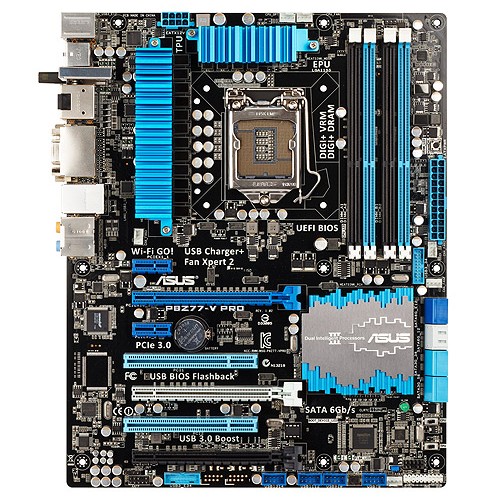
Above the 24-pin ATX power connector, we find the ASUS MemOK! button, which allows memory recovery to default speeds. Along with the ASRock boards, we have eight SATA ports—four SATA 3 Gbps from the PCH and four SATA 6 Gbps—two from the PCH and two more from an ASMedia controller. Below this are the TPU and EPU switches, designed for enhanced CPU performance and energy saving modes respectively.
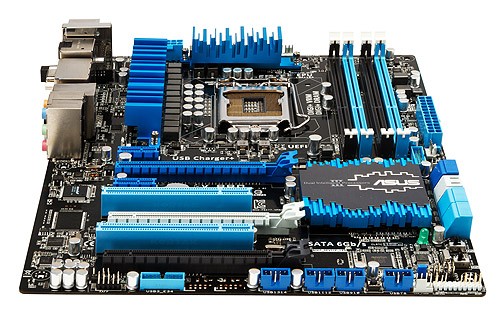
Along the bottom of the board is the standard array of a front panel audio header, another USB 3.0 header, USB 2.0 headers, and a front panel header. In terms of PCIe layout, despite there being three full-length PCIe connectors on board, we are only limited to using two for multi-GPU setups. In order, we have a PCIe x1, a PCIe 3.0 x16 (x8 in dual GPU), x1, PCI, PCIe 3.0 x8, PCI, and a PCIe 2.0 x4. Thus in dual GPU mode, similarly to the ASRock Extreme6, we can also add in a PCIe x1 and PCIe x4 card.

The chipset heatsink is indicative of the large but low philosophy of many motherboard manufacturers, hiding away the chipset controller. What is not on these boards, as you may notice, is a combination power/reset pair of buttons, nor a two-digit debug, some of which we used to see on ASUS Pro boards of old. Nevertheless, the ASUS board in return makes up for it on the back IO panel.
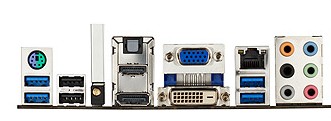
On the back panel, we have a combination PS/2 port, two USB 3.0 ports (blue), two USB 2.0 ports (black), an ASUS Wi-Fi GO! Card, optical SPDIF output, HDMI, DisplayPort, D-Sub, DVI-D, gigabit Ethernet, two more USB 3.0 ports in blue, and standard audio headers.
This means that rather than add in a WiFi module on the board, or use up a mini-PCIe slot with wifi, we have a slot in order to add a WiFi module. This can be in 2.4 GHz or 5 GHz mode, and updateable as WiFi standards change. This all comes as part of the package, with magnetic wireless antenna to attach to the case.
Board Features
| ASUS P8Z77-V Pro | |
| Size | ATX |
| CPU Interface | LGA-1155 |
| Chipset | Intel Z77 |
| Power Delivery | 12 + 4 |
| Memory Slots |
Four DDR3 DIMM slots supporting up to 32 GB Up to Dual Channel |
| Video Outputs | DisplayPort, HDMI 1.4a, DVI-D, D-Sub |
| Onboard LAN | Intel 82579V |
| Onboard Audio | Realtek ALC892 |
| Expansion Slots |
2 x PCIe x16 Gen3 (x16, x8/8) 1 x PCIe x16 Gen2 (x4) 2 x PCIe x1 Gen2 2 x PCI |
| Onboard SATA/RAID |
2 x SATA 6 Gbps (PCH), Support for RAID 0, 1, 5, 10 2 x SATA 6 Gbps (ASMedia) 4 x SATA 3 Gbps (PCH), Support for RAID 0, 1, 5, 10 |
| USB |
Four USB 3.0 at rear (2 PCH, 2 ASMedia) Two USB 3.0 headers on board (PCH, ASMedia) Ten USB 2.0 (2 back panel, 8 on board) |
| Onboard |
4 x SATA 6 Gbps 4 x SATA 3 Gbps 2 x USB 3.0 Headers 4 x USB 2.0 Headers 6 x Fan Headers 1 x SPDIF Header 1 x Front Panel Audio Header MemOK! Button TPU/EPU Switches USB Flashback Button |
| Power Connectors |
1 x 24-pin ATX connector 1 x 8-pin 12V connector |
| Fan Headers |
1 x CPU Fan Header (4-pin) 4 x CHA Fan Headers 1 x OPT Fan Header |
| IO Panel |
1 x PS/2 Combo Port 1 x DisplayPort 1 x HDMI 1.4a 1 x DVI-D 1 x D-Sub 1 x Gigabit Ethernet 4 x USB 3.0 2 x USB 2.0 1 x Optical SPDIF 1 x WLAN Connector 6 x Audio Jacks |
| Warranty Period | 3 Years |
| Product Page | Link |
ASUS as a direct standard are now placing Intel NICs on all their channel motherboards. This is a result of a significant number of their user base requesting them over the Realtek solutions. Also to note are a total of six USB 3.0 on board, two on the back panel and four from internal headers. These USB 3.0 ports can take advantage of the improved UASP USB 3.0 protocol using appropriate hardware and some ASUS software. As always, we expect ASUS fan control of the six headers to be top notch.
Originally published at https://www.anandtech.com/show/5728/intel-z77-panther-point-chipset-and-motherboard-preview-asrock-asus-gigabyte-msi-ecs-and-biostar (Wayback Machine).